10 Feb 2007 at 09:11 #1 Born_2_Kill_83 Born_2_Kill_83 Soldato Joined 10 Nov 2006 Posts 8,578 Location Lincolnshire Which setting can you tweak so when you hover above a picture icon instead of just the file details popping up you get a larger thumbnail pic instead?
Which setting can you tweak so when you hover above a picture icon instead of just the file details popping up you get a larger thumbnail pic instead?
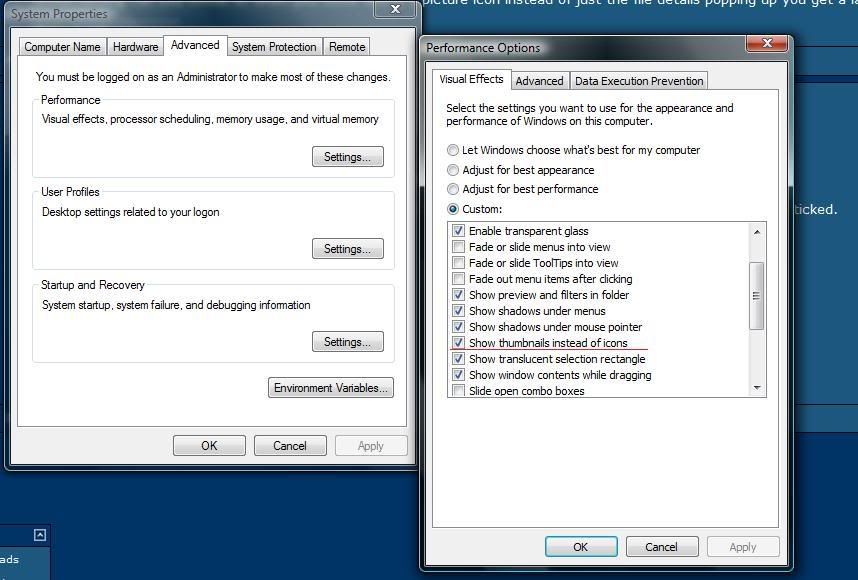
10 Feb 2007 at 10:32 #2 AndyOcUK AndyOcUK Soldato Joined 15 Feb 2006 Posts 3,421 Location Staffordshire Right click "My Computer" Left Click "Proprties" Click "Advanced System Settings" You should have a small window thats titled "System Properties" Click the performance settings button and make sure the box that says "Show thumbnails instead of icons" box is ticked. You pictures and icon files will now be displayed as a thumbnail anyway, so rolling over them shouldn't make a difference. Click "Views" in a window and set to extra large icons. These will now be huge thumbnails. Job Done Regards AndyOcUK OcUK Tech Last edited: 10 Feb 2007
Right click "My Computer" Left Click "Proprties" Click "Advanced System Settings" You should have a small window thats titled "System Properties" Click the performance settings button and make sure the box that says "Show thumbnails instead of icons" box is ticked. You pictures and icon files will now be displayed as a thumbnail anyway, so rolling over them shouldn't make a difference. Click "Views" in a window and set to extra large icons. These will now be huge thumbnails. Job Done Regards AndyOcUK OcUK Tech