Vista ultimate 64 gaming issues

Soldato
Joined
1 Dec 2006
Posts
16,918
Location
Amsterdam, NL
ok, i made the switch again, but this time, im noticing that all my games are a bit jitterish, difficult to explain, but ive updated everything, all the latest patches for vista, drivers are updated and all that good stuff, i just cant work out what the problem is :S

ags
 
That's odd. Bit of a lame suggestion but have you tried reinstalling it again? Unless you have a piece of hardware which isn't compatible with vista then I can't think what would cause it. I assume you don't have something running in the background?
 
I don't get any jitter with v64U, maybe something to do with the sli?

Tried it with a single card?
 
My UT2004 is juttery with SLI on Vista64, works fine with one card. Though thats the only game I have problems with.
 
I've got almost the same spec PC as you but only a single 8800 rather than SLI.

Can't say I've noticed anything like that but it has been a while since I switched so may have jsut got used to it! What games are you playing?
 
im playing css, tf2, grid and i just installed overlord (but that games horribly optamised anyway)

about to install some other games and see what they are like, assassins creed, crysis and devil may cry 4, oh and dirt :)

i just cant explain it, the only things i have running in the background (from user not system) are the sidebar, msn, steam, nhancer and the razer mouse icon thingy.

ill try non sli guys :) see if that works

oh, where can i check that i defo have SP1??? ive looked in the update history, but its all just saying vista update lol

ags
 
Updated SATA controller drivers too? This fixed some annoying suttering in games which would cause the sound to skip and game to lockup momentarily.
 
Updated SATA controller drivers too? This fixed some annoying suttering in games which would cause the sound to skip and game to lockup momentarily.

lol, i went to look in the updates for windows, cos i remember seeing it as a optional one, and low and behold, sp1 wants to install...

ill report back, btw, just tried overlord without sli, no stuttering, and with... stuttering...

very odd

ags
 
I'd try using driver cleaner pro to remove the nvidia driver completely, and then install the latest one. Might be remnants of the crappy driver that vista installs still causing problems.
 
lol, i went to look in the updates for windows, cos i remember seeing it as a optional one, and low and behold, sp1 wants to install...

ill report back, btw, just tried overlord without sli, no stuttering, and with... stuttering...

very odd

ags


Hmm... so everything was not upto date ;)
 
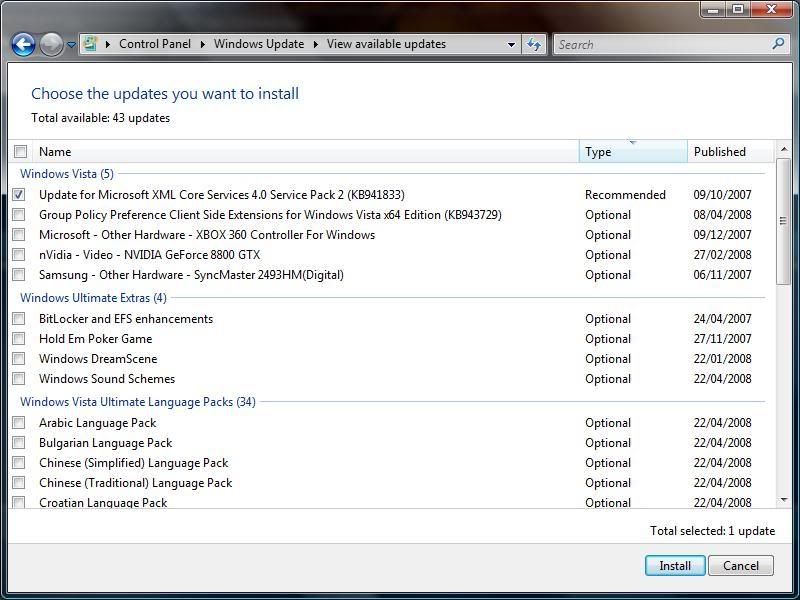
im on SP1 now, heres a screenie of the optional updates i have left, any suggestions?

obviously im not going to bother with the language packs, seeing as i only speak english lol

Untitled-6.jpg


ags
 
Are you sure it's not the placebo effect ?

You should just let someone turn on your pc in xp or vista randomly, so you don't know, start a game, and then let you play and see if you still say the vista boots are stuttery then :p ?
 
Are you sure it's not the placebo effect ?

You should just let someone turn on your pc in xp or vista randomly, so you don't know, start a game, and then let you play and see if you still say the vista boots are stuttery then :p ?

i wish it were so lol, but im sure its not. i really like vista now for some unknown reason, after all the updates it seems to be a hell of a lot better than when i first bought and used it (2 months after release, never used it again lol)

right, ive installed sp1, lets see if i get any improvements, if not, ill uninstall drivers and swep them, and reinstall them in safe mode? that way vista wont try to auto update right?

suggestions on that front?

ags
 
Back
Top Bottom