


I have 2 PCs at home (a desktop/work PC and a games PC) connected to a screen/keyboard/mouse with a KVM.
I used to have Creative Labs speakers on the desktop PC and a Razer USB soundbar on the games PC.
Having recently purchased some Bose speakers from MM here, which are loads better quality than the Creative Labs speakers, I purchased a RCA/Phono switchbox so that both PCs could use the speakers.
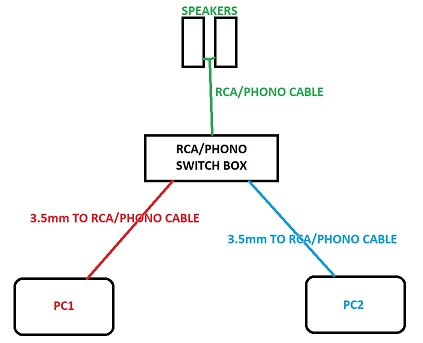
The speakers have RCA/phono inputs, so I have 3.5mm to Phone cables from the PCs and a phono-phono cable from the switchbox to the speakers.
Everything is fine if I just play MP3 / youtube etc from either (or both) PCs - I can use the switchbox to select which PC is coming out of the speakers and it all sounds great.
The weird thing is, if I launch a game on the games PC, as soon as the game is running, I start getting terrible buzzing / interference on the speakers.
It goes away if I unplug the desktop PC from the switchbox.
I've tried 2 different audio switch boxes and they both produce the same results.
I've tried with my old Creative Labs speakers and they produce the same results, too.
It also happens the other way round - if I play a game on the desktop PC, I get the interference and it goes away if I unplug the games PC.
And it all happens whether the other PC is powered up or not.
So weird - and I'm close to just returning this switchbox and going with dual speakers again.
Any ideas?
I used to have Creative Labs speakers on the desktop PC and a Razer USB soundbar on the games PC.
Having recently purchased some Bose speakers from MM here, which are loads better quality than the Creative Labs speakers, I purchased a RCA/Phono switchbox so that both PCs could use the speakers.
The speakers have RCA/phono inputs, so I have 3.5mm to Phone cables from the PCs and a phono-phono cable from the switchbox to the speakers.
Everything is fine if I just play MP3 / youtube etc from either (or both) PCs - I can use the switchbox to select which PC is coming out of the speakers and it all sounds great.
The weird thing is, if I launch a game on the games PC, as soon as the game is running, I start getting terrible buzzing / interference on the speakers.
It goes away if I unplug the desktop PC from the switchbox.
I've tried 2 different audio switch boxes and they both produce the same results.
I've tried with my old Creative Labs speakers and they produce the same results, too.
It also happens the other way round - if I play a game on the desktop PC, I get the interference and it goes away if I unplug the games PC.
And it all happens whether the other PC is powered up or not.
So weird - and I'm close to just returning this switchbox and going with dual speakers again.
Any ideas?




