

You are using an out of date browser. It may not display this or other websites correctly.
You should upgrade or use an alternative browser.
You should upgrade or use an alternative browser.
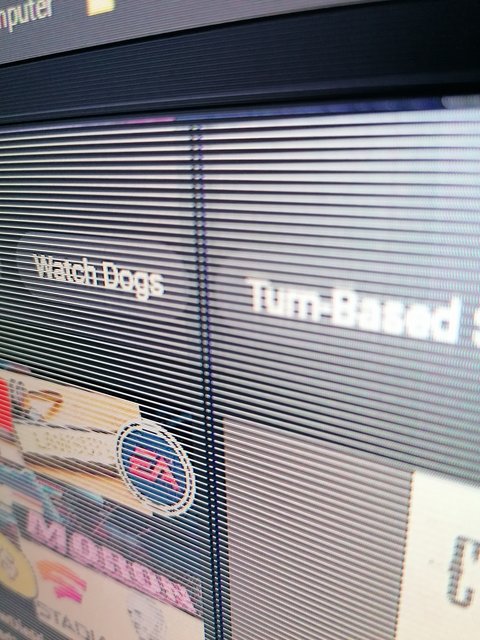
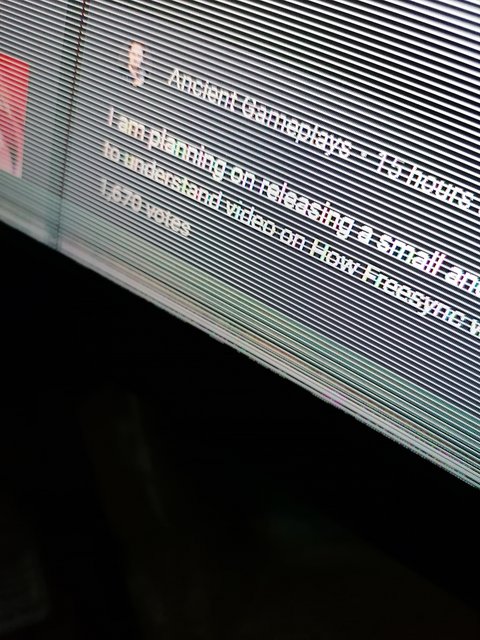
What would cause this?
- Thread starter linwelin
- Start date
More options
Thread starter's posts

How old is the monitor?
only a few months old

Iv got a DP cable in it, ill try an HDMI, you really think its the monitor?Try a different PC/cable to make sure it is the screen, then RMA it if it is.
Most likely which is why we want to rule it out.Iv got a DP cable in it, ill try an HDMI, you really think its the monitor?
For all we know it could be the cable or the GPU or something else
If i take a screenshot of it when it next happens and it doesn't show, does that mean its the monitor?Most likely which is why we want to rule it out.
For all we know it could be the cable or the GPU or something else
YesIf i take a screenshot of it when it next happens and it doesn't show, does that mean its the monitor?
Cheers will check that too in the morning see what happens, thx for advice guys will post tomorrow with what happens

Permabanned
- Joined
- 11 Jan 2019
- Posts
- 3,214
- Location
- bedlam
Last few days turning my monitor on in the morning my monitor looks like this:
It goes away within a few seconds, anyone any ideas?
test it with a skybox or dvd player, most artifacts are GPU related
One way or another you are seeing a failure progressing. Within a week "something" won't power up at all. Definitely test out the monitor or see if you can plug your PC in to the tv to test out your graphics card. Just make sure its completely cold when you try it.
Permabanned
- Joined
- 11 Jan 2019
- Posts
- 3,214
- Location
- bedlam
my brothers AMD GPU will flake out no boot some times and just give a full blue or purple screen.
dose it most days. we found out is was down to fast boot not loading the GPU right before booting. and hitting reset fix's it.
his as been like that for over 12 months and still works perfectly ones running.
step one.... remove all overclockes.
step two.... drivers. has the gpu updated laty.
step three.... remove and start testing parts in different systems if you can.
dose it most days. we found out is was down to fast boot not loading the GPU right before booting. and hitting reset fix's it.
his as been like that for over 12 months and still works perfectly ones running.
step one.... remove all overclockes.
step two.... drivers. has the gpu updated laty.
step three.... remove and start testing parts in different systems if you can.

Put your gpu thro the stress test.
If its artifacts ing it will fail
If it passes u know it's not gpu. At least 99% sure.
Artifacts most likely can't run 100% and its main GPU chip on it's way out.
Can be fixed by reballing, but that's for another topic.
If its artifacts ing it will fail
If it passes u know it's not gpu. At least 99% sure.
Artifacts most likely can't run 100% and its main GPU chip on it's way out.
Can be fixed by reballing, but that's for another topic.
Ignore all of this... People parroting things they've half read. If it is the GPU and it only happens just after a display output is requested and then its fine, who's to say a stress test will prove anything at all.
Just plug the blasted screen into another machine...
Just plug the blasted screen into another machine...
Or just disable fastboot, fastboot always causes issues in my experiencemy brothers AMD GPU will flake out no boot some times and just give a full blue or purple screen.
dose it most days. we found out is was down to fast boot not loading the GPU right before booting. and hitting reset fix's it.
his as been like that for over 12 months and still works perfectly ones running.
step one.... remove all overclockes.
step two.... drivers. has the gpu updated laty.
step three.... remove and start testing parts in different systems if you can.

Permabanned
- Joined
- 9 Aug 2008
- Posts
- 35,717
Listen to Acme. Simply plug it into another screen, even if it's a TV. If it's fine then the GPU is at fault. If it's not fine then it's the GPU. Simples.
Actually, they look like blinds - have you had any new ones installed lately? just pull the cord to open them?
Actually, they look like blinds - have you had any new ones installed lately? just pull the cord to open them?
I replaced the DP cable with an HDMI cable yesterday, i even did a furmark test for an hour and had no problem at all, heck i even used DDU and reinstalled the drivers just to be sure, i don't really turn my PC off at night i just let it run in the background, but i think i already have fast boot disabled.
So this morning i turned the monitor on and the same thing happens again i did take a screenshot of it but the artifacts not showing up in the screenshot. This dam monitor is just over 6 months old so i don't know if where i bought it from will replace it now or will i have to go through the whole process of contacting MSI and shipping it to them. I can see bit of a nightmare ahead with this
I will try my fire stick in it as a last resort and see what happens, but it only does this after the monitor has been off for a prolonged time.
I put the Firestick in and no artifacts on it, but i won't know until the monitor has been off overnight, so guess i have to wait till tomorrow again
So this morning i turned the monitor on and the same thing happens again i did take a screenshot of it but the artifacts not showing up in the screenshot. This dam monitor is just over 6 months old so i don't know if where i bought it from will replace it now or will i have to go through the whole process of contacting MSI and shipping it to them. I can see bit of a nightmare ahead with this
I will try my fire stick in it as a last resort and see what happens, but it only does this after the monitor has been off for a prolonged time.
I put the Firestick in and no artifacts on it, but i won't know until the monitor has been off overnight, so guess i have to wait till tomorrow again
Last edited: