Which 140mm fans?

Soldato
Joined
14 Jul 2005
Posts
9,514
Location
Birmingham
Hi all,

I want to get 2x 140mm fans as intakes for the front of my case.

I do not know whether to get fixed speed, slow rpm fans that runs off the molex power at a fixed speed all the time, and will be very quiet. eg: https://www.overclockers.co.uk/scythe-slip-stream-140-xt-500rpm-fan-140mm-fg-059-sy.html


OR

Whether to get variable speed fans that will run off the motherboard system headers and allow for speed increases if required. I am looking for a good airflow and quiet. eg https://www.overclockers.co.uk/alpenfoehn-140mm-wing-boost-2-plus-pwm-fan-white-fg-023-al.html


I see some fans come with 7V adapters. I assume these are so that the fan can be run slower and quieter off the molex power?


I currently have 1x120mm intake fan and 1x120mm exhaust fan. I don't have a GPU yet, and I think I will need more airflow when I get one due to the temperatures they give out.


Also, do I need to ensure the intake fans are blowing over the HDD? My case has room for 3x120mm or 2x140mm & 1x120mm intakes at the front, and it also has a removable panel above the HDD bays. If I remove this panel I can fit a fan so that it intakes over the HDD directly. If I don't remove the panel, then I cannot get an intake fan in that spot.


The noisiest fan in my system is the CPU fan. It came with the cooler I bought - an alpenfohn matterhorn pure, and the fan is badged as an alpenfohn fan. However when it spins up beyond 1000 rpm it is quite loud. Can I get quieter CPU fans?
 
Do those run fixed speed all the time or off the variable speed motherboard headers?

They don't seem to come with any extra cables like some of the others - just says 3 pin?
 
I like the idea of Noctua but I've looked at them in the past and just thought they are ugly and expensive. For a decent PWM Noctua you are looking at £20 whereas you can go elsewhere and buy one for £10.
 
I'm confused about the different fan types and connections, and what fans come with what connectors.

My cpu fan appears to have a different type of connection to the system fans. They are all 3 pin but the cpu fan has a pin missing in the middle whereas the system fans connect across 3 pins of the 4 in the motherboard connectors.
 
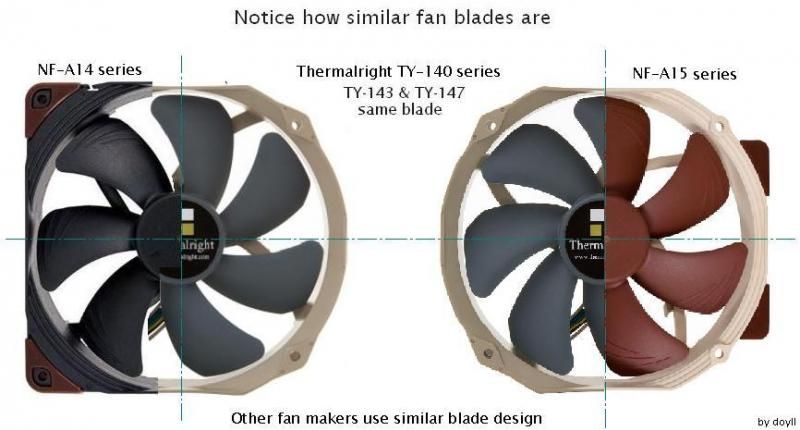
If you have 120mm mounts, you could get some Thermalright TY147s - they are pretty much Noctua fans with a different frame

NF-A14A15ampTY-140seriesblade_zpsf5eb68aa.jpg
 
I'm confused about the different fan types and connections, and what fans come with what connectors.

My cpu fan appears to have a different type of connection to the system fans. They are all 3 pin but the cpu fan has a pin missing in the middle whereas the system fans connect across 3 pins of the 4 in the motherboard connectors.
I would use variable voltage (3-pin) case fans.
What case do you have?

I would use automatic motherboard control for case fans. CPU and GPU fans are all automatic speed controlled based on their heat. It only makes sense to do the same with case fans .. they are what is supply the airflow to the coolers, so doesn't it seem logical to have that airflow dependent on their needs?

Phanteks PH-F140SP are good fan.

If you have 120mm mounts, you could get some Thermalright TY147s - they are pretty much Noctua fans with a different frame

NF-A14A15ampTY-140seriesblade_zpsf5eb68aa.jpg
Most cases with 120mm and 140mm fan mounts do not have mounts spaced for 120mm mount spacing on 140mm fans. The spacing is only for 120mm fans with 105mm spacing and 140mm fans with 124.5mm spacing.

Me thinks it's more like Noctua fans are pretty much Thermalright fans with a slightly different frame. :D
 
Can you explain the different connectors for cpu fans and case fans? I don't see how these fans are interchangeable if the pin configuration is different.
 
Well, fans area all fans. CPU fan is one used on a CPU and a case fan is one used on case.

As for 3-pin and 4-pin, the 1st 3 pins are the same; ground, power and rpm in that order. The difference is 3-pin fans are speed controlled by varying the voltage on 2nd pin .. while 4-pin fans are PWM with 4th pin being PWM control and 2nd pin being fixed 12 volt power.

Now that was the fans. Motherboard header are a different matter. Most motherboards have a combination of 3-pin and 4-pin fan headers, but most only have PWM control on the 4-pin CPU fan header. Any other 4-pin head most likely has nothing on the 4th pin and only functions as a 3-pin variable voltage fan header.

This is not 100% true of all motherboards, but it is a pretty safe bet. You can look in your motherboard manual and see what it says your fan headers are, but it is a known fact that some motherboard manuals are not labeled properly as to what the fan headers really are.
 
My motherboard has 4 pin headers for both cpu fans and system fans, but the manual says that the pin configurations are different for the cpu header compared to the system headers.

Also the fans that came with my case all use 3 pin connectors which are in line - I.e the first 3 pins are being used. The connector only fits across the first 3 pins on the motherboard, leaving the 4th pin open.

But the cpu fan connector is different as is clearly using pins 1, 2 and 4. There is no pin 3 on the fan connector. The fan connector fits across all 4 pins on the header.

How can this be if the fans are the same?
 
It sound the 'cpu fan connector' does not have a rpm pin.
I'm not sure what you mean by connector.
The fans have a cable with a plug on it.
The motherboard has fan headers.
'Y' splitter have 2x sockets and one plug. Usually only one of these 2x sockets has a 3rd-pin. This is so the rpm signal is not messed up by having 2x signals going to header.
 
Yes I meant the plug on the fan cable. The cpu fan has 3 wires going into the plug and pin 3 is not used, but pin 4 is, and the plug is a full width plug. The fan is not pwm though as far as I know as it doesn't show up as pwm in hwmonitor.

The system fans have a 3 pin plug.

I am getting rpm feedback from all fans though.

It doesn't make sense at all. When I get home I will have a proper look at the configurations.
 
Last edited:
It can only be the power or the rpm lead.
Is each fan plugged into it's own fan header on the motherboard?
Are you seeing a rpm reading for every single fan you have running?
 
I have had a proper look inside the case.

CPU fan
I was wrong about the CPU fan - it is a 4 wire fan. The fan cable has a built in splitter, and it is this that only has 3 pins.

The motherboard manual lists the following pin configuration for the CPU fan:
Pin 1 - GND
Pin 2 - +12V
Pin 3 - Sense
Pin 4 - Speed control

What I don't understand here is why HWmonitor is not detecting this as a PWM fan? As you can see below I am getting a speed value but no PWM value.

2iu2a7n.jpg


I am assuming, because it is pin 3 that is missing from the splitter, that I can only ever plug in another PWM fan to this splitter cable, because a standard 3 pin fan would only connect to pins 1 and 2 and therefore run at full 12V speed being supplied to the first fan under PWM. Is this correct?

I am further assuming, that if I did not have a PWM fan, that the motherboard would revert to adjusting the voltage on pin 2 to control the fan speed, in conjunction with pin 3 returning the speed value. Is this correct?


System fans
My two system fans are both 3 wire fans with pins 1, 2 and 3 being active.

The motherboard manual lists the following pin configuration:
Pin 1 - GND
Pin 2 - Speed control
Pin 3 - Sense
Pin 4 - VCC

Now you can probably see why I was getting confused. Pin 2 is listed as speed control now, rather than +12V, and a new term, VCC has been introduced and I don't know what this means.

I am assuming that my current 3 pin fans are therefore running with pin 2 being used to control the voltage.

As you can see from the above screenshot, I am getting speed values returned.


Questions:
Why am I not seeing a PWM value returned back to HWmonitor if the CPU fan is a PWM fan running on 4 wires?

Should I buy PWM fans for the rest of my system?

What does VCC stand for?

Some fans on OCUK are listed as a fixed rpm. Does this mean that the motherboard won't control the speed of these fans, even though they would be connected to pin 2 giving a variable voltage output?

I can hear my current system fans whirring if I take them to 60% speed (about 900rpm). Below this I can only hear wind noise, which is fine - I just don't like the whirring. So I was thinking if I can get quiet high flow fans that I can keep below 1000 rpm all the time then this would be nice and quiet.

The CPU fan whines when it spins up. I was hoping to control this by having a good air flow through the rest of the case so that the CPU fan doesn't need to spin up so much.
 
Last edited:
Your system fan headers are variable voltage on pin-2. VCC on pin-4 is pin not being used. In electronics Vcc = Collector supply voltage

But motherboard companies use as they see fit. There is no real standard for what VCC means on motherboard pin diagrams. Whoever makes up the motherboard pin-out drawing for the manual slaps VCC or Vcc on pin-4 when the pin is not being used. No idea why they just don't just label it 'reserved' or 'not in use'
 
Well, either your bios is lying to you or the manual is, because manual shows sys fan headers as pin-2 being 'speed contol' and that is varaiable voltage with pin-4 is VCC . which is unused pin, not PWM signal.
 
I checked the manual and it's less helpful than **** on a boar. :(

Fan Speed Percentage
Allows you to control the fan speed. This item is configurable only when CPU OPT Fan Speed Control is set to Manual. Options are: 0.75 PWM value / o C ~ 2.50 PWM value / o C.
1st System Fan Speed Control (SYS_FAN1 Connector)
Allows you to determine whether to enable the fan speed control function and adjust the fan speed.
Normal Allows the fan to run at different speeds according to the system temperature. You can adjust the fan speed with System Information Viewer based on your system requirements. (Default)
Silent Allows the fan to run at slow speeds.Manual Allows you to control the fan speed under the Fan Speed Percentage item.
Full Speed Allows the fan to run at full speeds.
They say the same for all fan headers.

CPU_FAN is PWM control, but all the others are PWM powered, not PWM controlled. PWM control is using PWM signal on pin-4 while PWM powered is using pulsed power to the fan motor.

Motherboard manufacturers are known to play games with our heads with their use of the term 'PWM'.
  • To them 'PWM' is anything using pulsed power.
  • To us (at least those I know and myself) 'PWM' control is the use of a PWM signal on 4th pin to signal the PWM circuit in fan to pulse the 12v power to the fan motor. A 4-pin PWM fan header using a 4-wire PWM fan.
  • To them 'PWM may be a 3-pin or 4-pin fan header with pulsed power on pin-2.

Proper use of the term 'PWM control' in the fan industry is the use of 4 wire 4-pin control system that signals the PWM fan with
  • pin-1 = ground
  • pin-2 = 12v constant power
  • pin-3 = rpm signal from fan
pin-4 = PWM control signal to fan

Motherboard manufacturers use of 'PWM control' is pulsed power to the fan
  • pin-1 = ground
  • pin-2 = speed control Notice they do not say PWM here, but advertise this as 'PWM control'
  • pin-3 = rpm signal from fan
  • pin-4 = nothing (if it is a 4-pin header)
This use of 'PWM control' does not use any of the PWM control system in a PWM fan. The PWM fan as used as if it is a 3-pin fan.

Sadly this misrepresentation of 'PWM control' is nothing new.

So, assuming Gigabyte is telling us the truth, your Z170 has PWM controlled 4th pin on CPU_FAN and 'speed control' (pulsed power) SYS_OPT, SYS_FAN1, SYS_FAN2 & SYS_FAN3

Gigabyte need to be kick so hard in the behind they fart though their eyes! They used to have simple software for setting automatic fan speed to temp curves, but not any more. :mad:

Even on my low end MSI Z170M Mortar I can setup custom temp to rpm curves .. even same and set them as default.
 
Back
Top Bottom