

-
Notice regarding image hosts and attachments. See here.
You are using an out of date browser. It may not display this or other websites correctly.
You should upgrade or use an alternative browser.
You should upgrade or use an alternative browser.
Windows 10
- Thread starter Glaucus
- Start date
More options
Thread starter's posts

Soldato
- Joined
- 28 Sep 2014
- Posts
- 4,018
- Location
- Scotland
Whats the build no.?
Same build I downloaded days ago. 1803 10.0.17134.1
Last edited:

Whats the build no.?
Win 10 Pro
Version 1803
Build 17134.1
(My main PC is on 17134.4 but that was with an ISO 17134.1 then Windows Insider KB4135051)

Soldato
- Joined
- 18 May 2010
- Posts
- 24,577
- Location
- London
Snip. Answered already.

Soldato
- Joined
- 28 Sep 2014
- Posts
- 4,018
- Location
- Scotland
Took ages to update but now after logging in all I get is a black screen for about 10 minutes or so.
Strange. Mine took about 15 mins to update.
Maybe you not updated all drivers to latest version before install 1803 update. If you downloaded it from Windows Update then you will need to use Media Creation Tool to download latest updates and reinstall Windows 10 1803 that should fix your issue.
Soldato
- Joined
- 28 Sep 2014
- Posts
- 4,018
- Location
- Scotland
Just updated with no noticeable issues, but there is this under diagnostics & feedback:
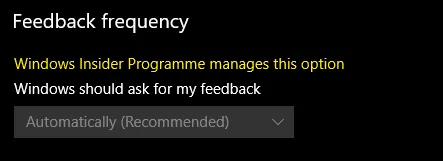
I'm not in the insiders programme so why can't I turn this off?
No worry, everybody get these too. Insiders received patch from Windows Update fixed that issue updated build to 10.0.17134.5.
So far no new updates from Windows Update yet so maybe there will be updates next week on 8 May 2018.
No worry, everybody get these too. Insiders received patch from Windows Update fixed that issue updated build to 10.0.17134.5.
So far no new updates from Windows Update yet so maybe there will be updates next week on 8 May 2018.
Thanks. Hopefully it'll get patched soon then.
I've uninstalled the Feedback Hub app anyway so shouldn't get prompt by them
 ...
...I noticed a lot more privacy options as well looking at it.
...And fast start up turned itself back on.

After i did the update now i have a Local Disk D: that just appeared in my computer, anyone know what it is or why it is there?
https://gyazo.com/d9b44690698699f516c3d5c5fe751c1e
https://gyazo.com/d9b44690698699f516c3d5c5fe751c1e

Looks like the Asus AI Suite is broken again with this release, though I'm more inclined to blame Asus' inability to program within the guidlines than MS. Asus went though all this a few months back and release patched software to make it work again, but they seem to be incapable of colouring within the lines.
Soldato
- Joined
- 28 Sep 2014
- Posts
- 4,018
- Location
- Scotland
After i did the update now i have a Local Disk D: that just appeared in my computer, anyone know what it is or why it is there?
https://gyazo.com/d9b44690698699f516c3d5c5fe751c1e
Hmmm I had same issue when G: partition popped up on both desktop and on VMWare, it only affected UEFI Mode and it did not affected Legacy Mode.
I found out my G: is OEM partition (former Recovery partition) so I removed it from showed up in File Explorer with diskpart.
1. Open Windows PowerShell (Admin)
2. Type in "diskpart" and press enter
3. Type in "list vol" and press enter
4. Find which volume listed D: and type in "select volume #" where # is a number
5. Type in "remove" then press enter and D: will be removed from File Explorer
My 1803 just installed in about 10 minutes.
Things I have noticed that are broke or doing crazy stuff so far is...
All my IMAP email accounts say "System Error, Can't get mail" in yellow text in account in the email app. All settings are there but don't appear to be working.
The photo's app started adding pictures and video's from every hdd I had connected to the PC instead of the one folder I previously had it set to with no way to stop or removed the other folders. This set my ram and processor usage in to overdrive.
I fixed that by going to app features and doing a reset on the photo app and then just adding my one folder back.
Things I have noticed that are broke or doing crazy stuff so far is...
All my IMAP email accounts say "System Error, Can't get mail" in yellow text in account in the email app. All settings are there but don't appear to be working.
The photo's app started adding pictures and video's from every hdd I had connected to the PC instead of the one folder I previously had it set to with no way to stop or removed the other folders. This set my ram and processor usage in to overdrive.
I fixed that by going to app features and doing a reset on the photo app and then just adding my one folder back.

Man of Honour
- Joined
- 5 Oct 2008
- Posts
- 9,009
- Location
- Kent
I'm not sure this Lean edition is that great, does not even have regedit, which is a pretty useful tool. Will see how it plays out.
I'm not sure this Lean edition is that great, does not even have regedit, which is a pretty useful tool. Will see how it plays out.
Panic set in then thought that was the code name for the next update, checked and thankfully not
Hmmm I had same issue when G: partition popped up on both desktop and on VMWare, it only affected UEFI Mode and it did not affected Legacy Mode.
I found out my G: is OEM partition (former Recovery partition) so I removed it from showed up in File Explorer with diskpart.
1. Open Windows PowerShell (Admin)
2. Type in "diskpart" and press enter
3. Type in "list vol" and press enter
4. Find which volume listed D: and type in "select volume #" where # is a number
5. Type in "remove" then press enter and D: will be removed from File Explorer
Thanks worked a charm.
Last edited:
Strange. Mine took about 15 mins to update.
Maybe you not updated all drivers to latest version before install 1803 update. If you downloaded it from Windows Update then you will need to use Media Creation Tool to download latest updates and reinstall Windows 10 1803 that should fix your issue.
Thanks. Strangely it seems to have been resolved by itself but that's the first time I've had an issue like this with any of the W10 updates.
Man of Honour
- Joined
- 5 Oct 2008
- Posts
- 9,009
- Location
- Kent
Panic set in then thought that was the code name for the next update, checked and thankfully not
I would not put it past MS to remove it, but fingers crossed it stays at least in the full version!