


Been a while since I asked a stupid question so I thought it was about time.
My wife is an Electrician (I know!) and I'm trying to make a template in Word for her to complete certification forms, the software you can get to do it costs a fortune so I thought I'd save her some money. Trouble is, I've only ever used Word to type letters and whatnot so I'm a bit lost.
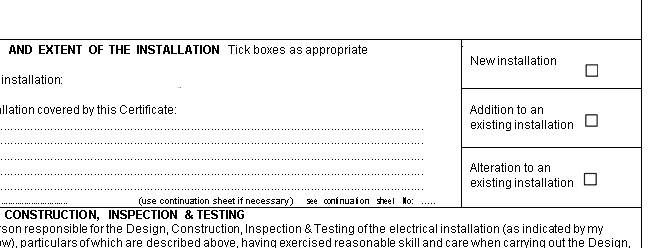
I converted the standard forms from PDF to Word and they look pretty good, I'm now adding textboxes where appropriate. The only thing I'm struggling with is when these docs have been converted, there's some checkboxes that have been left behind, seemingly embedded into the document somehow. I want to remove these and replace them with Word's own tickboxes but I cant get rid of them.
Hard to explain, hopefully the screenshot will help. I can't click on these boxes to select them, they seem like they are images rather than objects in word. How do I get rid of them!!??
My wife is an Electrician (I know!) and I'm trying to make a template in Word for her to complete certification forms, the software you can get to do it costs a fortune so I thought I'd save her some money. Trouble is, I've only ever used Word to type letters and whatnot so I'm a bit lost.
I converted the standard forms from PDF to Word and they look pretty good, I'm now adding textboxes where appropriate. The only thing I'm struggling with is when these docs have been converted, there's some checkboxes that have been left behind, seemingly embedded into the document somehow. I want to remove these and replace them with Word's own tickboxes but I cant get rid of them.
Hard to explain, hopefully the screenshot will help. I can't click on these boxes to select them, they seem like they are images rather than objects in word. How do I get rid of them!!??

