• Competitor rules

    Please remember that any mention of competitors, hinting at competitors or offering to provide details of competitors will result in an account suspension. The full rules can be found under the 'Terms and Rules' link in the bottom right corner of your screen. Just don't mention competitors in any way, shape or form and you'll be OK.

4870x2 : One Core 82 Degrees

Soldato
Joined
18 Oct 2002
Posts
21,543
Location
Cambridge, UK
Hi,

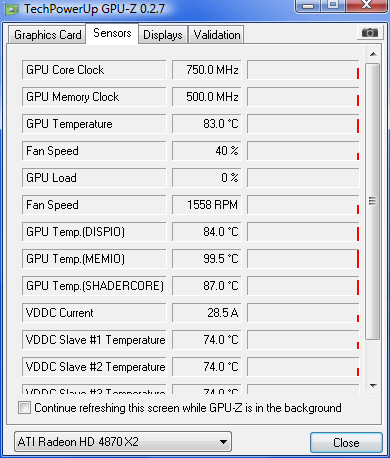
One of the cores on my Sapphire 4870 is running at 82 degrees:-

amd.jpg


I was hoping to change the fan speed using Riva Tuner 2.10

riva.jpg


but it doesn't seen to want to play ball, if I reboot it seems to do nothing, if I do detect now it does nothing.

I'm using Vista X64.

Or should I just RMA?

Cheers

HEADRAT
 
Last edited:

Try this. It worked with my mates x2. And it might be possible that one of your cores in running in 3d mode while the other isn't. You could use gpuz to check this.
 
Unless its causing problems at stock speeds you wont be able to RMA it, as the card is working fine. :(
 
The speed thing happened on mine till I flashed it to a faster bios. Try running the AMD tool log and see what the speed and temps are in game. Or you can open two gpu-z and leave those monitoring in the background
 
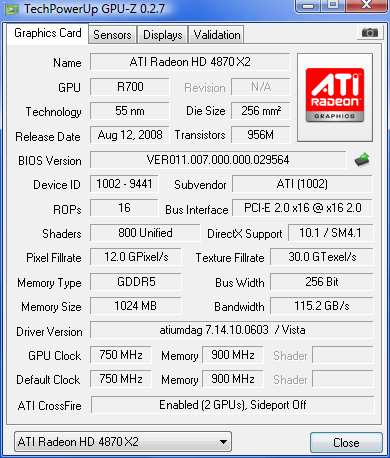
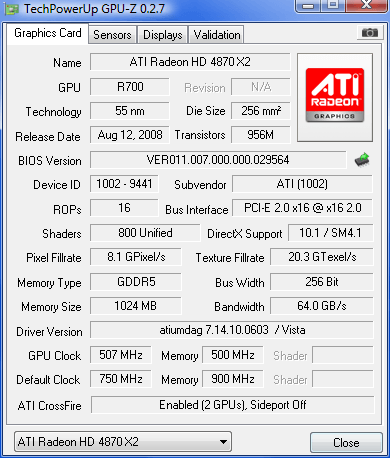
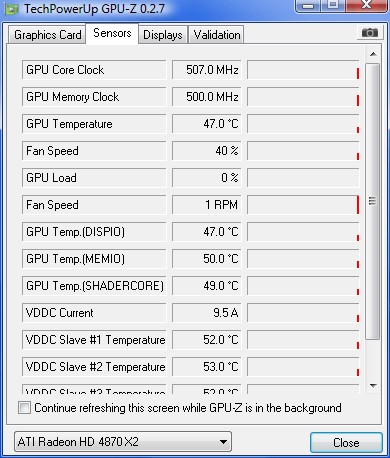
Great tip thanks matey, fired up to GPU-Z's and watched the temps/rpm/load rise, once I quitted my game both cores have dropped back to 507Mhz Core 500Mhz Memory.

2gpuz.jpg


Obviously just a driver bug.
 
Last edited:
On idle right now I have one core at 86 C and one at 60 C, not had any problems with it but it doesn't like clocking very far at all.
 
Its mainly because they let the fan speed drop way down at idle. Check out the fan profile from the bios.

It'll stay at 27% rpm until it gets to 70C.


Compare that to the Asus TOP X2 bios. 25% until 40C then 100% by 64C, that's going to be running a lot more often. You could just increase the stock cards bios (master only) with say a 35% minimum, very easy to do.

 
Last edited:
a quote of a post to some one that i added in a thread earlyer with the same questions as yours allmost

1: in the box it states that on vista it WILL blackscreen with the drivers on the disk and that you have to reboot a few mins after blackscreening and that the drviers will be installed, (new drviers have fixed this).

2: download the latest gpu-z, then check both cores, one will be hotter because its further from the fan.

3: it will report one at 500/500 and one core at full speed, no idea why but it shows one core in 2d mode and one in 3dmode but dont worry when in game they go up to 750/900


what you can do is edit your profiles like iv done and made the 2d clock (when the card is on desktop not in use) and made both cores and memory 300/400 core and memory 1, and 300/400 core and memory 2, and it idles at a nice 37c core1, 38c core 2(core 2 further from the fan)

and in game they go up to 800/950, and 800/950.

hope this helps


read this to change the fan speed and how to underclock the card in 2dmode when idle etc:
http://www.hardforum.com/showthread.php?t=1337485


edit: allso for 100% true gpu temp readings download AMD GPU Clock Tool:

 
Back
Top Bottom