OC'ing an i7 920 106A4

Associate
Joined
3 Feb 2009
Posts
950
I started trying to up the OC a bit on my new i7 build today and was wondering if anyone had a chip from the same batch as me.

The CPU cooler is a Noctua NH-U12P 1366 version and its in an Antec 1200 with all the fans on full.

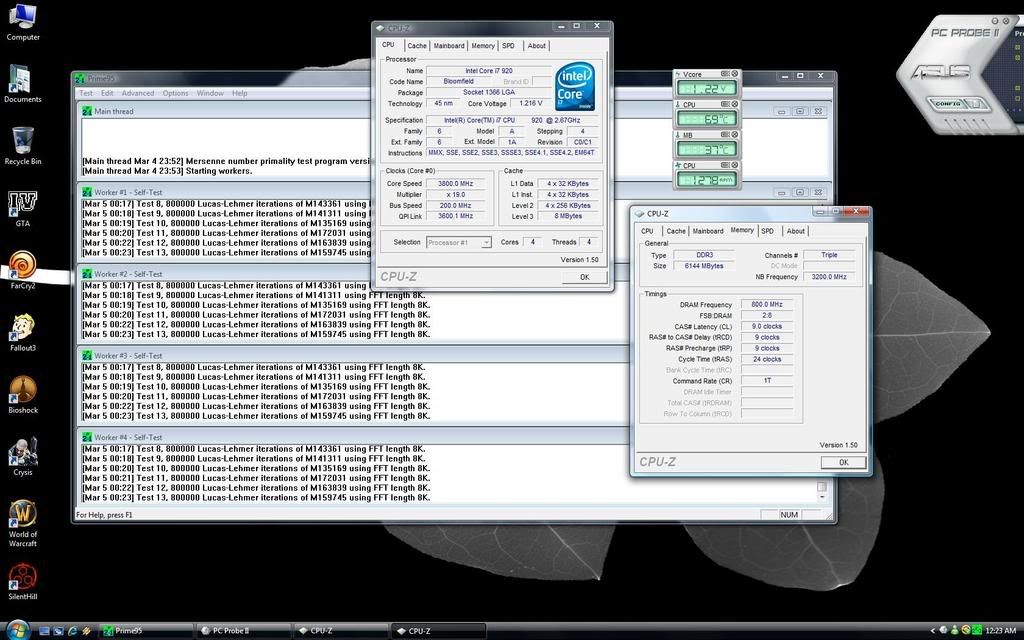
Under full load the temps across the cores seem a quite varied for some reason and a little higher than I would have expected. Screenie below, any opinions?


ocscreenie.jpg
 
the batch number is found on the box packaging that contained your chip or on the heat spreader itself. 106A4 just identifies that your chip is i7 920 c0.

If you google image "i7 batch number" there are lots of screenshots i7 cpuz and benchmarks matched to their batch numbers.
 
Ah, didnt realise that.

The CPU is OEM from OCUK, short of ripping the cooler off there's no way to find out what batch # it is?

Does anyone else have the one of the OEM 920's from OCUK?
 
I have the same dilemma, I threw away the chip packaging and don't want to take the heatsink off again. dont know of any other way to check its batch.
 
I have the same dilemma, I threw away the chip packaging

That was a bad idea - after the first year, the text in the white box on the end-cap contains the warranty information. Sorry, but Intel now have no way of knowing that you have a retail CPU to RMA. The 'manual' that comes with the CPU explains this.
 
Have you tried testing stability with lower vcore? That vcore seems high for the speed.

Mine's up to 3.8ghz with lower vcore. Chip does 4ghz stable but requires 1.41v and runs a little warm for my tastes :p

Gotta love these i7's.

38ghz.jpg


Also, disable HT and knock off about 10c under load.
 
Last edited:
Does anyone else have the one of the OEM 920's from OCUK?

Yeah, mine is. Can't say I have any idea what the batch is though - just took it out of the tiny box and stuck it in my PC :D

At the moment stable @ 3.8ghz - idling at 39c and loading at 76c.

Can't get it to even boot at 4ghz though. I've boosted some of the voltages but I'm rather in the dark about overclocking these chips.

Also, disable HT and knock off about 10c under load.

Would you recommend this; is HT really necessary? :) I'm thinking not because I don't use a lot of multi-threaded apps, and four cores should be enough anyway, so I might give that a shot.
 
Yeah if you're not using it turn it off. You really will see your load temps drop.

Yep. I can confirm this. With my i7 920 at 3.9ghz my idle temps are around 42 to 44 and under load using prime I find the cores all show between 66 and 69 degrees C.
 
Last edited:
Looks like turning HT off is the way forward for dropping those temps then. The only time I really ever use HT is for re-encoding my DVD's and I got through 3 TV series and 5 movies worth of video in something crazy like an hour so I really don't need the speed boost :p.

Also, rghutch; what's your Vcore in that screenie? I can't quite see through the fuzz but it looks like 1.218 to me?
Should I just drop the voltage incrementally until it stops being stable... And if so, what are the suggested incrementals to try?

Thanks for all the advice.
 
SirConfused

Our systems seem pretty much the same except you are using faster RAM than I am. With regards to turning off the Hyper Threading, have you thought about saving different profiles in your BIOS to boot for different scenarios? One for HT enabled and one for disabled!
 
I can't say that was something I had considered yet GunRunner, but thanks for the suggestion.

Anyway, onto the results of my latest test and I have to say I am fairly astounded at the difference that HT makes. I dropped the Vcore to 1.168 and turned HT off and so far it's running stable under prime multi-core at about 12+ degrees less than the previous attempt.

OC31v2.jpg


Is it safe to drop the Vcore any lower?
 
In the whole scheme of things, dropping the Vcore is always a good thing! Less heat, however is the difference significant enough to pursue this as a goal?

I dont know whether this helps you, but recently I asked for help on sorting out a procedure for oveclocking our motherboards, but found that I was the one writing the procedure in the end.

See here..

http://forums.overclockers.co.uk/showthread.php?t=17982688

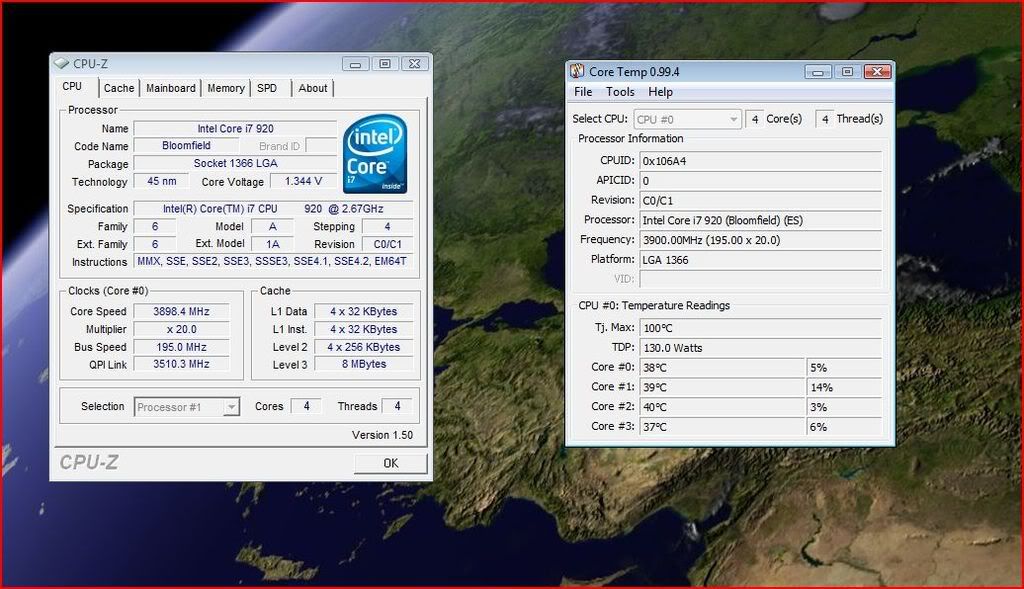
If you look further down the thread, you will see my temperatures and settings for running at 3.9ghz with a Vcore at 1.3875 in the BIOS, but the applications show lower at 1.344v.

CoreTemp.jpg


CoreTempwithprime95.jpg
 
Last edited:
Thanks for the thread link, it proved very useful. I now have successfully got a stable clock of 3.61 at only 56 degrees fully loaded.

I turned on LLC, dropped the multiplier to 19 and upped the BLC to 190 to get where I am now.

The only problem is, Windows now actually seems more sluggish for some reason. The only thing I can think of is that it might be due to the dropped speed on the ram (dropped the multi on that to 8x now so its only hitting 1520MHz) but I wouldn't have thought it would make that much difference.

Anyway, here's the setup of my latest attempt:

36v1.jpg
 
SirConfused

Having read myself to death on the RAM speed, I am of the opinion that it does not make a significant difference. I may be wrong, but even the "experts" say the ram speed does not make a whole lot of difference. I cannot supply links as I have read so much. I have only got 1333mhz ram and I have it on a 6 x multiplier it shows at 1140mhz and the machine flies. Check out my signature for 3dmark06!
 
Yes 3.6 is stable, yes I have stress tested it - not for a full 8 hours as of yet though.

Personally I have reached my threshold for a temp that I am happy with. Under full load with HT turned off and the Vcore @ 1.184 according to CPUZ (LLC enabled in bios) the hottest core hits about 55 degrees. I would maybe be happy with 60 but definitely don't want to see it get any hotter than that so for the moment it stays at 3.6.

I have to say that an extra GHz on top of the stock is a lot for me and i'm happy to enjoy it for now.
 
Back
Top Bottom