


Right, finally got round to doing this. Just for my own amusement I've taken some thermal images of my pc showing the various water cooled bits and odds and ends. It also shows visually just how little the water temperature varies in any part of the loop, which I think is one of the things which always surprises people when they first get into water cooling. I did something similar years ago.
Now, let it be known that I don't really care what my PC looks like. Really, I couldn't give a bugger. It is still beige ffs. Its all about performance and minimal in-case clutter around the mobo as far as I am concerned. So bare that in mind when you look at the pics below, just try not to throw up or anything. I did think about spraying everything black when I had it in bits, but I am simply too lazy. Maybe next major upgrade. The observant amongst you may spot my pc has a chunk of wood in it, this just goes to show how Heath Robinson I am prepared to go in the name of engineering.
Full case, showing my improvised heli-pad, AKA my rads. Its and old school Chieftec Dragon full tower I've had for about 8 years
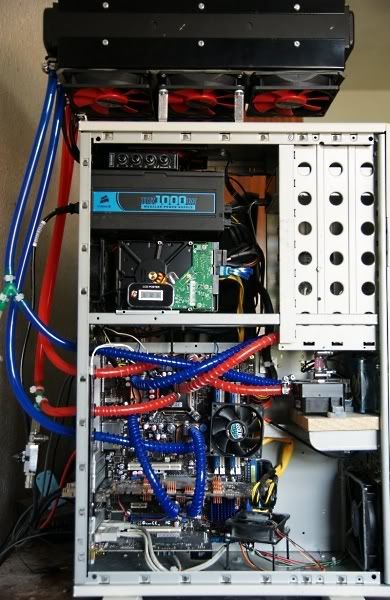
View of mobo area

Now the thermal images. These were taken with a Flir Systems PM695 thermal imaging camera.
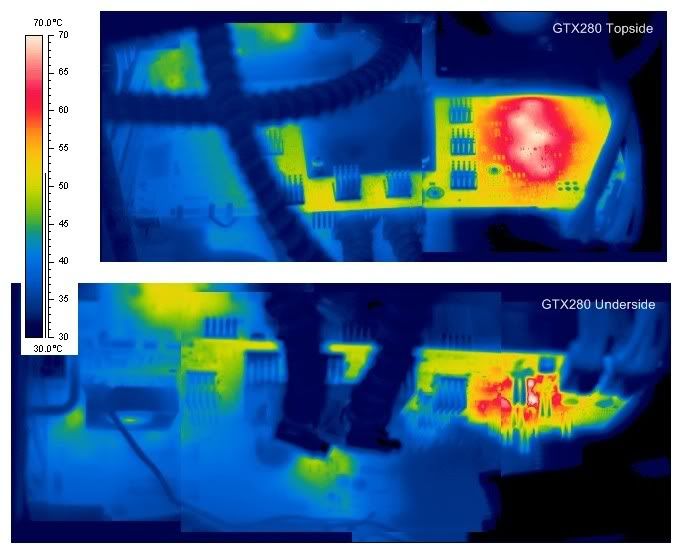
The first one is a view of the whole pc. I had set it running Orthos and Furmark for a good 45 mins. Note that Furmark really stresses your gcard. After running this my gpu core temp was up to 47°C indicated by gpu-z, in normal games it only gets to about 41-42°C. The VRMs on the graphics card maxed out at 100°C! In normal games these only go up to 65ish. It just shows you how hard Furmarks works you card. It also tells me that since my card works perfectly ok at these temps with air cooled sinks on my vrms, then full cover blocks which cool the ram and the vrms add uncessary heat to the gpu loop which could in theory limit your max gpu clock. This is obviously the main advantage of the gpu only blocks, Dtek GFX2 in this case, with home made backplate. They are slightly harder to fit however, look a bit functional and SLI would be more difficult. CPU temp was about 58°C indicated by Realtemp

Close up of GTX280, I may put a fan on the top side where the VRMs are below, but then again, it will only get this hot if you are running Furmark
Area around cpu block, which is a dtek fusion V2

Area around NB block

Area around Ram. Not much to see here really as the fan is in the way

Pumps. These have an 80mm fan blowing over them from the side but obviously still have a hot spot on the non cooled side

Incidentaly, the 10W pump is for the cpu loop, which also includes one mosfet block. The 18W pump deals with the GPU loop which includes the NB and the other mosfet. I chose not to bother water cooling the SB on this mobo, even though I bought the relevant block, for the sake of reducing tube complexity. Also, for info I use 2 EK150 Multioption reservoirs which occupy some of the 51/4 bays.
Side of one hard disc. Temp monoitoring software says these get max out at about 32°C in normal use, which looks about right. There are 4 of them on that rack cooled by a rear fan

Top view of the rads, it looks a bit lopsided obviously since I'm using a 120.3 and a 120.2. I may swap to another 120.3 if I go i7 at some point

End view of rads. This was taken after I stopped Furmark so the gpu loop has cooled a bit

Tube temperatures

This pic is interesting because it shows you just how little the water temperature varies at any point in the loop. You are only talking about a 1°C delta across the rad, for both loops.
Final pic of the whole pc again, but in greyscale and a different temperature scale

There you go. Hope you found this interesting. Try not to have nightmares about how I've mounted my rads
Now, let it be known that I don't really care what my PC looks like. Really, I couldn't give a bugger. It is still beige ffs. Its all about performance and minimal in-case clutter around the mobo as far as I am concerned. So bare that in mind when you look at the pics below, just try not to throw up or anything. I did think about spraying everything black when I had it in bits, but I am simply too lazy. Maybe next major upgrade. The observant amongst you may spot my pc has a chunk of wood in it, this just goes to show how Heath Robinson I am prepared to go in the name of engineering.
Full case, showing my improvised heli-pad, AKA my rads. Its and old school Chieftec Dragon full tower I've had for about 8 years
View of mobo area
Now the thermal images. These were taken with a Flir Systems PM695 thermal imaging camera.
The first one is a view of the whole pc. I had set it running Orthos and Furmark for a good 45 mins. Note that Furmark really stresses your gcard. After running this my gpu core temp was up to 47°C indicated by gpu-z, in normal games it only gets to about 41-42°C. The VRMs on the graphics card maxed out at 100°C! In normal games these only go up to 65ish. It just shows you how hard Furmarks works you card. It also tells me that since my card works perfectly ok at these temps with air cooled sinks on my vrms, then full cover blocks which cool the ram and the vrms add uncessary heat to the gpu loop which could in theory limit your max gpu clock. This is obviously the main advantage of the gpu only blocks, Dtek GFX2 in this case, with home made backplate. They are slightly harder to fit however, look a bit functional and SLI would be more difficult. CPU temp was about 58°C indicated by Realtemp
Close up of GTX280, I may put a fan on the top side where the VRMs are below, but then again, it will only get this hot if you are running Furmark
Area around cpu block, which is a dtek fusion V2
Area around NB block
Area around Ram. Not much to see here really as the fan is in the way
Pumps. These have an 80mm fan blowing over them from the side but obviously still have a hot spot on the non cooled side
Incidentaly, the 10W pump is for the cpu loop, which also includes one mosfet block. The 18W pump deals with the GPU loop which includes the NB and the other mosfet. I chose not to bother water cooling the SB on this mobo, even though I bought the relevant block, for the sake of reducing tube complexity. Also, for info I use 2 EK150 Multioption reservoirs which occupy some of the 51/4 bays.
Side of one hard disc. Temp monoitoring software says these get max out at about 32°C in normal use, which looks about right. There are 4 of them on that rack cooled by a rear fan
Top view of the rads, it looks a bit lopsided obviously since I'm using a 120.3 and a 120.2. I may swap to another 120.3 if I go i7 at some point
End view of rads. This was taken after I stopped Furmark so the gpu loop has cooled a bit
Tube temperatures
This pic is interesting because it shows you just how little the water temperature varies at any point in the loop. You are only talking about a 1°C delta across the rad, for both loops.
Final pic of the whole pc again, but in greyscale and a different temperature scale
There you go. Hope you found this interesting. Try not to have nightmares about how I've mounted my rads










