

-
Competitor rules
Please remember that any mention of competitors, hinting at competitors or offering to provide details of competitors will result in an account suspension. The full rules can be found under the 'Terms and Rules' link in the bottom right corner of your screen. Just don't mention competitors in any way, shape or form and you'll be OK.
You are using an out of date browser. It may not display this or other websites correctly.
You should upgrade or use an alternative browser.
You should upgrade or use an alternative browser.
***Official Ivybridge Overclock Thread***
- Thread starter MonsterMoshi
- Start date
More options
Thread starter's posts


UPDATE:
stable @ 4.6 GHz
vcore: 1.296/1.304 (flickers slightly in cpuz more the latter though)
LLC: ultra high (found anything less and there was vdroop)
multi: 46
ran 10+ hours prime95 small fft
Temps: 82oC max core... mostly just in high 70's
none of those yellow triangles in event viewer
right.... so i have speed step enabled now... it shifts the multi which is good... but with voltage... can i get that to change easily? or is it a case of changing to offset mode, finding what i need to set the offset to so i can get my 1.304/1.296 back and then it will step the voltage up and down? (sounds like a pain in the bum )
)
also i tried going for 4.8.... had to get the voltage up to 1.34 in bios (roughly 1.38 in cpuz).... after many failed boots or boots into windows and then stuff dying while trying to load ... but once it was in and kinda stableish... proceeded to run prime and within 2 seconds a warning from AIsuite (thermal radar) came up saying my CPU was at 75oC (think thats the socket not the cpu as realtemp said 87oC) but prime then failed so i called it a day and toned it back down to 4.6 and proceeded to play Diablo 3 all evening without any hiccups .
so.... how can i try and get my temps down now? reduce the CPU PLL by.1 or .2? see if it's stable? any other suggestions?
might get some springs/washers for the H80 to increase the camping pressure looking at the liquid pro TIM also... though i'm a bit worried it will just run out and drip on stuff xD
stable @ 4.6 GHz
vcore: 1.296/1.304 (flickers slightly in cpuz more the latter though)
LLC: ultra high (found anything less and there was vdroop)
multi: 46
ran 10+ hours prime95 small fft
Temps: 82oC max core... mostly just in high 70's
none of those yellow triangles in event viewer
right.... so i have speed step enabled now... it shifts the multi which is good... but with voltage... can i get that to change easily? or is it a case of changing to offset mode, finding what i need to set the offset to so i can get my 1.304/1.296 back and then it will step the voltage up and down? (sounds like a pain in the bum
)also i tried going for 4.8.... had to get the voltage up to 1.34 in bios (roughly 1.38 in cpuz).... after many failed boots or boots into windows and then stuff dying while trying to load
... but once it was in and kinda stableish... proceeded to run prime and within 2 seconds a warning from AIsuite (thermal radar) came up saying my CPU was at 75oC (think thats the socket not the cpu as realtemp said 87oC) but prime then failed so i called it a day and toned it back down to 4.6 and proceeded to play Diablo 3 all evening without any hiccups .so.... how can i try and get my temps down now? reduce the CPU PLL by.1 or .2? see if it's stable? any other suggestions?
might get some springs/washers for the H80 to increase the camping pressure
looking at the liquid pro TIM also... though i'm a bit worried it will just run out and drip on stuff xDso.... how can i try and get my temps down now? reduce the CPU PLL by.1 or .2? see if it's stable? any other suggestions?
Yeah, CPU PLL can go down to 1.5 iirc as long as it stays stable. There's also a few other things you can do to stabalize the OC a bit more so maybe instead of 1.34v you only need 1.32v to get 4.8Ghz stale.
right.... so i have speed step enabled now... it shifts the multi which is good... but with voltage... can i get that to change easily? or is it a case of changing to offset mode, finding what i need to set the offset to so i can get my 1.304/1.296 back and then it will step the voltage up and down?
Yes, as the offset uses the boards autovoltage which depends on the CPU's vid you just need to adjust the offset +/- after seeing what the autovoltage goes to under load to get it at the right level and turbo will boost upto the desired clockrate and voltage when under load, or go back down to stock voltage/multiplier when idle.
One of the more complex issues with offset is if you need to undervolt the offset quite a lot such as -0.07v then that also gets taken off when idle so it can become unstable at idle but fine at full load as strange as that sounds.
A good trick around this however is to adjust LLC to compensate, so for isntance you could have it on low LLC and then you would only need -0.05v offset for example to attain the same full load voltage that is required.
Yeah, CPU PLL can go down to 1.5 iirc as long as it stays stable. There's also a few other things you can do to stabalize the OC a bit more so maybe instead of 1.34v you only need 1.32v to get 4.8Ghz stale.
Yes, as the offset uses the boards autovoltage which depends on the CPU's vid you just need to adjust the offset +/- after seeing what the autovoltage goes to under load to get it at the right level and turbo will boost upto the desired clockrate and voltage when under load, or go back down to stock voltage/multiplier when idle.
One of the more complex issues with offset is if you need to undervolt the offset quite a lot such as -0.07v then that also gets taken off when idle so it can become unstable at idle but fine at full load as strange as that sounds.
A good trick around this however is to adjust LLC to compensate, so for isntance you could have it on low LLC and then you would only need -0.05v offset for example to attain the same full load voltage that is required.
so like i said... pain in the bum xD
these "things" are they the phase power controls and such to deliver more stable power at the compromise of a bit more NB heat? for example.
will i need turbo mode on or? because well... i disabled it and then changed the mulit and it became greyed out but said enabled(i think).
so starting point for offset would be to take off speed step again, put offset mode on, put offset to 0? and maybe leave the LLC on ultra high just to see when i get in windows? and have turbo on? or.....
edit: just found this.. http://www.bit-tech.net/hardware/cpus/2011/01/07/how-to-overclock-the-intel-core-i5-2500k/3
seems pretty useful, could have more detail but is helping me understand some of the other settings a bit more
Last edited:

Loving my new i7-3770k so far, I think it's a good chip. It's doing 4.7Ghz (HT off for when I'm gaming) at 1.23v. I even got the RAM to 2400mhz, good stuff.

http://valid.canardpc.com/show_oc.php?id=2378475
i7-3770k @4.7Ghz, 1.23v
Batch #L212B252 from Malaysia
Asus P8Z77-V Deluxe
Corsair H100 + 2x Cougar Vortex fans
Idle at 30-35c, max at 72c on the hottest core
It's been stable for over a week now, with a lot of BF3 action. CPU and RAM current is set to auto, LLC is set to high, along, with spread spectrum, internal PLL overvoltage and VCCIO, PLL and all other voltages on auto.
http://valid.canardpc.com/show_oc.php?id=2378475
i7-3770k @4.7Ghz, 1.23v
Batch #L212B252 from Malaysia
Asus P8Z77-V Deluxe
Corsair H100 + 2x Cougar Vortex fans
Idle at 30-35c, max at 72c on the hottest core
It's been stable for over a week now, with a lot of BF3 action. CPU and RAM current is set to auto, LLC is set to high, along, with spread spectrum, internal PLL overvoltage and VCCIO, PLL and all other voltages on auto.
Last edited:
that's awesome!!!!!!snip
i am very interested in your bios settings, could i trouble you to get some shots of the pages you altered? (i.e. digi+ page, cpu configs etc etc)
also so cool! i've said it before but i don't know if i'm getting enough pressure down on the block on my H80 as it seemed too easy to tighten up
that's awesome!!!!!!
i am very interested in your bios settings, could i trouble you to get some shots of the pages you altered? (i.e. digi+ page, cpu configs etc etc)
also so cool! i've said it before but i don't know if i'm getting enough pressure down on the block on my H80 as it seemed too easy to tighten up
There you go:
http://i50.tinypic.com/et9qgz.jpg
http://i45.tinypic.com/2cpakqs.jpg
http://i49.tinypic.com/24bn234.jpg
http://i49.tinypic.com/359j0hu.jpg
http://i49.tinypic.com/9geamu.jpg
Just remember that everyone's chip will vary, so you may need to even increase the vcore a little bit if it's a no show.
There you go:
"snip"
Just remember that everyone's chip will vary, so you may need to even increase the vcore a little bit if it's a no show.
thanks
 just curious more than anything to see what people are doing in more detail I'm sure I'll bombard you with questions once i get time to look at them in depth
Soldato
- Joined
- 27 Oct 2006
- Posts
- 7,770
- Location
- London
Vincentx can you do a good long run on prime95 ?
I've done 6.5 hours... I'm using more volts than you and is more toasty
What do you guys think of this after 6.5 hrs ?
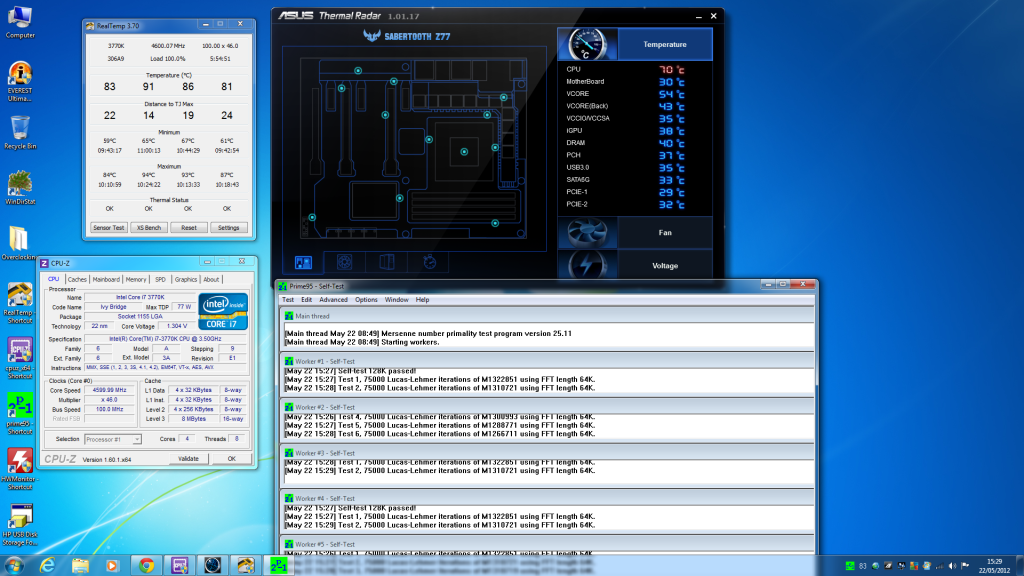
I've done 6.5 hours... I'm using more volts than you and is more toasty
What do you guys think of this after 6.5 hrs ?
What do you guys think of this after 6.5 hrs ?
get the fans on that sabertooth!!!!!, i have the one on the NB blowing in and the one on the back I/O panel as an exhaust. they may be small but they will make the difference. have mine set to turbo, should reduce that 70oC socket temp down a bit
 i'm also thinking about getting some of those spot fans. one to blow around the socket and another onto the back of my GPU
Soldato
- Joined
- 27 Oct 2006
- Posts
- 7,770
- Location
- London
Yeah I think my case intake fan is rubbish. Will need upgrades.
Soldato
- Joined
- 27 Oct 2006
- Posts
- 7,770
- Location
- London
bit odd.... with the fixed voltage and speed step it works in windows. but when i tried using the offset and speedstep... it wouldn't clock down :\ plus i am really lost with all the settings haha xD
I enabled all the C states for the CPU. Switches between 1600 and 4400mhz. Will check with a power meter to see if it's worth the effort
Voltage set to auto / tamed up PLL / VTT / LLC and I was benching as low at 1.18V for 4.4ghz. Will get it stable tomorrow
Loving my new i7-3770k so far, I think it's a good chip. It's doing 4.7Ghz (HT off for when I'm gaming) at 1.23v.
Have you tried clocking it with HT on?