OK so my turn to review this case. Sorry for the delays, have been very busy and wanting to do a good job for you guys so hope its up to scratch.
Here we have the new Bitfenix Ghost case in a kind of odd photo, first impressions are (most listed in my previous post in thios thread but overall a very nice looking case with a kind of metallic fleck that I have tried to capture in some of the photos:
These are the parts that come with the case, 4 rubber gromits for cables to go through, 4 rubber adhesive PSU standoffs, the Hard Drive click-in bays for SSD's and regular HDD's a bag of screws and a cover for connector of the external Hot Swap bay
The case has some modest connectivity:
2 USB 2.0, 2 USB 3.0, Headphone, microphone. on/off and reset switch with power on/activity lights
External Hot-Swap Bay for SSD's and Regualr HDDs if you want to quickly add another Hard Drive
Direct comparison against a Coolermaster HAF-x
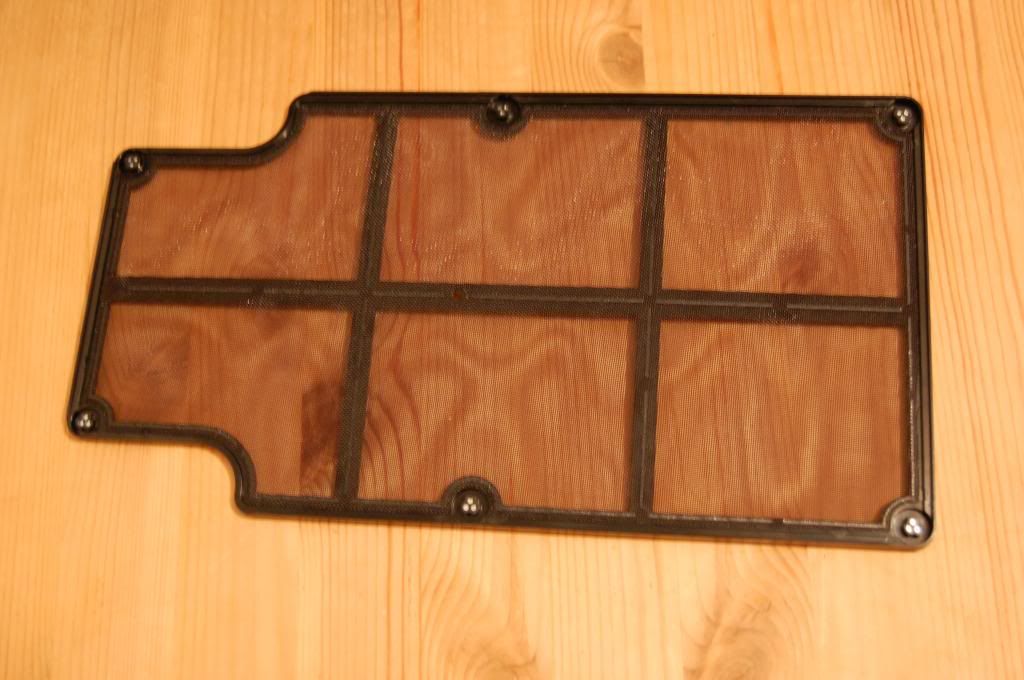
Here is the click on fan cover for the top of the case, the irritating part is that it kept popping off when I bruswhed my arm past it when working on the case:
So I took it off, it has a thin gauze type filter to protect from dust
Giving room for 2 x 140mm/120mm fans or a slimline double rad for watercooling
Here is the case with the top attached
Working on the front door of the case a rather nifty trick is to be able to open the door from either side ad-hoc, just move these pins to adjust which side you would like the case to open from:
The front door has sound deadening in which can be found over the side panels as well
Click in front door that opens up by pushing the left hand side - however if you have two fans in here just be careful of children's hands going near it, it wouldn't take too much effort for them to take it off and catch them in the fans:
Pre installed fan:
Front door again having the thin gauze type dust filter
Side panel with sound deadening
On the underside of the case we have a magnetic dust filter which snugly fits into place yet easily pulls off, I wish more dust filters were like this. Also to notice the strips where you can install the alchemy strips:
First Disappointment, the bottom front edge of the case feels very flimsy and able to snap, and as this is where you would possibly hold the case, makes not a great place and could really do with a stronger material or some reinforcement to be honest:
Onto the inside of the case:
As we can see the case has built in stand-offs which although are quite a good feature, run the risk of shorting the motherboard so later as you'll see, I put a little tape over them to insulate and reduce this risk. Plenty of holes for routing cables and the like
Piccy of the top of the inside:
HDD bays
The rear of the case leaves little over 20mm cable management but then you have to factor in the chunky sound deadening leaving approx 15mm.
Front Optical bays with a nice foam backing to them:
Motherboard standoffs covered with some masking tape just to prevent any conductivity between case and component:
Motherboard in place:
Second Front Fan installed
PSU in - So far I am noticing that although in exterior size it does not appear much smaller than the HAF-x, it is noticably different in size when installing these components:
Wires everywhere
Graphics cards in
Coming close to the edge of the case
Ghetto installation of two 140mm fans, ghetto because cable ties used and not the neatest install, fans were bought second hand so no screws and wanted to get the review done for you guys.

My experience in building the case was that it does seem to offer some quality features and benefits. However it is noticeable that costs have been cut in places, noticeably the front panel on the bottom edge, this is almost unacceptably flimsy, but as long as you are aware of this, I guess you can carry the case a different way.
I would say that I am a little disappointed with the fact that only 2 fans are included, I Would've at least expected 3 maybe 4. 2 seems a little stingy but maybe that's just me or to give users the choice to their own fans.
The Hard drive bays are nice and smooth and fit the hard drives nice and snugly.
The foam backing and Sound deadening of the case seems good quality and I suspect that because of the cost of these parts were the reasons costs had to be cut elsewhere to keep the case at an attractive price.
There was not much room for cables at the back, I did my best at cable management but took some persuasion to manipulate the cables so they would fit properly, I would say that there does need to be a bit more room, however someone with a bit more time on their hands could most likely sort something out and wire them a bit more efficiently than what I had time to do.
Here we have two sound comparison between my HAF-x on Full fans and the Bitfenix on full fans after playing BF3:
Haf-x:

Bitfenix:

As you can hear not too much difference in the noise aspect of things when everything's on full.
Temperature results:
HAF-x
Bitfenix Ghost
So, quite a shocking result. Very surprised - I knew the case would be hotter but 96 is just a little too high for my liking, but possibly could be improved with some better/more fans or even just a cooler graphics card, please remember the gtx 480 was probably one of the hottest graphics cards around, not to mention I have two of them in this case so it doesn't do a bad job when you think about it really.
And if you alsop notice the CPU temps are barely affected, its just ht GPU temps that are rising a bit above acceptable - so this this a very strong argument from this perspective - my i7 is clocked at 4.4 ghz
Results have been taken after playing BF3 for just half an hour. The GTX 480's are hot cards, there is no ignoring that, it just shows what a good job the HAF-x really does with airflow.
All in all this case is a nice neat answer and fits a niche in the market however is the niche too small, well that's not for me to answer, I think this case Is pretty cool despite its obvious set backs.
As for positives, it looks so much nicer sitting under my desk than My Haf-x its really nice to look at and has been complimented by people who have seen it. A large majority of the case has 'quality' feel to it, the only let down is this respect is I suppose the front door in the way it feels, not looks and again the bottom front edge with weakness issues.
The built in standoffs are a nice feature and with all the dust filters and front door you know that dust should be kept to a minimum.
Hope you enjoyed the review.