

-
Competitor rules
Please remember that any mention of competitors, hinting at competitors or offering to provide details of competitors will result in an account suspension. The full rules can be found under the 'Terms and Rules' link in the bottom right corner of your screen. Just don't mention competitors in any way, shape or form and you'll be OK.
You are using an out of date browser. It may not display this or other websites correctly.
You should upgrade or use an alternative browser.
You should upgrade or use an alternative browser.
** GALAX CLEARANCE SALE: GTX 970 EX OC!! **
- Thread starter Gibbo
- Start date
More options
Thread starter's posts

Have you tried running GPUz while running a stress program? Reason I ask is mine comes up with Perfcap reason VRel nd VOp
Also have you registered your card yet? As it wont let me log in after refistering myself, although I have contacted them about this.
But other than that, seems like a great card, just done a couple of runs on heaven and its nice and quiet in the low 60's
Your sig says you got an MSI gtx 970. I got a Galax 970 EXOC Black Edition. I checked the GPU-Z perfcap reason. It shows same as yours. I don't think that's anything to worry about. Apparently its just an experimental feature which gives information about the gpu state. When the gpu is idle mine says 'util' and 'VRel,Vop' when under load. If you hover the mouse over Perfcap reason it shows you what each message means.
Last edited:
Deleted member 66701
Deleted member 66701
What case do you have them in? How are your temps?
Lian-Li V2000b.
Temps are really good

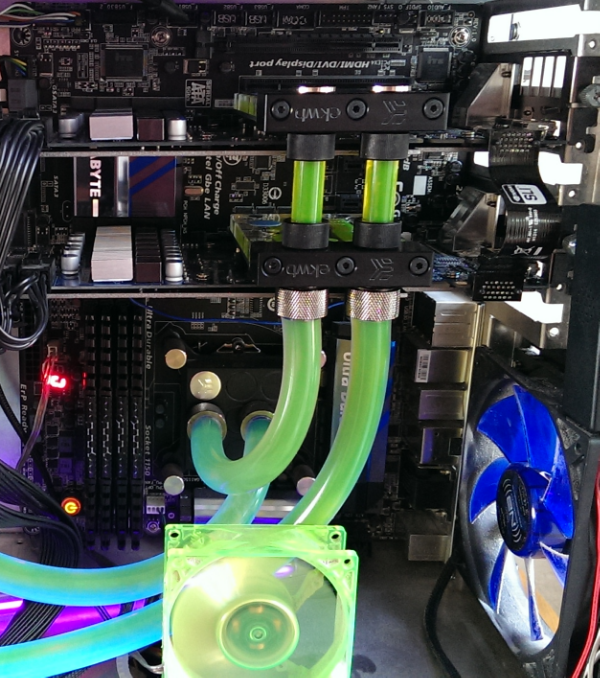
It's such a shame no one has made a water block for this
See above - use a chip only block. The ram chips aren't cooled by the factory sink anyway.

Associate
- Joined
- 13 Apr 2013
- Posts
- 1,107
- Location
- Scunthorpe
Lian-Li V2000b.
Temps are really good
See above - use a chip only block. The ram chips aren't cooled by the factory sink anyway.
Sorry I should have been more clear the first time, i actually meant full cover blocks.
Ok got the black edition today. Here's some quick feedback.
Build Quality and Temps
-----------------------------
The card feels like its built of quality materials. The cover is metal and everything feels solid and looks stylish.
The overall quality is much better than the Inno3D gtx 970 which I bought previously and returned. The heatsink is pretty amazing and manages to keep the card a very comfortable 64C under load, even when overclocked. In comparison the Inno3D was hitting 80C+ which is pretty poor .
Overclocking
---------------
So far managed to OC it to 1463MHz at stock voltage. 1500MHz works but randomly crashes it so most likely could be stable with more voltage.
Noise
-------
The fans are very quiet. Speed maxes out at about 72% and you cannot hear the fan noise over the case fans which is amazing. By comparison the old vapor-x 7950 was pretty loud when gaming.
Coil Whine
--------------
There is absolutely no coil whine under normal gaming situations.
However there was a lot of whine when I ran the gf OC test (GL4) in MSI Kombuster. The fps in that test hit over 1400fps. It appears that coil whine is present when the fps is higher than 1000 fps. This happened in my 7950 so nothing to worry about. I doubt any game would run at that kind of fps.
Overall I am happy with this card, especially the temperatures. It's a decent upgrade from a 7950.
thanks for this - running a 7950 vapor x also and noticed that it actually is quite noisy when I game (remember buying it and supposedly it was supposed to be on the quite side.
wondering if you can set a profile for a slower (quieter fan) - Im debating about this or the strix ...
This one seems quite nice thou
thanks for this - running a 7950 vapor x also and noticed that it actually is quite noisy when I game (remember buying it and supposedly it was supposed to be on the quite side.
wondering if you can set a profile for a slower (quieter fan) - Im debating about this or the strix ...
This one seems quite nice thou
The vapor-x 7950 temps get to about 73C under load and fan rpm to about 70%. If you reduced the fan speed I guess your temps would go up to maybe 80C. I wouldn't feel comfortable at that kind of temp.
The Asus Strix looks like a nice card but I doubt you would get temps much lower than the Galax EXOC, maybe a couple of degrees. The price difference is the biggest factor between the two.
The vapor-x 7950 temps get to about 73C under load and fan rpm to about 70%. If you reduced the fan speed I guess your temps would go up to maybe 80C. I wouldn't feel comfortable at that kind of temp.
The Asus Strix looks like a nice card but I doubt you would get temps much lower than the Galax EXOC, maybe a couple of degrees. The price difference is the biggest factor between the two.
just realized I didnt type my question clearly ... was wondering about the fan speed profile with the galax if there is a way to tone it down a bit if needed.
btw what program do you use to OC?
MSI afterburner does everything you need; Fan profiles, Overclocking, voltage adjustment, onscreen fps display.
If you haven't got the Galax EXOC yet believe me you won't need to slow the fan down. Even if set manually to 100%, the fan is less noisy than the vapor-x 7950 at 75%.
If you haven't got the Galax EXOC yet believe me you won't need to slow the fan down. Even if set manually to 100%, the fan is less noisy than the vapor-x 7950 at 75%.
Last edited:
I thought that but they are actually kfa2, I think they joined with galaxy or something. But it certainly put my mind at ease. There's a link to warranty in the graphics section. I think it was about 1 week turnaround so pretty good. I'm well impressed with mine.
Associate
- Joined
- 1 Mar 2014
- Posts
- 2,419
Arrgh, I've never bought a brand name that I didn't know about before, but at £40 less than the Asus 970 Strix I am really tempted...
What's the warranty/quality like on GALAX? Would you recommend this over the ASUS?
I was always an Asus guy myself, got the bad end of the stick on a few MSI cards and wanted to go with something other than MSI for GTX970s.
There were only Zotac and Galax GTX970s in stock at OCUK, so I picked Galax and will never look back.
The next Nvidia gpus that will be coming out probably next year Im going to be buying Galax again for SLI, thats how happy I am.
The only instance of coilwhine I saw was at 1500fps+ I think someone mentioned this before.
Last edited:
Further update:
The card is performing well so far and temps are staying at 61-64C during gaming (crysis3, Tombraider, etc). This is when it's overclocked to 1475MHz. It appears the voltage maxes out at 1.212V (fixed in bios). I can run the card at 1500MHz but crashes in MSI Kombuster 3.0 in the Furry PQTorus gpu burner test. Temps get to 70C in this test. Works fine in Heaven 4.0 and games though.
It would be interesting to see if the guys getting over 1500MHZ have tested it in Kombuster 3.0. So far that test seems to be stressing the card more than most games.
Another thing to mention is that I had found the image quality to be slightly washed out compared to the Radeon 7950. It turns out that the Nvidia cards set the output to limited RGB by default if they detect a hdmi connected monitor as a tv.
There is no fix from nvidia yet but a user has made a registry hack that fixes the problem and sets it to full RGB. The image quality is much better with the fix.
Some info is here :
https://pcmonitors.info/articles/correcting-hdmi-colour-on-nvidia-and-amd-gpus/
The fix can be found here :
http://blog.metaclassofnil.com/?p=83
The card is performing well so far and temps are staying at 61-64C during gaming (crysis3, Tombraider, etc). This is when it's overclocked to 1475MHz. It appears the voltage maxes out at 1.212V (fixed in bios). I can run the card at 1500MHz but crashes in MSI Kombuster 3.0 in the Furry PQTorus gpu burner test. Temps get to 70C in this test. Works fine in Heaven 4.0 and games though.
It would be interesting to see if the guys getting over 1500MHZ have tested it in Kombuster 3.0. So far that test seems to be stressing the card more than most games.
Another thing to mention is that I had found the image quality to be slightly washed out compared to the Radeon 7950. It turns out that the Nvidia cards set the output to limited RGB by default if they detect a hdmi connected monitor as a tv.
There is no fix from nvidia yet but a user has made a registry hack that fixes the problem and sets it to full RGB. The image quality is much better with the fix.
Some info is here :
https://pcmonitors.info/articles/correcting-hdmi-colour-on-nvidia-and-amd-gpus/
The fix can be found here :
http://blog.metaclassofnil.com/?p=83
Last edited:
Further update:
The card is performing well so far and temps are staying at 61-64C during gaming (crysis3, Tombraider, etc). This is when it's overclocked to 1475MHz. It appears the voltage maxes out at 1.212V (fixed in bios). I can run the card at 1500MHz but crashes in MSI Kombuster 3.0 in the Furry PQTorus gpu burner test. Temps get to 70C in this test. Works fine in Heaven 4.0 and games though.
It would be interesting to see if the guys getting over 1500MHZ have tested it in Kombuster 3.0. So far that test seems to be stressing the card more than most games.
Another thing to mention is that I had found the image quality to be slightly washed out compared to the Radeon 7950. It turns out that the Nvidia cards set the output to limited RGB by default if they detect a hdmi connected monitor as a tv.
There is no fix from nvidia yet but a user has made a registry hack that fixes the problem and sets it to full RGB. The image quality is much better with the fix.
Some info is here :
https://pcmonitors.info/articles/correcting-hdmi-colour-on-nvidia-and-amd-gpus/
The fix can be found here :
http://blog.metaclassofnil.com/?p=83
This is great advice, I just did it and it really does make a difference, maybe this information should be made into a sticky?


Further update:
The card is performing well so far and temps are staying at 61-64C during gaming (crysis3, Tombraider, etc). This is when it's overclocked to 1475MHz. It appears the voltage maxes out at 1.212V (fixed in bios). I can run the card at 1500MHz but crashes in MSI Kombuster 3.0 in the Furry PQTorus gpu burner test. Temps get to 70C in this test. Works fine in Heaven 4.0 and games though.
Yeah, that 1.212V is a pain. Got them under water and would love to go 1.25V-1.3V.
Haven't seen anyone post a custom BIOS yet for em


Haven't seen anyone post a custom BIOS yet for em
Try asking in the bios thread, maybe someone can mod it for you?
http://forums.overclockers.co.uk/showthread.php?t=18638693
Associate
- Joined
- 1 Mar 2014
- Posts
- 2,419
Will a cosair rm550 psu be man enough for this card, only powering 2 hard drives and about 4 silent wing fans, 8gig ram?
Assuming no better deal on this come black friday then!?
148W TDP for the card
Try something like this http://extreme.outervision.com/psucalculatorlite.jsp
to get rough averages of Watts
148W TDP for the card
Try something like this http://extreme.outervision.com/psucalculatorlite.jsp
to get rough averages of Watts
Great! That's a really helpful calculator, looks like i've got plenty of spare, my system need about 380W apparently.