• Competitor rules

    Please remember that any mention of competitors, hinting at competitors or offering to provide details of competitors will result in an account suspension. The full rules can be found under the 'Terms and Rules' link in the bottom right corner of your screen. Just don't mention competitors in any way, shape or form and you'll be OK.

Overheating Palit Jet Stream 4GB 680GTX

Associate
Joined
2 Sep 2010
Posts
50
Location
Haddenham, Cambridgeshire
Hi all,

Noticed blackscreens to desktop on several of my more demanding games in the past few days - Crysis 2, Far Cry 4, F1 2012 at 2560x1600. Some come up with errors saying the nvidia driver failed and attempts to recover it.

Downloaded HWMonitor and noticed just before the black screen my 680 was hitting 80C but no noticeable loud noise from fans. However after the crash the fans did slow down noticeably in volume.

Unplugged GPU and cleared what little noticeable dust I found. Downloaded Thunder master from Palit website for manual fan control/curve.

My card is idling at 40c. This seems a little high to me. is this high? I've manually altered fan curve. i tried manually changing to 85% speed and it span louder than i've ever heard it, at least double what the fans sounded like when the games blackscreen. So clearly, prior to downloading this the GPU wasn't utilizing enough of the fan speed.

I'm going to test again now on some games to see how it fairs. The card is 2.5 years old. Got dust filters all over my case and it's in a Xigamatek Elysium full tower with plenty of space for airflow.

If I wanted to try and clean/disassemble the card a bit, how's best to do this? ideally i'd just like to unscrew the fan/cover to I could get at the heatsink with compressed air.

Ed
 
Last edited:

80C on full load is pretty standard for a GPU..

After you're cleaning/fan curveaddition are you still getting black screens?

Cleaning wise, no need to undo the heatsink, just blow the fans/other inlets with compressed air.

40C on idle is about right too.
 
You'll want some thermal paste, thermal paste remover (or isopropyl alcohol) and a lint-free cloth too, while you're at it. The old paste may be part of the overheating cause, if it's grown some air bubbles. Some types of paste are just no good after a couple years, either.

If you take pictures of every angle of the card, then you can put everything back together, the connectors etc, no problem.

If it's your first time cleaning/re-applying TIM, watch some vids and get a feel for the task.
 
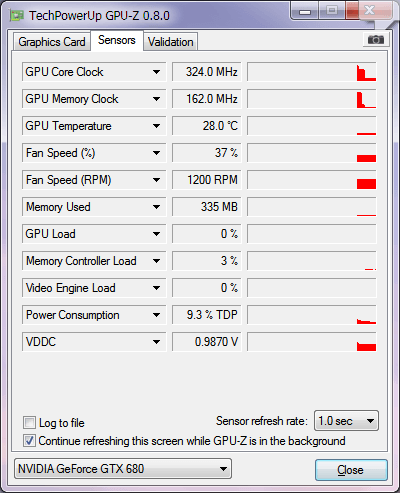
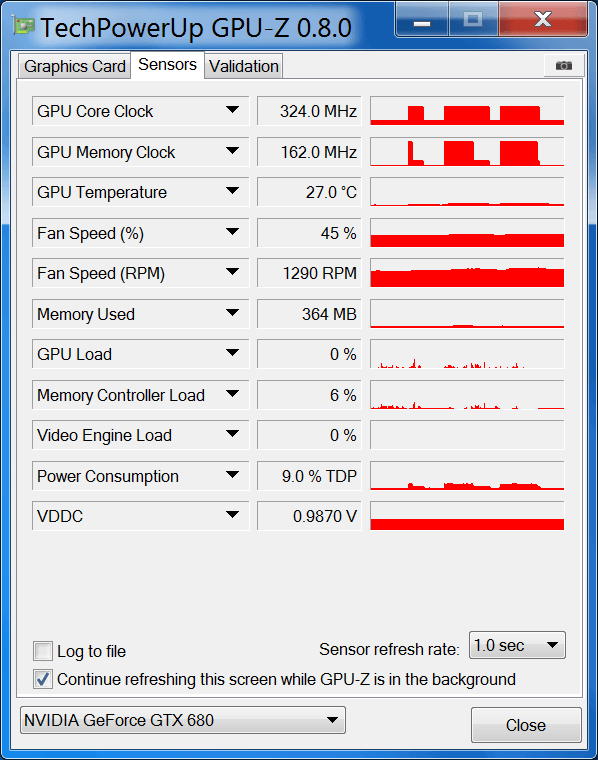
My 680 4GB is 28C on idle. It'd be interesting to see if the GPU is idling or not (some apps' drivers can cause it to remain on max performance constantly even when they aren't running, they alter the default driver's setting). Do you have GPU-Z to check? Should look something like this on idle:

evn.png
 
gpuinfo.png


Here's what it's looking like. I just wonder why it kept crashing at 80c and the fans didn't sound half as loud as when I manually cranked it to 85% via the Palit ThunderMaster programme.

I'm going to try gaming now. it first happened with Far Cry 4 but I put it down to still being buggy. Then Rome 2, and now today, both of the above as well as F1 2012 and Crysis 2.

I'll get back to you guys in a while to see if it remains as it happens very shortly after getting into a game.

Ed
 
Ok the fan ramp up seems to help keep it just under 70c although the fan is rather horrifically loud at this point

GPUscreen.png


Thing is, I was intending to buy a 970 next month. But if this card is playing up now, i'd feel guilty selling it to a friend of mine who's been wanting to buy it from me.

Not sure what to do? I'll keep testing some more tonight to make sure this wasn't just a fluke.

Ed
 
Thanks for posting. It's not idling down as it should. So that's probably the issue. Or one of them (the high-ish idle temps). The crashes on load may have a different cause.

My bet is that one of the games' drivers is changing the global setting power management mode to maximum performance and preventing it from going into adaptive. I guess check that the 3D global setting is set to Adaptive, prior to doing anything else.
 
Ohh yeah, sorry should've mentioned that. I tweaked it to max performance after reading a guide on trying to fix Far Cry 4 black screen crashes. I'll switch that back now.

Ed
 
As a little update. played Far Cry 4 and got past the bit where it'd crashed 3 times previous. Decided to check GPU-Z to see what was going on.

Temp is 72c but GPU load his 99% This is when the game crashed previously, but no black flicker or artifacts this time round. Fanspeed kicked up to 82% as well.

Will clearing out what dust I can without taking anything apart help much? I have no compressed air though to aid in cleaning.

Also, even with power settings on adaptive the clock speeds remain at 1k and 1.5k

Ed
 
Last edited:
As a little update. played Far Cry 4 and got past the bit where it'd crashed 3 times previous. Decided to check GPU-Z to see what was going on.

Temp is 72c but GPU load his 99% This is when the game crashed previously, but no black flicker or artifacts this time round. Fanspeed kicked up to 82% as well.

Will clearing out what dust I can without taking anything apart help much? I have no compressed air though to aid in cleaning.

You'll have to see. Use a paintbrush to remove the dust from the heatsink. I'd still also replace the thermal paste too. If the chip has to lose contact with the heatsink during disassembling of the fans segment, depending on how the screws are set up, you'll have to do it anyway.


Also, even with power settings on adaptive the clock speeds remain at 1k and 1.5k

Ed

Try doing a graphics driver install - custom clean options. Directly afterwards, open Nvidia Control Panel - Manage 3D Settings. Click the Program Settings tab, and click the Programs to Customize dropdown. Check that every game you intend to open, is already in that list. If it isn't, add it, prior to opening the game. See if that helps. Nvidia Inspector can also help check some things if that doesn't solve the non-idling issue.
 
I guess replacing the thermal paste would involve unscrewing the screws from the back of the GPU? Then will it all come off in one go?

Ed
 
I guess replacing the thermal paste would involve unscrewing the screws from the back of the GPU? Then will it all come off in one go?

Ed

Try and leave the four centre screws on (those hold the actual heatsink). Take the ones on the edges off, and see if the fan casing pops off. If it does then you have access to the heatsink while it still maintains contact with the chip. If you can shine a light in there first to see if dust actually is a problem, try that first to save yourself the bother.

If/when you are ready to replace thermal paste then yes, unscrew the four centre screws.
 
Thankfully the fans un-clip from the GPU. Brushed off dust as you said. There was quite a bit on there. Gently brushed the rest of the case down too with a hoover 15 cm or so away from my hand and the paint brush so as to avoid static etc.

It cleaned up nicely

GPU has fallen by over 10C and is idling at 25C now.

10861140_779695272109499_489745087296204316_o.jpg


gvb.png


One thing I did notice is on my CPU heatsink the rubber band wraps for the NZXT fans that hold onto the heatsink are starting to fray quite noticeably. I'm going to invest in an all in one heatsink in a few weeks.

Might invest in some high veolcity fans for the bottom of the case to help keep the GPU cool. Any ideas for decent power 140mm fans which aren't too noisy? My case can hold 3 along the bottom which should help shave off some more GPU temps.

Ed
 
Last edited:
That looks right now.

As for silent 140mm fans, there are several decent ones but I'll drop two suggestions. I like the Aerocool DS fans, despite not being proper static pressure fans*. They still work a treat on heatsinks/rads and are very quiet on full. Noctuas, more expensive.

* http://www.kitguru.net/components/c...ds-dead-silence-fan-120mm-and-140mm-review/6/

Keep us posted with how the 680 gets on. All the best.


EDIT: Oh, the 140mm's are for case fans, not for your CPU cooler. Nevermind, the Aerocool DS are good for that too. Not high powered but a very good balance struck between CFM and noise.
 
Last edited:
Back
Top Bottom