Mechanical keyboard and new mouse around/under £100

Soldato
Joined
29 Dec 2014
Posts
2,622
Location
The "North"
Hi everyone, so as the title states since it's christmas and the sales are upon us I was thinking about kitting out my setup with some new peripherals. I think the mouse will need to be a palm grip mouse as my current "cheap" Logitech mouse I use with a palm grip.

So does anyone have any suggestions for a mechanical keyboard and new mouse. This will be my first mechanical keyboard and gaming mouse so I'm open to any suggestions. :D

 
What is the thing about a mechanical keyboard that makes them a popular choice these days?

Actuation point mainly. You have to press the keys down far less than a membrane keyboard. Great for gaming but takes a while to get used to when typing as you will be far more prone to typing errors.
 
Mechs are all right. Mostly sturdiness, and consistency of typing, and aging better. Long travel distance may need some getting used to, if you come from laptops and short keystrokes.

Quite please with the CoolerMaster QuickFire TK (MX Brown). I'm just always mindful of the USB connector, but overall sturdy and no nonsense. There is a non-TKL version as well, so for cheap and cheerful mechs, they're worth a look. They've gone up in price though.

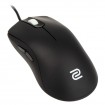
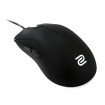
I've got a whole collection of Zowies. They are fine gaming mouse, the scrollwheels are the weak point, but not to the point of really bothering me.

A selection.

My basket at Overclockers UK:

Total: £282.41
(includes shipping: £10.50)


Last edited:
Thank you for the recommendations. Just wondering which type of keyboard is better for me though, full size or (insert number here) keyless. :D
 
Last edited:
You loose stuff with TKL, obviously. The Quickfire TK switches between numpad and arrow keys (pressing the num-lock), but still, takes a while getting used to. There's another version of the coolermaster which is pure TKL (you loose the numpad entirely, but the arrow key layout ans key spacing is consistent with full-size keyboards).

TKL keyobards do save a bit of space. Depends if it's an issue or not.

As for mice, there are quite a few in the £40 range. Maybe a Logitech (G100S, there's a 15 grams weight inside that's probably worth removing).
 
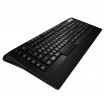
The steelseries apex raw is not mechanical. The apex m800 is but it is very expensive. On a side note, you need to consider what type of keys you want, I.e blue, black, red or brown. There are plenty of guides on the forums explaining the differences.
 
You loose stuff with TKL, obviously. The Quickfire TK switches between numpad and arrow keys (pressing the num-lock), but still, takes a while getting used to. There's another version of the coolermaster which is pure TKL (you loose the numpad entirely, but the arrow key layout ans key spacing is consistent with full-size keyboards).
TKL keyobards do save a bit of space. Depends if it's an issue or not.
As for mice, there are quite a few in the £40 range. Maybe a Logitech (G100S, there's a 15 grams weight inside that's probably worth removing).
I never really seem to use the numberpad so I don't think a keyboard down size would cause too many issues. Probably wont go for the G100s if I have to remove the weight as although it isn't a big task to undertake I don't want to void it's warranty. :D

The steelseries apex raw is not mechanical. The apex m800 is but it is very expensive. On a side note, you need to consider what type of keys you want, I.e blue, black, red or brown. There are plenty of guides on the forums explaining the differences.
I've had a look at the switches and I think I'm siding towards the reds as although I do type using the keyboard it is more for gaming :)
 
I couldn't be without a numpad, I use it when gaming though. Maybe I'm weird?

I got the razer one in a flash 50% off, it's great but then it's the first decent board I've had.
 
I couldn't be without a numpad, I use it when gaming though. Maybe I'm weird?
I got the razer one in a flash 50% off, it's great but then it's the first decent board I've had.
I was looking at the Razer keyboard and it does look pretty good but I'm not sure which switches (Green or Orange) and if it would look good with my systems colour scheme as I like to switch colours :D
 
Last edited:
Have a look at the cougar boards and mice too. They are really reasonable in terms of pricing but the components they use are high quality. Good switches on the boards, good sensors on the mice. A lot of bang for buck for sure.
 
it's a keyboard, not a GPU, EOL means nothing when it comes to whether the actual product is a solid purchase.
EOL just means it might be harded to source. On the plus side, retailers might be clearing stock, which is a chance for bargain.
 
Have a look at the cougar boards and mice too. They are really reasonable in terms of pricing but the components they use are high quality. Good switches on the boards, good sensors on the mice. A lot of bang for buck for sure.
Thank you for the suggestion, the Cougar mice look pretty good although I can't find any of their keyboards. :confused:

Func KB460 as keyboard
CM Alcor as mouse
Thank your for the suggestion, I like the look of the CM Alcor but I'm not so sure about the Func as if I buy something it will need to have a warranty with it which might be difficult due to it being EOL. :)
 
The Alcor is OK (I have one). If you find the Lift Off Distance too high (the mouse tracks up to 3-4 mm off the pad), there are a few firmware updates available. Otherwise, it's a good buy, didn't like the shape that much but it's serviceable and subjective anyway.
 
Probably wont go for the G100s if I have to remove the weight as although it isn't a big task to undertake I don't want to void it's warranty. :D

You don't have to remove the weight, but I'm always going for light mice. It's not that heavy to start with (85-90 grams, like a FK1). Logitechs add weight to their mice for some reason (MX510 has one too).

I've had a look at the switches and I think I'm siding towards the reds as although I do type using the keyboard it is more for gaming :)

MX Brown is a good all round compromise. Among the Cherry switches, it's the closest feel to typical membrane keyboards, if you get the chance. You don't have to go with a mech keyboard, but they are nice and consistent. And more expensive.
 
Last edited:
You don't have to remove the weight, but I'm always going for light mice. It's not that heavy to start with (85-90 grams, like a FK1). Logitechs add weight to their mice for some reason (MX510 has one too).
Brown is a good all round compromise. Among the Cherry switches, it's the closest feel to typical membrane keyboards, if you get the chance. You don't have to go with a mech keyboard, but they are nice and consistent. And more expensive.
To be honest I'm going with a new mechanical keyboard and gaming mouse as I have never invested a reasonable amount of money into peripherals (Usually go for the £10 Logitech kits) so I was looking for ones that are solid and feel better to use. Since everyone seems to recommend mechanical it seems like the right choice as they certainly have the reputation to back up their feel and lifespan :D
 
Last edited:
Back
Top Bottom