


It's 'recommended' but later on tonight I'll find out the best I can
Is this just applicable to 1080?
Andi.
Please remember that any mention of competitors, hinting at competitors or offering to provide details of competitors will result in an account suspension. The full rules can be found under the 'Terms and Rules' link in the bottom right corner of your screen. Just don't mention competitors in any way, shape or form and you'll be OK.
It's 'recommended' but later on tonight I'll find out the best I can
OcUK didn't think anyone would be daft enough to buy two 1080s?
From what I've been told, we're waiting on availability from manufacturers guys. We hope to stock them as soon as we are able to, but I don't have any idea on pricing or an ETA.
Yes apparently just the 1080 (so far) has been made to use both SLi connectors on the card for 'optimum' performance, mainly for 4K resolutions
You can use two standard bridges in place of the single HB bridge, it does the same job.

You can use two standard bridges in place of the single HB bridge, it does the same job.
You can use two standard bridges in place of the single HB bridge, it does the same job.
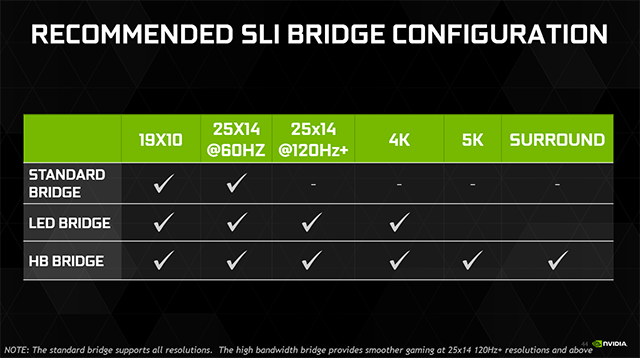
It's not just connecting both SLI connectors, the traditional flexible bridges do not support the data rate per cable that the newer rigid ones do.
There was a chart nvidia showed which suggested that there was support for 3 different data rates, the lowest was the only one possible on flexible bridges, the medium rate was supported by the previous generation of rigid "LED" bridges, and the new ones supported an even higher data rate.
Edit: This one..
Mind you I'm looking at SLI 1070s at 1440p 144Hz, so it looks like the mid range ones will be fine.

Guru3d said:Beginning with NVIDIA Pascal GPUs, the two interfaces are now linked together to improve bandwidth between GPUs. This new dual-link SLI mode allows both SLI interfaces to be used in tandem to feed one Hi-res display or multiple displays for NVIDIA Surround. Dual-link SLI mode is supported with a new SLI Bridge called SLI HB. The bridge facilitates high-speed data transfer between GPUs, connecting both SLI interfaces, and is the best way to achieve full SLI clock speeds with GeForce GTX 1080 GPUs running in SLI. The GeForce GTX 1080 is also compatible with legacy SLI bridges; however, the GPU will be limited to the maximum speed of the bridge being used. Using this new SLI HB Bridge, GeForce GTX 1080’s new SLI interface runs at 650 MHz, compared to 400 MHz in previous GeForce GPUs using legacy SLI bridges. Where possible though, older SLI Bridges will also get a speed boost when used with Pascal. Specifically, custom bridges that include LED lighting will now operate at up to 650 MHz when used with GTX 1080, taking advantage of Pascal’s higher speed IO.
Is there any particular reason/advantage as to why nVidia have stuck with bridges?
It's not just connecting both SLI connectors, the traditional flexible bridges do not support the data rate per cable that the newer rigid ones do.
There was a chart nvidia showed which suggested that there was support for 3 different data rates, the lowest was the only one possible on flexible bridges, the medium rate was supported by the previous generation of rigid "LED" bridges, and the new ones supported an even higher data rate.
Edit: This one..
Mind you I'm looking at SLI 1070s at 1440p 144Hz, so it looks like the mid range ones will be fine.

So unless I go 5K or surround then my EVGA one will be fine?
Possibly a bit more info on it:
http://www.guru3d.com/articles_pages/nvidia_geforce_gtx_1080_review,4.html
Without knowing whether your thinking of SLI 1070s or 1080s and whether that bridge has four or two connectors on it's difficult to tell, however..
Armageus's link to guru3d suggests that it would be enough for 1080 SLI if it's the 4 connector version.
So unless I go 5K or surround then my EVGA one will be fine?

Just spent a while testing Unigine Valley:
I upped the settings as much as i could to test the cards:
Mode: 2560x1440 8xAA
Gsync off
6700K @ 4.5 Ghz
And i can safely say there is no difference in cables using this benchmark at least
I did notice that with one Ribbon cable attached - it suggested i use a faster/better quality cable
With 2 x Ribbon cables attached it didn't give me any such warning.
I scored around 5010-5080 using the same settings, the EVGA link.
Interestingly the program listed my card as:
GPU model:
NVIDIA GeForce GTX 1080 10.18.13.6825 (4095MB) x2
so not whats going on with the RAM it is picking up there, maybe just a program issue though?
If anyone else has an idea for a good SLi benchmark, ill be happy to try tomorrow.
Ran 4 way TXs @8k with an EVGA bridge and it runs ok with no loss of performance.
I wonder how much money NVidia will make on these new bridges.




