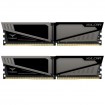
Spec me ram for ASRock Z370 Taichi motherboard.

Thanks 8Pack I'll look that up, thank you.
Pity... its a bit expensive :(
 
Last edited:
It's our best selling memory right now. If you compare to likes of corsair vengeance it's cheaper and more compatible with better performance.

We sold 1100+ kits in 9 months of this stuff.
 
I have a 8700K for video editing/encoding and think I would go for 32GB of ram.

I'd suggest you look at the fact you'll be doing encoding/media work, and realise that the 8700K for these tasks doesn't really benefit with significantly faster RAM, or much lower timings, before blowing loads of cash on RAM that will make little to no difference in the applications you are using.

If you are playing games then it does make quite a bit of difference, in certain titles, but before you spend £400 on 32GB of RAM, do some further investigation, or give some examples of the software you will be using.

My basket at Overclockers UK:
Total: £287.69 (includes shipping: £8.70)

Is spending £110-130 more going to get you 43% more performance on the RAM, as that is the price difference, 43% higher cost! Also going this route leaves you 2 slots free if you want to upgrade to 64GB down the line, if DDR4 ever drops in price.

EDIT: Here's a link to an analysis for the Coffeelake 8700K and RAM performance, you'll notice how little difference there is once you get above 2666MHz with reasonable timings.
https://www.techpowerup.com/reviews..._Memory_Performance_Benchmark_Analysis/4.html
 
Last edited:
Coffee lake 3600 c16 in my testing decent improvement for small extra. 4k very little better ....
 
Coffee lake 3600 c16 in my testing decent improvement for small extra. 4k very little better ....

Are you talking about games or media encoding, which his what the OP asked about?

Also £110+ is not a small amount, it as pointed above 43% more cost, which is the cost of a 500GB SSD, or an upgrade from a GTX 1050 to a 1060 3GB, etc.
 
Well I did Corona, R15 and terragen so rendering ..

What percentage better was the result vs. 3000/3200 at C16? If it's less than 5%, then I'd hardly call spending 43% more money a good investment.

With Cine R15 on my test system using a 7700K, I went from 993 at 2666MHz C14, to 997 at 3466MHz C16, and there was one point difference in single core. I know that you really want to sell your RAM, and I think it's great for gamers, who want the bleeding edge performance at whatever the cost, but when it comes to productivity, once you hit anything above 2666MHz you are talking single digit % gains in most real world applications, especially rendering and such, as memory bandwidth doesn't make that much difference.
 
We sold 1000+ kits of my ram in 9 months I have zero need to beg for sales... Its our best selling memory. I showed R15 in a video time ago.

It's not an investment. You have money you buy better you don't you don't....

How many boards etc did you test for efficiency at different speeds and scenarios??
 
We sold 1000+ kits of my ram in 9 months I have zero need to beg for sales... Its our best selling memory. I showed R15 in a video time ago.

It's not an investment. You have money you buy better you don't you don't....

I didn't argue that it wasn't great RAM, just that in this instance it presents poor value for the specific users needs, no need to take offence and start sounding like a market trader.

If you "personally" think that spending almost 50% more money for something that will net you a 1, 2 or 3% increase then that is your personal opinion, just like it is mine that I believe that the money could be spend better elsewhere on the system.

Just for you I'll link your Coffee Lake video at the memory speed testing part.


3200MHz RAM - R15 - 1640
3600MHz RAM - R15 - 1648
4000MHz RAM - R15 - 1652

So between 3200, and 3600, there is 0.48% increase in the score, and between 3200, all the way to 4000, there is a 0.73% increase.
 
Coffee lake 3600 c16 in my testing decent improvement for small extra. 4k very little better ....

Any tips on where you'd start tuning these timings @8 Pack ?
This is on a 3200c14 kit.


3600c15_timings.png

mem3600c15-16-35.png


Thanks
 
I'd suggest you look at the fact you'll be doing encoding/media work, and realise that the 8700K for these tasks doesn't really benefit with significantly faster RAM, or much lower timings, before blowing loads of cash on RAM that will make little to no difference in the applications you are using.

Hi Journey, thank you for that, no, no games at all just video editing with Edius8 and encoding for DVD and making a file from the timeline to use in Handbrake.

My current system has 16GB of DDR3 and if I move up at all I'm bound to see an improvement.
I've a 2700K Edius system at the moment and its rock solid and you know, I see nothing wrong with the speed I'm getting, I just want to build a new edit PC for myself to handle 4K clips.

Thank you.
 
Back
Top Bottom