Recommissioning my gaming PC

Associate
Joined
29 Mar 2019
Posts
17
Location
Cambs, UK
Hi all,

I’ve been out of PC gaming for a few years now. I’m looking to get back into gaming soon as I will have some more free time on my hands in a couple of months.

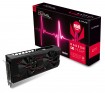
Below is the current specs of my rig. I built it 8 years ago now and though it has seen a couple of upgrades in that time, I’m wonderng what components particularly you guys think will be showing their age. My main usage will be for sim racing at 1080p for now, although a monitor is on my shopping list and unsure whether I should look at 1440p to futureproof a bit. Currently it’s without a GPU as the Zotac GTX780 that was in it hasn’t bitten the dust but I’m looking to order a Sapphire Vega 56 imminently to fill that gap.

CPU: i5 2500k
Cooler: Titan Fenrir Evo Extreme
Mobo: Asus P8Z68-V Gen3
RAM: 16Gb Corsair Vengeance
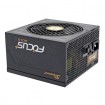
PSU: Corsair TX850 V2
OS Hard Drive: 256Gb Samsung 830 SSD
Hard Drive 2: 1Tb Western Digital Black
Case: Coolermaster CM690 MkII

I’m pretty sure that a CPU upgrade is probably not a bad idea but beyond that I’m not sure what would be the ‘bottleneck’ as it were.

Any thoughts much appreciated,

Dan

 
I’m looking to order a Sapphire Vega 56 imminently to fill that gap.

You're in luck the Sapphire Vega 56 is on sale this weekend - and comes with 3 free games:

Wait for the weekend deal!
Vega 56 shall go live at £269.99 on the Pulse for weekend only! :)

So the below card will be £269 at the weekend and comes with: Resident Evil 2, THe Division 2, Devil MayCry 5.

My basket at Overclockers UK:


I would also clock that CPU to ~4.5GHz if you haven't done so already - i'll suggest a cooler if you only have stock strapped to the top. This will reduce any bottlenecking and is a simple process - especially 4.3GHz usually a simple voltage bump.

The Vega 56 coupled with a nice clock on the 2500K will see a nice boost to your system. And give you a few months to until RYzen 2 is released - if you feel like you need more power you could take another look then. But you should be very happy with the vega 56 and clocked CPU combo at 1080p.

EDIT: As your considering 1440p what is your budget and what style of monitor? The vega 56 will still cope at 1440p.
 
Last edited:
Cheers for the reply,

I'd seen the forthcoming deal on the Sapphire for this weekend which was the final kick I needed to go ahead and get one bought.

The CPU has never been clocked which I gather is pretty crazy considering the 2500k is regarded as a great overclocker! It's not something I've ever looked at before so will need to do some research on that. If anyone has any straightforward overclocking guides they'd recommend then I'd appreciate it!

To be honest the monitor will probably need a bit more saving to get. I'd ideally like something 27" at least, hence going 1440p. For now I just have an old 1080p monitor knocking around to get me started again. I'll probably go looking seriously at monitors in a couple of months time.
 
will have some more free time on my hands in a couple of months.
In couple months CPUs might get major jump in bang per buck...
Like tripling amount of cores from current for £300 level.
So for CPU upgrade would aim for that timing.
RAM might also drop some more in price, because you're going to need new RAM.

For first aid that CPU should clock nicely and that Titan cooler should certainly be good enough for overclocking it.
And if you upgrade to modern 2560x1440 monitor that moves load more toward GPU.
With new GPU already that would feel major jump.

That PSU wasn't really modern when bought and is now pretty dated and wastes unnecessary watts to heat.
Which you might want to avoid especially when summer comes.
So that could be thing to be modernized.

If you have Dremel or something similar you could also improve case airflow by replacing that stamped mesh of rear fan with wire made finger guard.
 
In couple months CPUs might get major jump in bang per buck...
Like tripling amount of cores from current for £300 level.
So for CPU upgrade would aim for that timing.

I'm assuming that you're referring to upcoming Ryzen CPUs?

That PSU wasn't really modern when bought and is now pretty dated and wastes unnecessary watts to heat.
Which you might want to avoid especially when summer comes.
So that could be thing to be modernized

Do you think the TX850 V2 will be fine for the Vega 56 for now in cooler temps?
 
I'm assuming that you're referring to upcoming Ryzen CPUs?


Do you think the TX850 V2 will be fine for the Vega 56 for now in cooler temps?
Yep.
It's pretty darn sure that AMD didn't leave empty spot the size of another 8 core "computing die" into CPU package of Zen2 Ryzen for the fun of it.
And releasing only 8 core CPU catching Intel's existing CPU would be bad plan, giving Intel plenty of chances to do better fast.
So I consider December's rumours of 12 core and even 16 core models pretty reliable when also that chiplet design got confirmed.

That PSU is good for Vega, but change to modern PSU could lower amount of extra heat dumped into your room.
(also desktop/idle load efficiency sucks because of oversizing)
That unnecessary heat produced into room isn't likely issue yet...
But once weather warms up you might not neeed extra heating.
 
Do you think the TX850 V2 will be fine for the Vega 56 for now in cooler temps?
It will be feeling it's age but it was a semi decent unit back in the day (OEM seasonic @EsaT?) but it has two separate PCI-e cables so will certainly suffice until your big upgrade.

Give it a clean with some compressed air if concerned about temps - probably pretty dusty if you haven;t given it any TLC recently. You can strip them down easily - but only do this if you're confident about what your doing as the caps can hold significant charge.

EDIT: The guru of all PSU knowledge has already answered.
 
The CPU has never been clocked which I gather is pretty crazy considering the 2500k is regarded as a great overclocker! It's not something I've ever looked at before so will need to do some research on that. If anyone has any straightforward overclocking guides they'd recommend then I'd appreciate it!
Read through this thread - clicky - i/we guide another forum member to clock his 2500K.
Or just bump up the multiplier to 43 and leave everything on auto and see how it responds - it can be that simple with the 2500K. Or up Vcore up to 1.3v and try experiment with 4.3GHz to 4.5GHz

ANd are you sure your memory is running at correct speed (1600MHz)?
 
Yep.
It's pretty darn sure that AMD didn't leave empty spot the size of another 8 core "computing die" into CPU package of Zen2 Ryzen for the fun of it.
And releasing only 8 core CPU catching Intel's existing CPU would be bad plan, giving Intel plenty of chances to do better fast.
So I consider December's rumours of 12 core and even 16 core models pretty reliable when also that chiplet design got confirmed.

That PSU is good for Vega, but change to modern PSU could lower amount of extra heat dumped into your room.
(also desktop/idle load efficiency sucks because of oversizing)
That unnecessary heat produced into room isn't likely issue yet...
But once weather warms up you might not neeed extra heating.

I'll keep my ears open for Ryzen news then, thanks.

If I was to look for a modern PSU would you have any recommendations?
 
It will be feeling it's age but it was a semi decent unit back in the day (OEM seasonic @EsaT?) but it has two separate PCI-e cables so will certainly suffice until your big upgrade.

Give it a clean with some compressed air if concerned about temps - probably pretty dusty if you haven;t given it any TLC recently. You can strip them down easily - but only do this if you're confident about what your doing as the caps can hold significant charge.

I'll certainly do the compressed air clean. The CPU hasn't seen any new thermal paste, I'm gonna assume that a new layer of thermal paste wouldn't go amiss?
 
I'll certainly do the compressed air clean. The CPU hasn't seen any new thermal paste, I'm gonna assume that a new layer of thermal paste wouldn't go amiss?
I would, as the paste may have hardened over ~7 years. Plus, your fins may be blocked up with dust and the best way to ensure a good clean is to remove the tower from the machine.
 
Read through this thread - clicky - i/we guide another forum member to clock his 2500K.
Or just bump up the multiplier to 43 and leave everything on auto and see how it responds - it can be that simple with the 2500K. Or up Vcore up to 1.3v and try experiment with 4.3GHz to 4.5GHz

ANd are you sure your memory is running at correct speed (1600MHz)?

Hi, sorry I can't see the link in your post to the thread you mention?

My RAM is 1866MHz DDR3 I believe? Corsair CML8GX3M2A1866C9R.
 
Thanks, for some reason the word clicky wasn't displaying before.
I probably hadn't edited it in yet.
No I haven't touched anything like that, should I be looking to my BIOS for this?

Yes, as it's probably only running at 1333Mhz. Look for set XMP in your BIOS (or similar) - if you have a choice choose profile 1 - then F10 and exit.
 
Last edited:
Brilliant, thanks for your advice and recommendations. Looks like I have a lot to consider. Then again it has been a long time!

In the immediate short term:
Good clean out of case.
New thermal paste on CPU.
Order Sapphire Vega 56 at the weekend.
Look at XMP settings and clocking that 2500k.

Not too distant future:
New PSU.
 
Brilliant, thanks for your advice and recommendations. Looks like I have a lot to consider. Then again it has been a long time!

In the immediate short term:
Good clean out of case.
New thermal paste on CPU.
Order Sapphire Vega 56 at the weekend.
Look at XMP settings and clocking that 2500k.

Not too distant future:
New PSU.
Sounds like a solid plan - and you'll be pleasantly surprised with the performance boost a new GPU can have - it will feel like a new build.

If you run into any problems re: memory settings or clock just post back.

Recommend you download CPUz.
 
Back
Top Bottom