are poe ap's the way to go for this....

Or highly insulated walls especially ones that have foil and again depends on how thick the materials are. Mega old houses with stone walls can be a nightmare as can interference from appliances etc.
 
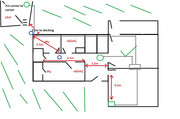
now don't be getting all jealous of my architectural drawing skills.....all walls are solid.

ItueBEu.jpg.png
 
I take it the green box is the BB connection and the two blue circles are what you are proposing to be the AP's?

Q. Do you have a power cable to your decking area (SWA)?
 
of course there could be . Bungalow means one level, not, 'no walls'. lol

if it's brick walls then you only need 2 to get a degraded perfomance enough to cause issues.

You should see how small the bungalows are round my way. 1 router does the whole house lol.


You will want to move that blue circle a little closer to the middle.

Not going to be very good for the other rooms? i.e the one with the tick and whatever that little box is beside it lol.

You might be better off having an outside POE AP if you wanting to use wifi outside on the decking. (needs to be weather proof or you could stick it inside a clear box of some sort that's weather proof.
 
OK other option is if you power up the decking from your house mains, you can use a PLC (powerline carrier) to get your network/bb to that area.

This means go for one good AP in the centre of the bungalow to cover the main house.

Or as Bouton posted above (forgot this initial post) use cat5/6 to take a wire out there to do same.

 
Last edited:
Not going to be very good for the other rooms? i.e the one with the tick and whatever that little box is beside it lol.
the tick indicates wifi is all good (that's the kitchen) the room with the little green box is the living room with the little green box being the router.....i really should have added a key :p
OK other option is if you power up the decking from your house mains, you can use a PLC (powerline carrier) to get your network/bb to that area.

This means go for one good AP in the centre of the bungalow to cover the main house.

Or as Bouton posted above (forgot this initial post) use cat5/6 to take a wire out there to do same.
i had thought about that but getting a spark round my way is like trying to get hold of the Mona Lisa's left boob!! ideally i'd like wifi out on the decking and in the general garden area before summers out and if i wait on a spark that's not likely to happen!
 
the tick indicates wifi is all good (that's the kitchen) the room with the little green box is the living room with the little green box being the router.....i really should have added a key :p

Where the rooms it says ok-ish is that with the door open? yeh your plans should have had a key and also you should have had the doors shut n then tell us if the wifi was ok-ish. :p
 
You only need a spark to connect the wire to the main DB panel and sign it off. You can clip it and bury it and get the gear ready. :)
 
Where the rooms it says ok-ish is that with the door open? yeh your plans should have had a key and also you should have had the doors shut n then tell us if the wifi was ok-ish. :p

Not catch me living in them parts. The rain is huge and green!! Maybe near a radioactive plant or something..
 
yup, and when i say okish....it's really ***** !!

This is what I would do personally. it should cover 100% everything but if not slightly move the APs. it all depends on budget though though. Normally I put network cabs in centre of the house where possible and run everything from that. You can run ethernet over rj11 if that bb box (green) needs moving.

IfoYXNp.jpg
 
or there is potential of adding a centre network cab in this location maybe then branch out from that. You could run 2 network points into each room if you really wanted. Again depends on your budget. RJ45 cable can be used for RJ11 if you needed to move the internet BB box (green one).

6QNxGM1.jpg
 
Not catch me living in them parts. The rain is huge and green!! Maybe near a radioactive plant or something..
took me a while to work that one out lol.....that's my lovely lush grass......don't mock my drawing!! :cry:
This is what I would do personally. it should cover 100% everything but if not slightly move the APs. it all depends on budget though though. Normally I put network cabs in centre of the house where possible and run everything from that. You can run ethernet over rj11 if that bb box (green) needs moving.

IfoYXNp.jpg

or there is potential of adding a centre network cab in this location maybe then branch out from that. You could run 2 network points into each room if you really wanted. Again depends on your budget. RJ45 cable can be used for RJ11 if you needed to move the internet BB box (green one).

6QNxGM1.jpg
green box is sort of stuck where it is - fibre to the premises, so guessing i don't want to be ******* about with that? 1st suggestion looks to be the most straight forward for me.....i think!
 
only me again good gentlefolk.......googled high and low for ubiquiti/unifi, or whoever they are called, outdoor and indoor poe ap's and got lost with the sheer amount of options.....but along the way came across these 3 jobbies below. yay? nay? i think they are compatible and would do what i want but then again i think i'm a pretty cool guy and most others would probably say i'm not, so what i think isn't always correct!

TP-Link PoE Switch 5-Port Gigabit, 4 PoE+ (TL-SG1005P V2) > TP-Link N300 Wireless Outdoor Access Point & TP-Link AC1350 Wireless Access Point
 
That TP link outdoor AP is only wireless N, so very slow.

There is also no need to have power at the deck to run WiFi, just run it off the side of our house, WiFi will easily go tens of meters outside, especially with direct line of sight.

If you want to go Ubiquiti, you could stick an AC-mesh (weather proof) on the outside corner of the house and a 6 Long Range in the middle of the house. I think the Poe switched you linked will be fine for Ubiquiti kit.

I’d just terminate all of the cables in the loft with the POE switch and run one back to the ISP supplied router (WiFi disabled) where it comes into the house. No need for a network rack inside the house, that’s major overkill.

 
Back
Top Bottom