


I hadn't... But have now. Now it says couldn't get an ip address.Presume you've done the obvious thing of forgetting the network and adding it again?
You are using an out of date browser. It may not display this or other websites correctly.
You should upgrade or use an alternative browser.
You should upgrade or use an alternative browser.
*** Official Ubiquiti Discussion Thread ***
- Thread starter RoyMi6
- Start date
More options
Thread starter's posts

Is there an option to forget the client in your Ubiquiti network?
Is the new network wifi 6? As that requires WPA 3 and if the network was WPA 2 before some devices have a little moan and prompt you to accept the change.
I removed my phone and a few mins later its come back on. But some hard wired units are still offline... Sky etc..
I'm thinking a reboot of all switches etc and its been disconnected and reconnected a dozen or so times over the last few days.
That won't achieve anything.I'm thinking a reboot of all switches etc and its been disconnected and reconnected a dozen or so times over the last few days.

Looking at the USW-Flex for locating in my garage, I'm after a switch that's suitable for indoor/outdoor use. Does the USW-Flex support RSTP etc. and then I plan to run a G4/G4 4K camera off it and then wireless mesh back to the house with an AP located in the garage etc.
Failing that I run cables to my garage from my loft, not easy. I can either run cables under the patio if dug up or via an external cable tray to the garage bridging a gap etc.
Looking at the Camera G4 Instant for inside the garage too
Failing that I run cables to my garage from my loft, not easy. I can either run cables under the patio if dug up or via an external cable tray to the garage bridging a gap etc.
Looking at the Camera G4 Instant for inside the garage too
Last edited:

Looking at the USW-Flex for locating in my garage, I'm after a switch that's suitable for indoor/outdoor use. Does the USW-Flex support RSTP etc. and then I plan to run a G4/G4 4K camera off it and then wireless mesh back to the house with an AP located in the garage etc.
Failing that I run cables to my garage from my loft, not easy. I can either run cables under the patio if dug up or via an external cable tray to the garage bridging a gap etc.
Be careful with those as they need PoE++ (60W) if you fully load (I ran a AP, G4 Pro & 2 x G3 Flex's off it) them up, I ended swapping it out for a Enterprise-8-POE
Last edited:
Be careful with those as they need PoE++ (60W) if you fully load (I ran a AP, G4 Pro & 2 x G3 Flex's off it) them up, I ended swapping it out for a Enterprise-8-POE
Many thanks. My semi concern is the damp / lower temperatures of the garage, hence considering them.
Sadly my single garage is detached at end of my drive with prob a 6ft gap between house and garage.
Mmm
Last edited:
I wouldn't worry about picking an outdoor-rated switch for a garage, if it's powered on all the time then it won't be cold enough for liquid to condense on it, and if it's not going to get rained on then it will be fine. Use a Switch Lite 8 PoE and you will be OK.
Last edited:
Rejigged the layout, I've switched the 16-XG and Pro-24 around.Had another stab at it today, and it's finally in and working.
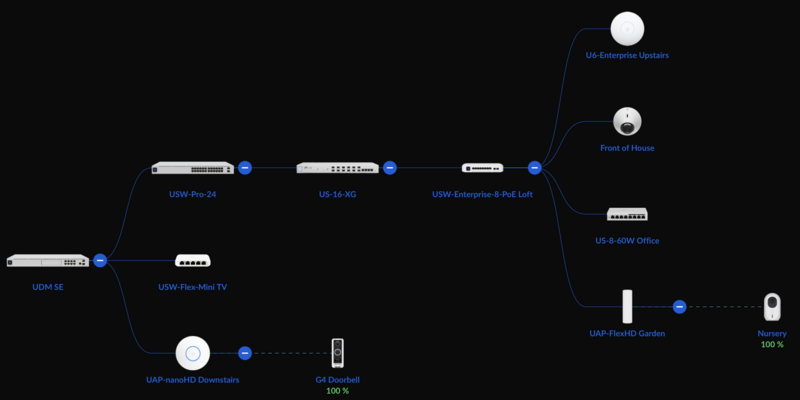
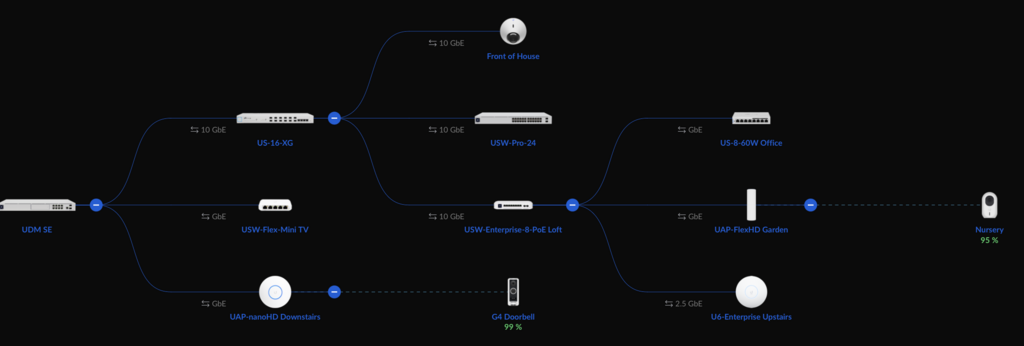
Will probably make zero difference!
Also switched out the DACs the ESXi hosts were using to SFP28 ones. The ones I had before were showing TX Fault on the switch port but didn't seem to make a difference. I'll be getting some 25 Gb NICs when I see them for a decent price.
Next job is to put in a 4 way keystone behind the TV unit, to connect the devices there to the 24-Pro and keep the Flex switch as a spare.
Last edited:
That won't achieve anything.
Well you were wrong.
Kinda..
So after a few hours of trying to get Sky Q to talk to the network. Despite showing on the network. It would constantly disconnect.
Rebooted everything and the 5 port tp-link switch that the sky was connected to didn't come back on.
Swapped it for another switch and Sky Q and Shield connected to the network straight away.
Now getting 700+ Mbps over wifi downstairs and fingers crossed everything now seems stable.
Any chance that failing switch could have been messing up the network
Not really, last time I checked there is a difference between replacing a switch and rebooting everything.Well you were wrong.

Sounds like the TP-Link wasn't taking part in STP/RSTP properly.
Ah, But had i not rebooted I wouldn't have found it...Not really, last time I checked there is a difference between replacing a switch and rebooting everything.
Sounds like the TP-Link wasn't taking part in STP/RSTP properly.

Intermittent faults are an absolute nightmare to track down right!
Now I've just got to get Sonos working properly... That might be a mission in itself.
Thanks to something @ChrisD. said about his phone cables being network cables thought I’d check mine out in the house as they are not being used, and yup cat5e cables 
So will be converting those to extra network ports, thanks for mentioning it
So will be converting those to extra network ports, thanks for mentioning it
Last edited:
No worries, I wish I’d have discovered it sooner. Sadly they are usually cabled in a ring topology so get a cable tester.Thanks to something @ChrisD. said about his phone cables being network cables thought I’d check mine out in the house as they are not being used, and yup cat5e cables
So will be converting those to extra network ports, thanks for mentioning it
I’ve only got 2 extension sockets, with the ‘main’/first socket in the chain in the same area as the existing network ports.
From what I can tell there’s one cable from the cupboard to the living room, then one from the living room to the study.
So I’ll likely just turn them each into network ports.
Did toy with joining the 2 cables in the living room to give me a run from cupboard to study, but if for some reason I need that I can just always use a tiny patch lead in the living room to connect the two
Helps solve the issue I had that I forgot to spec 2 cables in some locations which would’ve been useful.
Now only thing I want to try and do is get something run up to the loft. I’ve got one port up on the upstairs landing, my thinking is if I can drop 2 cables down to there I can join one up to the existing cable that gives me a run from the cupboard to the loft, then with the second cable patch that into the existing port.
Then stick a little switch up in the loft to connect them all up to and should be good. In my head anyway.
From what I can tell there’s one cable from the cupboard to the living room, then one from the living room to the study.
So I’ll likely just turn them each into network ports.
Did toy with joining the 2 cables in the living room to give me a run from cupboard to study, but if for some reason I need that I can just always use a tiny patch lead in the living room to connect the two
Helps solve the issue I had that I forgot to spec 2 cables in some locations which would’ve been useful.
Now only thing I want to try and do is get something run up to the loft. I’ve got one port up on the upstairs landing, my thinking is if I can drop 2 cables down to there I can join one up to the existing cable that gives me a run from the cupboard to the loft, then with the second cable patch that into the existing port.
Then stick a little switch up in the loft to connect them all up to and should be good. In my head anyway.
Last edited:
I wouldn't worry about picking an outdoor-rated switch for a garage, if it's powered on all the time then it won't be cold enough for liquid to condense on it, and if it's not going to get rained on then it will be fine. Use a Switch Lite 8 PoE and you will be OK.
Yes I know the Lite range, I have the 16 port unit that I picked up when they were first released, I'll check it out. 8 Port units I've been using the US-8-60W and US-8 units.
Just looking at the U6-IW / UAP-IW-HD for maybe the doorbell area, I have runs to the attic nearby, but not in the perfect location, so thinking this with a PoE injector for the doorbell. TBH wish I'd looked at the IW earlier for a downstairs area of the house.
Last edited:
Right it should be fairly obvious by now that i'm not an expert in Ubiquiti network stuff.....
So I installed the U6E (comes pre configured from retailer) all good.. But I've since moved it and now its showing offline. Google suggests its because it now has a new IP address but the os is looking for it on the old connection.
I'm using the retailers cloud controller.
I've left it overnight hoping it would come back online.
So I installed the U6E (comes pre configured from retailer) all good.. But I've since moved it and now its showing offline. Google suggests its because it now has a new IP address but the os is looking for it on the old connection.
I'm using the retailers cloud controller.
I've left it overnight hoping it would come back online.