New build, can I transfer my Win8.1 OEM licence to a new install of Win11?

Soldato
Joined
20 Oct 2002
Posts
19,686
Location
London
Hello all. Looking to upgrade my rather old build per this thread. I have a Win8.1 OEM disc and licence which is was upgraded to Win10 ages ago. Windows update tells me this;
Edition: Windows 10 Home. Activation: Windows is activated with a digital licence linked to your Microsoft account.

Unfortunately my cpu doesn't meet the requirements for Win11 so I cannot upgrade this machine, which I thought might be one route (It's a Intel i5-4690 CPU @ 3.50GHz). So, is there any path I can take here to transfer my Windows licence for my new build?

Also, I've not been in the hardware game for a while. What exactly is the process for installing Windows on new builds now? Download installer to USB and boot from that? :)

TIA.
 
Last edited:
download iso from windows. use rufus , which gives you options, like your cpu or have no tmp removed . then you can use win 11. handy tool, loads use it, just to get win 11.
rufus will install it on to a usb. all done
 
download iso from windows. use rufus , which gives you options, like your cpu or have no tmp removed . then you can use win 11. handy tool, loads use it, just to get win 11.
rufus will install it on to a usb. all done
I think the question more is about the licence. E.g. do I need to install Win10 on the new build first, then upgrade to 11? Will it let me install 10 if I haven't disabled the licence ( :confused: ) on my existing machine?

Or the other way; if I install Win11 from scratch will my licence work? :confused:
 
Or the other way; if I install Win11 from scratch will my licence work? :confused:
From what I'm aware of, since the changes to activation that were made around September/October 2023, that is the most likely option to lose your activation because old keys will no longer activate fresh Windows 10/11 installs with 7/8.1 keys.

Microsoft did mention that they were looking into some of the circumstances that were losing previously valid licenses, so I don't know if any tweaks have been made since then to make this process less rigid (prior to Sep/Oct 2023 it was very forgiving).

In theory, if you have a Microsoft account and it doesn't activate, it shouldn't be that hard to transfer the license, but I've seen mixed reports about this (for some it worked with no problem, for others it failed and Microsoft refused to help).

"Microsoft is now blocking Windows 7 and Windows 8 keys from activating a copy of Windows 11. It’s been a loophole that has existed for years, allowing people to upgrade from Windows 7 or 8 to Windows 10 or 11 free of charge.
Microsoft originally announced the changes to block Windows 7 and Windows 8 keys from Windows 11 late last month, but at the time, we saw that keys were still activating, and it wasn’t clear when the block would actually come into force. As of this week, Windows 7 keys are now fully blocked from clean installs of Windows 11, Microsoft confirms to The Verge."

I have a Win8.1 OEM disc and licence which is was upgraded to Win10 ages ago. Windows update tells me this;
I believe Windows 10/11 activations follow the same path with the digital license registration, so if you can successfully get this install working with a new PC and maintain the activation, then the Windows 11 upgrade will not be a problem.

Also, I've not been in the hardware game for a while. What exactly is the process for installing Windows on new builds now? Download installer to USB and boot from that? :)
Yep, pretty much everyone uses the Microsoft tool to create a USB now, apart from using Rufus to streamline/remove requirements.
 
I don't know if this way will work, but the way I'd try is by installing Windows 10 on your current machine, then upgrade 10 to 11 - hopefully the digital licence will carry across to 10, then 11. All being well, then try putting the SSD (?) drive with the Windows 11 install in your new build.

Or you could try upgrading your current build to 10 and installing your OS in the new build then install 11.
 
I don't know if this way will work, but the way I'd try is by installing Windows 10 on your current machine, then upgrade 10 to 11 - hopefully the digital licence will carry across to 10, then 11. All being well, then try putting the SSD (?) drive with the Windows 11 install in your new build.
So I’m already updated to Win 10. But my current machine doesn’t meet the requirements for Win11.

I was wondering if I could grab the Win10 installer for the new build, install that. But I’m not sure what would happen with the licence. Ideally I’d like to keep both active for a period to copy over files etc. in an easy way. Can I run a fresh install of Win10 without a license (for a period)? :confused:
 
So I’m already updated to Win 10. But my current machine doesn’t meet the requirements for Win11.

I was wondering if I could grab the Win10 installer for the new build, install that. But I’m not sure what would happen with the licence. Ideally I’d like to keep both active for a period to copy over files etc. in an easy way. Can I run a fresh install of Win10 without a license (for a period)? :confused:
In that case, try dropping your current OS drive into the new build and see if Windows remains activated. My guess is if it does, then try upgrading that machine to 11.

I'll be honest though, I don't like the sound of all these upgrades, especially when different hardware is involved. I'd prefer a clean 11 install, but I don't know how you'd transfer your current 10 licence to the new 11 machine.
 
I'd prefer a clean 11 install, but I don't know how you'd transfer your current 10 licence to the new 11 machine.
Agreed- that’s what I’m trying to do! I’m not taking any driver over to the new build.

Maybe I should just looking into the slightly-dubious (?) key sellers as opposed to OEM or retail.
 
Agreed- that’s what I’m trying to do! I’m not taking any driver over to the new build.

Maybe I should just looking into the slightly-dubious (?) key sellers as opposed to OEM or retail.

I couldn't get Windows 11 to activate after doing a clean install over Windows 10. I think my copy of Windows 10 had been activated as an upgrade from Windows 8. Anyway, I got bored with trying to get help from Microsoft and so splashed out a couple of quid for a "new" key, which solved the issue and still seems to be working fine.
 
I couldn't get Windows 11 to activate after doing a clean install over Windows 10. I think my copy of Windows 10 had been activated as an upgrade from Windows 8. Anyway, I got bored with trying to get help from Microsoft and so splashed out a couple of quid for a "new" key, which solved the issue and still seems to be working fine.
Thanks. Sounds like where I'd be then as it's a Win8 licence upgraded to Win10. I'm obviously tempted to try.. Where did you get your key from? DM obviously if it's not for discussion on here..

Excuse the dumb question but how does one port a licence over and what happens to the old machine? I'd like to build my new machine, keep both running so I can easily copy files over without too much aggro... If I 'disable' the licence on my current/old machine, can I still use it? :confused:
 
Excuse the dumb question but how does one port a licence over and what happens to the old machine? I'd like to build my new machine, keep both running so I can easily copy files over without too much aggro... If I 'disable' the licence on my current/old machine, can I still use it? :confused:
It depends how you want to copy the files. If you're using USB storage to transfer the files, just disconnect the old machine from internet before activating the new machine and keep the old machine offline.

If you're planning on transferring the files over your network, just disconnect the internet until the files are copies.
 
Almighty bump!

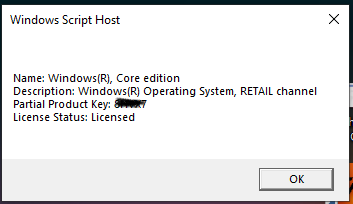
Building my new machine this week and getting things sorted. Looking into Win11 key options and remembered about my potential option for using my existing licence.. Did a quick bit of research and it seems my key is actually a RETAIL key. I'm assuming this increases my chances of being able to use it on a Win11 install?


EDIT: And it says in Windows it is "activated with a digital licence linked to your Microsoft account". Does that mean I don't need to find the actual key, I might just be able to login with my MS details to activate on the new build? :confused:
 
Last edited:
Almighty bump!

Building my new machine this week and getting things sorted. Looking into Win11 key options and remembered about my potential option for using my existing licence.. Did a quick bit of research and it seems my key is actually a RETAIL key. I'm assuming this increases my chances of being able to use it on a Win11 install?


EDIT: And it says in Windows it is "activated with a digital licence linked to your Microsoft account". Does that mean I don't need to find the actual key, I might just be able to login with my MS details to activate on the new build? :confused:
Are you currently on Windows 10 or 11?

If on 10 see if you can upgrade to Windows 11 and then do a clean install on your new system but you will need to remove the old system as you can only have 1 license activated on 1 PC at a time.

Edit, link may help if your on Windows 10

 
Last edited:
I would just do a clean install of 11 and see if it would let you activate it with the key linked to your account. If it doesn’t, spend a tenner or whatever it is and buy an OEM key. I’ve bought tons of them over the years and never had a single issue.
 
Are you currently on Windows 10 or 11?

If on 10 see if you can upgrade to Windows 11 and then do a clean install on your new system but you will need to remove the old system as you can only have 1 license activated on 1 PC at a time.
Current (old) machine on 10 but can't update to 11 as it doesn't meet the hardware requirements. Hence why I don't know for sure if my licence will update me to 11. In theory it should though, generally retail 10 users can upgrade to 11 for free.
I would just do a clean install of 11 and see if it would let you activate it with the key linked to your account. If it doesn’t, spend a tenner or whatever it is and buy an OEM key. I’ve bought tons of them over the years and never had a single issue.
Yeah I've downloaded and built the usb installer for 11, from Microsoft. What I don't have is an actual key (code). But as above it says it's digitally linked to my account so I guess it's going to be a case of suck it and see.

Hoping something like this will work - https://www.tomshardware.com/how-to...ransfer a Digital Windows License to a New PC
 
Almighty bump!

Building my new machine this week and getting things sorted. Looking into Win11 key options and remembered about my potential option for using my existing licence.. Did a quick bit of research and it seems my key is actually a RETAIL key. I'm assuming this increases my chances of being able to use it on a Win11 install?


EDIT: And it says in Windows it is "activated with a digital licence linked to your Microsoft account". Does that mean I don't need to find the actual key, I might just be able to login with my MS details to activate on the new build? :confused:
I don't think the key being retail or OEM offers any benefit with the Windows 10/11 upgrade. They're basically the same licensing system and if you have a digital license (previously activated Windows 10) and a fresh install of Windows 11, it will activate automatically on the same hardware, even if Windows 11 was never previously installed on that machine.

I haven't kept up with the news since a month or two after Microsoft made this change to the activation servers, but previously, keys which originate from 7 or 8.1 will no longer activate fresh installs on a different machine.

It doesn't matter if the key is retail or OEM, they're all locked out.

I don't know what difference a Microsoft account will make, because the way that works is not the same and seems to be a little more forgiving.

There are posts/comments elsewhere which say you can still install and activate 7/8.1 and then upgrade to Windows 10 and then to 11, but I tried that and it didn't work for me.

Current (old) machine on 10 but can't update to 11 as it doesn't meet the hardware requirements. Hence why I don't know for sure if my licence will update me to 11. In theory it should though, generally retail 10 users can upgrade to 11 for free.
It will definitely update you, on the same machine.
 
I got stung by this years ago by updating the bios with no other hardware changes and then Windows would not activate then I read about Win 7/8 keys no longer activating, thanks MS for screwing me over.
People screamed that logging into your MS account would work and activate it but it did not work though I also read online that people where spending hundreds of $$$ on a new Microsoft key and it either not working or it would work for a few months then the same thing would happen again and Microsoft support where either terrible or did not want to know.

Funny reading about the person who contacted Microsoft support and the agent used illegal means to activate a key on a customers machine. :cry:
 
Last edited:
I was under the impression an OEM key tied itself to the hardware you were using, some signature on the motherboard or something? Saying that, Windows keys are crazy cheap so it's not like it's a big thing. Just install a fresh Windows 11 and if it doesn't activate grab yourself a Pro key and be done with it.
 
Back
Top Bottom