Ssd or hdd for Nas

It’s a lockerstor 10 gen3 AS6810T If I actually bite the bullet on it.
I don’t mind wasting space as long it has enough memory for all the backups.
One iMac, one Mac studio , two windows pc,s.
I won’t be storing music or films.
But many photos which I can’t lose.
 
It’s a lockerstor 10 gen3 AS6810T If I actually bite the bullet on it.
I don’t mind wasting space as long it has enough memory for all the backups.
One iMac, one Mac studio , two windows pc,s.
I won’t be storing music or films.
But many photos which I can’t lose.

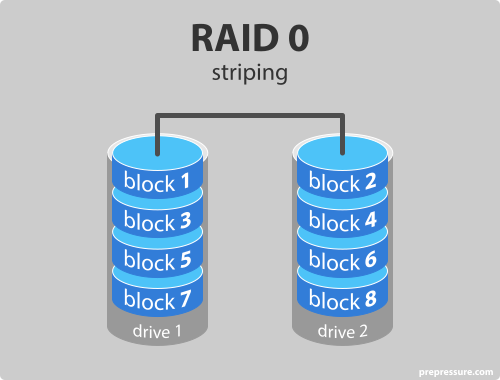
Then don't use RAID 0. That's purely for speed, if one drive goes down you lost everything.

I don't use Synology SHR, but it's a good idea where it's a mix of HD sizes, as personally I buy drives as I need them...rather than fill up a NAS and use RAID option. Then I use old HD for my backup (say 3TB, a couple of 2TB, couple of 1TB), with say a 8TB in the single drive bay...

I don't backup everything, if I lose specific things not a big deal.
 
I wouldn't be bothered about choosing a "performance" RAID system, they're all fast enough


RAID5 SHR seems good for home user
Raid5/SHR shouldn't be used for anything important. In the event of a drive failure, there's a high chance a second drive will fail during the rebuild resulting in data loss.

With 10 drive bays there are much more sensible options e.g. Raid6/Shr2 or much better Raid10
 
I’m going to be using 8 western digital red pro 26tb. 2x2 raid 0.
So that’s 4 drives taken up and raid 1 all 4 so that’s 8 drives used.
And for the nvme’s 4 western digital black 8tb gen4 drives but I won’t be raiding them they’ll be just for my photos.
 
I’m going to be using 8 western digital red pro 26tb. 2x2 raid 0.
So that’s 4 drives taken up and raid 1 all 4 so that’s 8 drives used.
No what you need to set up is an 8 drive Raid 10. That will give you 4 drives worth of space.

And for the nvme’s 4 western digital black 8tb gen4 drives but I won’t be raiding them they’ll be just for my photos.
So what happens if they fail?
Also why do photos need to be on NVME?


Honestly is this a real project or just some kind of weird look how much I can spend?

All the gear, no idea springs to mind.
 
No what you need to set up is an 8 drive Raid 10. That will give you 4 drives worth of space.


So what happens if they fail?
Also why do photos need to be on NVME?


Honestly is this a real project or just some kind of weird look how much I can spend?

All the gear, no idea springs to mind.

Yeah you REALLY need RAID 0 for flac music playback hahahahaha :cry:
 
I’m not joking this is my very first attempt at home storage.
Yes raid 10 over 8 drives is what I’m after I just didn’t know how describe it.
And also yes this is a real project.
I just want it setup with little maintenance or swapping drives and rebuilding arrays.
All the gear no idea, we all start somewhere mate .
 
I’m not joking this is my very first attempt at home storage.
Yes raid 10 over 8 drives is what I’m after I just didn’t know how describe it.
And also yes this is a real project.
I just want it setup with little maintenance or swapping drives and rebuilding arrays.
All the gear no idea, we all start somewhere mate .

Do not use RAID 0. It's literally for desktop, to eek out performance on old platter drives.

NVME on a NAS? LOL WHAT.
 
It’s still pointless to RAID 0 the NVME’s for extra speed. A single drive will be faster than a 10gb lan connection assuming they have the full 4 PCIE lanes assigned to them.

You need to be getting into 25gb and 100gb before you get extra speed from raid. Stick to raid 5 so at least you have some protection against drive failure.
 
That isn't what RAID6 means at all. What you are describing is a hot spare - which is essentially just an extra drive that stores no data, but is available in case of a drive failure to replace the failed drive - it applies to any raid level or SHR etc.

RAID6 is an extension of RAID5 but uses two parity stripes to store recovery information, so can tolerate any 2 drives within the array failing without data loss. The downside being that you "waste" 2 drives worth of space, and it's very computationally heavy both in writing as 2 sets of parity data have to be computed, and especially in the event of a drive failure, where the extra stress can often cause another drive to fail.


Depends entirely on how many drive bays you have available and ultimately the value of the data you are storing.

For a 2 bay NAS, your only option is RAID1.

For a 4 Bay NAS, your options are RAID5, RAID6 or RAID10 :
- RAID 5 uses the equivalent of 1 drive worth of space for parity information, and so can survive 1 drive failure. However due to the complexity and risk of a 2nd failure - it isn't recommended, unless the data isn't critical e.g. it would be ok for CCTV recordings or maybe ripped movies etc that can be replaced, and where capacity is more important than reliability
- RAID 6 uses 2 drives worth of space - meaning you are losing 50% capacity in a 4 bay NAS!
- RAID 10 is mirrored and striped. You always lose 50% capacity with RAID 10, however compared to RAID 6 it is much less complex, and a failed drive can be rebuilt much quicker with less risk (it's a 1:1 copy from the remaining drive, rather than reading all drives and doing parity calculations. This is generally the best choice for important data.

Was thinking of something else.

Anyway, yes RAID 6 is N-2 capacity available, same as RAID5 with hot spare.

And main point was that Alerting is critical, come across so many systems with 2 failed drives and lost data as they didn't react to first failed drive, especially is tucked away somewhere like the loft or garage (or a data centre).
 
Back
Top Bottom