

-
Competitor rules
Please remember that any mention of competitors, hinting at competitors or offering to provide details of competitors will result in an account suspension. The full rules can be found under the 'Terms and Rules' link in the bottom right corner of your screen. Just don't mention competitors in any way, shape or form and you'll be OK.
You are using an out of date browser. It may not display this or other websites correctly.
You should upgrade or use an alternative browser.
You should upgrade or use an alternative browser.
The Radeon RX9070XT / RX9070 Owners Thread
- Thread starter CAT-THE-FIFTH
- Start date
More options
Thread starter's posts

I'd have expected a higher GPU score with your 33 degree temps.
I run similar temps to WARburton and get a 34160 GPU score too, which is on par with what my 7900 XTX achieved. The Nitro+ has a slightly lower power limits than the Aurus though, even at +10%. Not sure how I get 34160 as my GPU doesn't boost as high as Warburton's to achieve the same FPS.
What card do you have? I think your undervolt can come down some more. Something is holding your score back as at 33 degrees it should be boosting to higher frequencies. You have similar GPU frequency to my card that's running at 44 degrees.

Result
 www.3dmark.com
Last edited:
I have a Powercolor red devil with Alphacool waterblock. I only did about 5 runs, wasn't even keeping a proper eye on the fact that memory scores can go down with error correction. The power limit is +10% of 330w.
Edit:
www.3dmark.com
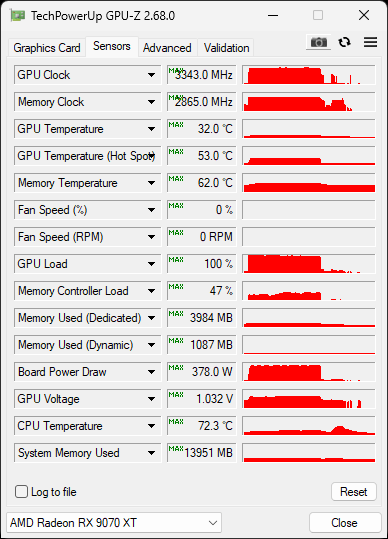
Whacked the memory up to 2880Mhz and then put it on fast and got an achievement of excellent score in 3dmark. I tried 2900Mhz but that black screened and I needed too hold the power switch down. When doing stable diffusion work load I have seen 69'c hotspot not happy with it tbh. I have PTM7950 on the core (from the factory it comes with paste), I also have some thermal grizzly equivalent thermal interface material.
Edit:
I scored 27 832 in Time Spy
AMD Ryzen 7 9800X3D, AMD Radeon RX 9070 XT x 1, 65536 MB, 64-bit Windows 11}
www.3dmark.com
Last edited:


Soldato
- Joined
- 26 Apr 2004
- Posts
- 10,051
- Location
- Milton Keynes
I finally got to install my Nitro+ last week, and I don't seem to have hit the VRAM silicon lottery; I found that enabling fast timings for VRAM, or pushing the memory higher than 2648 had a very high chance of causing black screens even just applying the clocks on the current drivers, the VRAM seems very finicky as going up or down can trigger it, but fast timings seems to trigger black screens very easily, and after a bit of FAFO I'd rather have an extra 150MHz on the VRAM, than fast timings.
At the moment I've gone for 2648 VRAM normal timings, +10% power, +200 offset and -50mv. I'll probably test a stronger undervolt later, but I would rather be a bit conservative to ensure its not crashing in games etc first, as I noticed that benchmarks seem to regularly be stable for many people at -100mv or even higher, but getting 100% stability above -75mv seems a lot less common; and I'm 100% in the camp of 24/7 stable overclock being a better result than a slightly faster one that isn't.
Vulkan Memtest is advising stability, and consistent results after an hour or two of testing; so I might leave that running for the rest of the afternoon. Definate speed improvement using 2648 over 2598MHz too, so I don't seem to have hit ECC regression; but I'm not going to go higher here for now due to the black screens seeming to kick in before the ECC does if I go beyond this point haha
Using the testing location in Helldivers just as you load into the Super Destroyer as the camera settles behind you, I went from low 150 to around 162FPS, so definately picked up about 10fps, ~7% which is nice enough for me as a quick and dirty UVOC. GPU clock seems to vary between about 3100-3350 depending on task/game.
I'll monitor for game stability before I consider pushing any further. On a plus side, the Nitro cooler is very quiet even on these settings; much more so than my case fans.
At the moment I've gone for 2648 VRAM normal timings, +10% power, +200 offset and -50mv. I'll probably test a stronger undervolt later, but I would rather be a bit conservative to ensure its not crashing in games etc first, as I noticed that benchmarks seem to regularly be stable for many people at -100mv or even higher, but getting 100% stability above -75mv seems a lot less common; and I'm 100% in the camp of 24/7 stable overclock being a better result than a slightly faster one that isn't.
Vulkan Memtest is advising stability, and consistent results after an hour or two of testing; so I might leave that running for the rest of the afternoon. Definate speed improvement using 2648 over 2598MHz too, so I don't seem to have hit ECC regression; but I'm not going to go higher here for now due to the black screens seeming to kick in before the ECC does if I go beyond this point haha
Using the testing location in Helldivers just as you load into the Super Destroyer as the camera settles behind you, I went from low 150 to around 162FPS, so definately picked up about 10fps, ~7% which is nice enough for me as a quick and dirty UVOC. GPU clock seems to vary between about 3100-3350 depending on task/game.
I'll monitor for game stability before I consider pushing any further. On a plus side, the Nitro cooler is very quiet even on these settings; much more so than my case fans.
Last edited:
This literally dose nothing. The card will do what ever it’s wants.+200 offset
As for undervolting, you have to set this game by game. For my squads will do -80, ashes of the singularity will only do -60 and battlefield will do -90
Soldato
- Joined
- 26 Apr 2004
- Posts
- 10,051
- Location
- Milton Keynes
I thought the offset would do nothing as well, but at least when running more VRAM rather than GPU limited tasks (like Vulkan memtest), I did notice the clock seems to settle a bit higher with the offset; so once I've verified stability I'll have a play around with this specific setting across a variety of tests, as higher clocks typically results in lower latency.
As you say UV can vary heavily from game to game, but I'll probably try and find a one size fits all - I'd rather have 24/7 stability than absolute peak performance
Edit: Yes, just verified this - if I remove the offset, when running Vulkan Memtest the card is sitting around 3330MHz on core. If I add the +200 offset, it does jump to 3500MHz and stay there; so its definately allowing the GPU to run at higher frequency when load/power/temperature allows.
As you say UV can vary heavily from game to game, but I'll probably try and find a one size fits all - I'd rather have 24/7 stability than absolute peak performance
Edit: Yes, just verified this - if I remove the offset, when running Vulkan Memtest the card is sitting around 3330MHz on core. If I add the +200 offset, it does jump to 3500MHz and stay there; so its definately allowing the GPU to run at higher frequency when load/power/temperature allows.
Last edited:
Just got a legendary achievement for this run in steel nomad!:
www.3dmark.com
-100mV, 2880Mhz VRAM, 363w power limit. It was on default timing and I usually have it on fast.
I scored 7 963 in Steel Nomad
AMD Ryzen 7 9800X3D, AMD Radeon RX 9070 XT x 1, 65536 MB, 64-bit Windows 11}
www.3dmark.com
-100mV, 2880Mhz VRAM, 363w power limit. It was on default timing and I usually have it on fast.
Last edited:
Soldato
- Joined
- 26 Apr 2004
- Posts
- 10,051
- Location
- Milton Keynes
OK well just ran Timespy and Firestrike, and I'm smack bang in the middle of Average and Maximum for equivalent configurations, which works for me for a 24/7 if I can prove this fully stable.
Sub 33k just seems low when you can hit 34k on stock cooled cards. Not sure why your card isn't boosting to higher clocks.I have a Powercolor red devil with Alphacool waterblock. I only did about 5 runs, wasn't even keeping a proper eye on the fact that memory scores can go down with error correction. The power limit is +10% of 330w.
Edit:
Whacked the memory up to 2880Mhz and then put it on fast and got an achievement of excellent score in 3dmark. I tried 2900Mhz but that black screened and I needed too hold the power switch down. When doing stable diffusion work load I have seen 69'c hotspot not happy with it tbh. I have PTM7950 on the core (from the factory it comes with paste), I also have some thermal grizzly equivalent thermal interface material.I scored 27 832 in Time Spy
AMD Ryzen 7 9800X3D, AMD Radeon RX 9070 XT x 1, 65536 MB, 64-bit Windows 11}
Last edited:
Steel Nomad loves a cool board and fast memory. It's been a very long time since I ran Steel Nomad but I was air cooled, so slightly hotter and my VRAM doesn't like anything above 2810 but it still got me 3rd for my old CPU somehow.Just got a legendary achievement for this run in steel nomad!:
I scored 7 963 in Steel Nomad
AMD Ryzen 7 9800X3D, AMD Radeon RX 9070 XT x 1, 65536 MB, 64-bit Windows 11}
-100mV, 2880Mhz VRAM, 363w power limit. It was on default timing and I usually have it on fast.
7900+ is a good score on this GPU
I scored 7 952 in Steel Nomad
Intel Core i7-13700K Processor, AMD Radeon RX 9070 XT x 1, 49152 MB, 64-bit Windows 11}
www.3dmark.com
Last edited:

That was my last attempt running driver 25.4.1 I think it was. Not tried with any further drivers.
www.3dmark.com
I scored 8 099 in Steel Nomad
AMD Ryzen 7 5800X3D, AMD Radeon RX 9070 XT x 1, 32768 MB, 64-bit Windows 11}
www.3dmark.com
I think it's got easier to undervolt in Steel Nomad with latest drivers so you may be able to beat it.That was my last attempt running driver 25.4.1 I think it was. Not tried with any further drivers.
I scored 8 099 in Steel Nomad
AMD Ryzen 7 5800X3D, AMD Radeon RX 9070 XT x 1, 32768 MB, 64-bit Windows 11}
I just ran -110 and got roughly the same score as my previous which was at -95. This is due to it being warmer ambient temps. I think my score I posted was on the same drivers as you. These new ones seem more stable with UV.
I may be able to hit 80 but I won't get 81 like you.
Last edited:
I'll give it a bash further into the week when I get a bit of time.I think it's got easier to undervolt in Steel Nomad with latest drivers so you may be able to beat it.
I just ran -110 and got roughly the same score as my previous which was at -95. This is due to it being warmer ambient temps. I think my score I posted was on the same drivers as you. These new ones seem more stable with UV.
I may be able to hit 80 but I won't get 81 like you.
If I remember correctly, this was actually on 25.5.1, with 24.4.1 I could barely complete a run at -70 but that allowed me to get -100 I believe.
I can only match and not beat my old score despite the lower UV. Must be the fact it's running about 8 degrees hotter.I'll give it a bash further into the week when I get a bit of time.
If I remember correctly, this was actually on 25.5.1, with 24.4.1 I could barely complete a run at -70 but that allowed me to get -100 I believe.
You may have better luck as it is definitely more stable than when I last ran 100%
It's cooling off nicely up in Scotland now. It may help the scores a bit.I can only match and not beat my old score despite the lower UV. Must be the fact it's running about 8 degrees hotter.
You may have better luck as it is definitely more stable than when I last ran 100%
Soldato
- Joined
- 26 Apr 2004
- Posts
- 10,051
- Location
- Milton Keynes
I just upped the undervolt to -100mv. It sailed through Steel Nomad with no issues, and no signs of performance degradation as yet. Only bugbear I find is the card is sensitive to not intialising correctly if my screen is off or set to a different display whilst booting, once booted, no issues.
I do need to give this undervolt a thorough spin though, I didn't win the VRAM lottery, it'd be nice if I've got a decent GPU core at least.
www.3dmark.com
www.3dmark.com
www.3dmark.com
Not unhappy with these scores at all though at -100mv.
Edit -125mv/+300 crashed out in Steel Nomad, so my limit seems to be somewhere between -120 to -100mv.
I've backed off down to -100mv, give it a few loops of Steel Nomad, and give it a general test. Even if maybe there's some mv on the table, as mentioned earlier, I'd rather be stable.
Edit2: Seems to be passing multiple loops of Nomad in a row at -100mv, with +300 offset, seem to be getting MARGINALLY higher scores across the 3DMark suit; will leave this config in place as doesn't seem to be causing any issues in Helldivers 2 either as yet, and see if it plays nice with all my games etc over the next week or two. If it doesn't I'll just bring the UV down.
(-100mv, +300 offset, +10% power, ram 2666 - 2650 real, default timings, fan default)
As a plus, very little coil whine too - I got a tiny bit during 3DMark: Night Raid or whatever its called when my card was hitting 1600FPS (which is exactly why I decided to give it a run as it generates extremely high FPS) lol but nothing in normal frame rate ranges, which is excellent
Edit 3: After a while of the above settings, I started getting some crashes in Helldivers 2 at 100mv and 75mv, so I've stepped back down to -60mv, +200 offset. See if that stabilises it when it gets warm. If it doesn't I'll revert back to -50mv.
To be honest, I kinda expected -100mv to be too far for 100% stability, so I'll see how it goes now. I've still got a niggling feeling the temperamental VRAM OC might be involved; but at the moment that seems to be stable at these clocks. Strangely if I drop it 25MHz I get black screens, its like there are certain successful bands.
I do need to give this undervolt a thorough spin though, I didn't win the VRAM lottery, it'd be nice if I've got a decent GPU core at least.
I scored 55 039 in Fire Strike
AMD Ryzen 7 9800X3D, AMD Radeon RX 9070 XT x 1, 65536 MB, 64-bit Windows 11}
www.3dmark.com
I scored 28 403 in Time Spy
AMD Ryzen 7 9800X3D, AMD Radeon RX 9070 XT x 1, 65536 MB, 64-bit Windows 11}
www.3dmark.com
I scored 7 805 in Steel Nomad
AMD Ryzen 7 9800X3D, AMD Radeon RX 9070 XT x 1, 65536 MB, 64-bit Windows 11}
www.3dmark.com
Not unhappy with these scores at all though at -100mv.
Edit -125mv/+300 crashed out in Steel Nomad, so my limit seems to be somewhere between -120 to -100mv.
I've backed off down to -100mv, give it a few loops of Steel Nomad, and give it a general test. Even if maybe there's some mv on the table, as mentioned earlier, I'd rather be stable.
Edit2: Seems to be passing multiple loops of Nomad in a row at -100mv, with +300 offset, seem to be getting MARGINALLY higher scores across the 3DMark suit; will leave this config in place as doesn't seem to be causing any issues in Helldivers 2 either as yet, and see if it plays nice with all my games etc over the next week or two. If it doesn't I'll just bring the UV down.
(-100mv, +300 offset, +10% power, ram 2666 - 2650 real, default timings, fan default)
As a plus, very little coil whine too - I got a tiny bit during 3DMark: Night Raid or whatever its called when my card was hitting 1600FPS (which is exactly why I decided to give it a run as it generates extremely high FPS) lol but nothing in normal frame rate ranges, which is excellent
Edit 3: After a while of the above settings, I started getting some crashes in Helldivers 2 at 100mv and 75mv, so I've stepped back down to -60mv, +200 offset. See if that stabilises it when it gets warm. If it doesn't I'll revert back to -50mv.
To be honest, I kinda expected -100mv to be too far for 100% stability, so I'll see how it goes now. I've still got a niggling feeling the temperamental VRAM OC might be involved; but at the moment that seems to be stable at these clocks. Strangely if I drop it 25MHz I get black screens, its like there are certain successful bands.
Last edited: