• Competitor rules

    Please remember that any mention of competitors, hinting at competitors or offering to provide details of competitors will result in an account suspension. The full rules can be found under the 'Terms and Rules' link in the bottom right corner of your screen. Just don't mention competitors in any way, shape or form and you'll be OK.

New 5070ti black screen after win logo. HELP!

Looks like that was it! set the both the pcix16 to gen 3 and the slot config to gen 3 booted in first time. Thank you all ever so much! If I could buy you all a round of beers I would!
Glad you're sorted. For info though, had Tetras' good call not been the answer, the riser cable would have been the next port of call. Connecting the card directly to the board would have been the definitive test there.

But luckily that's not necessary :)
 
Yeah tbh that wouldn't of been possible with it being SFF, so thank goodness that sorted it. I did try and Set it to gen 4 just to see but it didn't like it. Really id like to get a gen 4 riser cable but the Linkup one for the case cost £70 it would be cheaper to buy a meshroom D case and then I could slot it directly to the slot. madness money for a cable!

One thing I have noticed though is I am getting some stuttering on some frames as in I can tell it's not quite keeping up. I may reinstall the drivers or do a search for those type of issues with the card.
 
Last edited:
One thing I have noticed though is I am getting some stuttering on some frames as in I can tell it's not quite keeping up. I may reinstall the drivers or do a search for those type of issues with the card.
What software are you using? It might just need some minor tweaks to the settings, or perhaps with a new card you could change the codec to something else like AV1?
 
What software are you using? It might just need some minor tweaks to the settings, or perhaps with a new card you could change the codec to something else like AV1?
i am talking about in games. some one said i should change the Shader Cache size in the nvidia control panel to 100gb and it would sort it, but it didnt.
 
wyr.png
ufr.png


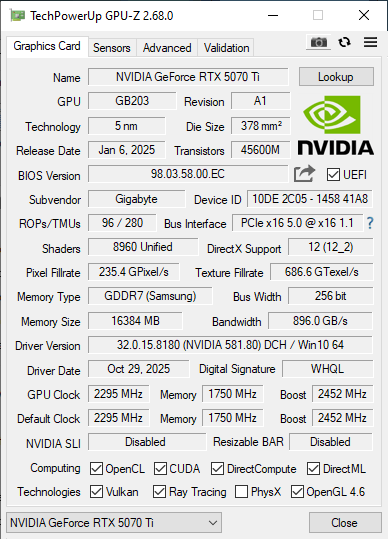
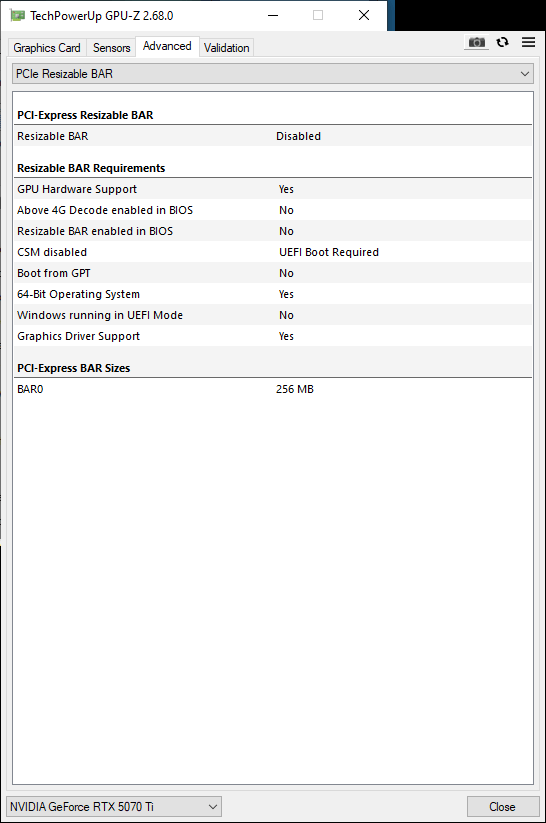
Looking into setting resizable bar and i dont think i can enable it with teh current set up. would probably need to reinstall windows or might not be possible.
 
Last edited:
I did a benchmark on my SSD and have noticed i am now getting Half speed what i had before, it would expain why i am feeling things taking lonager to load since the New GPU and Bios update happened. is this a result if setting things to 3.0 or maybe i need to change somthing again in the bios since the update?

Sequential read
was 7386 now 3729
Sequential write
Was 6872 now 3512
Random read
Was 1165527 now 887939
 
Last edited:
Still getting Microstuttering in games though :( One thing i will say though is i am pretty impressed with the cooling of this Card idles at 25 degrees and the fans don't even kick in. However if i cant resolve this stuttering issue i may return the card, i have been reading its a issue with some systems with the 50 series, dont expect to pay over £700+ for a card that cant play games smoothly.


My last try will be trying a 4.0 Riser cable. trying to source one from friends to try it out. but if not i'll have to return it and wait :(
 
Last edited:
Looking at your GPU-Z screenshot you need to enable UEFI mode in bios and may be best converting your windows to GPT rather than MBR.

Your bios needs to be UEFI to enable REBAR and along with converting to GPT may stop the microstutter.

This guide shows how to do the conversion, but may be easier to reinstall Windows if you have only just installed it.

https://www.windowscentral.com/how-convert-mbr-disk-gpt-move-bios-uefi-windows-10
 
Thanks, i might give the conversion a go as it would take ages to reinstall everything, i'll back up everything anyway before i do this tomorrow. tbh i wouldn't know how to install a GPT patition with installing fresh windows ( maybe there is an option) and converting the bios to UEFI.
 
@freddie64 ok so i have converted it all over, wasn't tricky at all. The only thing that isnt working so far is secure boot. when i try and enable it in the Bios i get this message "Secure Boot can be enabled when System in User Mode. Repeat operation after enrolling Platform Key(PK)" i think to solve this i just need to reset the PK key which is in the menu below and it should then work after a reboot once done. So after changing over the partion and enableing UEFI and enabling Resize Bar, a few things have happened.

-- i now have much better FPS as in i think maybe 20+ FPS in POE2
-- i can now install windows 11 ( not sure this is a good thing TBH, at least for a year)

however the main issue still isnt fixed, i am still getting the micro stuttering and laggyness.

eiather way it was worth doing so Thanks Freddie for your suggestion.

the next thing i'll have to try is a 4.0 riser. i may also try out another displayport cable but i am not hopefully that that will solve anything.

i am open to any other suggestions though :)
 
Last edited:
however the main issue still isnt fixed, i am still getting the micro stuttering and laggyness.
i am open to any other suggestions though :)
Stuttering is one of those catch-all terms that I suspect relates to a whole bunch of different issues/symptoms, some of which may be hardware specific, but many related to software/config issues. The list of potential fixes is enormous.

There's been a few threads on tech forums where the issue has been resolved, but I'd say that unfortunately the majority of them have no fix, except for the new hardware (in some cases, the entire newly built PC) being returned.

There's some ideas here (not all AMD specific):
 
Usually people are advised to remove riser cables when fault finding GPU problems, so not sure adding one will help. (are you using a riser cable at the moment?)
I believe so, yes. Initially had to set PCI-E gen 3 for stability, which isn't a good sign.

I think PCI-E errors may show up in the event viewer? Which if there was a lot of instability leading to data being corrupted and resent, I wonder if that could cause stuttering.

The only time I've seen laggyness mentioned is with frame gen being enabled.
 
What is the spec of your build?

Ssupd Meshlicious Mini ITX Case - Full Mesh - Black - PCIE 3.0
Corsair Vengeance LPX 32GB (2x16GB) DDR4 PC4-25600C18 3600MHz Dual Channel Kit (CMK32GX4M2D3600C18)
Gigabyte AMD B550 AORUS B550I PRO AX WiFi
Arctic freezer 3 240 AIO
AMD Ryzen 7 5700X Desktop Processor (8-core/16-thread
Samsung 990 Pro 1TB
Corsair SF1000L Fully Modular Low-Noise SFX Power Supply - ATX 3.0 & PCIe 5.0 Compliant
Gigabyte NVIDIA GeForce RTX 5070 Ti WINDFORCE SFF 16GB GDDR7
 
I see it's sorted but thought I'd add my fix here. Got a 5070ti yesterday and display was just going into standby after motherboard MSI boot logo. It got through to windows once but was artifacting and mouse stuttering on desktop like crazy. Updating to the most recent stable BIOS fixed it (old 2023 new 2025).

MSI B650 CARBON WIFI with AMD 7800X3D.
 
Thanks, i might give the conversion a go as it would take ages to reinstall everything, i'll back up everything anyway before i do this tomorrow. tbh i wouldn't know how to install a GPT patition with installing fresh windows ( maybe there is an option) and converting the bios to UEFI.

You can convert. Here's a video that shows you how:


Skip to 26:00, though updating the BIOS beforehand is a good idea.
 
Thx @freddie64 Secure boot is now Enabled. super tired of this now its taken much of my weekend and still not a fix, but very greatful for everyones help. i did find this though. seems similar to the issue i am having but not as bad as this and i dont get the disconnects.

 
Last edited:
Ssupd Meshlicious Mini ITX Case - Full Mesh - Black - PCIE 3.0
Can see why you want to try a gen 4 riser cable now, although you could try the GPU in the slot if you removed the motherboard from the case.

Do you need the WIFI/BT enabled in bios? Worth trying it disabled if you don't need it.
 
Can see why you want to try a gen 4 riser cable now, although you could try the GPU in the slot if you removed the motherboard from the case.

Do you need the WIFI/BT enabled in bios? Worth trying it disabled if you don't need it.
yep if i could try it in the slot easily i would, but a spare riser would make things much simpler, never really expected to have this kind of testing dilema with a GPU tbh.

in terms of the disabling, bluetooth maybe, but disabling wifi might be problimatic as most games now need logins.
 
Last edited:
Back
Top Bottom