


Thats why I am asking if 3 m.2 is bad since the CPU only have 24 pcie laneslooking at your first link all the drives that are under performing are all sata? it may just be because you using 4 pcie lains from the chipset, so the sata controller on the chipset is running show becuase are the load
-
Competitor rules
Please remember that any mention of competitors, hinting at competitors or offering to provide details of competitors will result in an account suspension. The full rules can be found under the 'Terms and Rules' link in the bottom right corner of your screen. Just don't mention competitors in any way, shape or form and you'll be OK.
You are using an out of date browser. It may not display this or other websites correctly.
You should upgrade or use an alternative browser.
You should upgrade or use an alternative browser.
5950x Pcie lanes with 3 ssds?
- Thread starter vian_siu
- Start date
More options
Thread starter's postspop one out and retest. it could just be the case of a slow sata controller in general.
how full would you say the drives are?
are they in raid?
and how old?
have you run a drive test to make sure the drives them self are in good health
how full would you say the drives are?
are they in raid?
and how old?
have you run a drive test to make sure the drives them self are in good health

Soldato
- Joined
- 21 Dec 2019
- Posts
- 8,459
- Location
- Planet Thanet
Your userbenchmark has a warning for
High background cpu usage
That will affect benchmarks
Should disable all possible background processes
Before running benchmarks
Even the windows build number
Can affect scores
Or which windows updates you have/haven't installed
What graphics driver version number too
What power plan youre using
theres lots of variables
I have 5 x m2 and 4 x sata ssds (x570 board and 5950x)
But can't remember if it was 3 x m2 that put my
Gpu to gen4 x 8
Or if it was adding the 4th and 5th m2
That caused it
So a bit surprised your gpu is at gen4 x 16
With 3 x m2 drives
But the bifurcation options are a bit complicated
On my board Your yours too probably
Your user benchmark doesn't look terrible
Other than what looks like 3 x 2.5 mechanical drives
Not sure how reliable user benchmark is
Gives you 336% on one of your drives
Which is outstanding
Then says its performing way below expectations
High background cpu usage
That will affect benchmarks
Should disable all possible background processes
Before running benchmarks
Even the windows build number
Can affect scores
Or which windows updates you have/haven't installed
What graphics driver version number too
What power plan youre using
theres lots of variables
I have 5 x m2 and 4 x sata ssds (x570 board and 5950x)
But can't remember if it was 3 x m2 that put my
Gpu to gen4 x 8
Or if it was adding the 4th and 5th m2
That caused it
So a bit surprised your gpu is at gen4 x 16
With 3 x m2 drives
But the bifurcation options are a bit complicated
On my board Your yours too probably
Your user benchmark doesn't look terrible
Other than what looks like 3 x 2.5 mechanical drives
Not sure how reliable user benchmark is
Gives you 336% on one of your drives
Which is outstanding
Then says its performing way below expectations

I wouldn't use it for this. I'd use CrystalDiskMark instead. That said, even if a drive is performing slowly, I doubt that would have any impact on the FPS.Not sure how reliable user benchmark is
That's about 6.5% lower than their overall score. Can you show us hwinfo's sensor tab (after a gaming session)?My best score was 22953. GPU: 26642 CPU: 12862
Last edited:
Its outstanding because the reference for comparing the percentage is not a nvme drive. It is performing below expectations because people with the same drive should get 400+Your userbenchmark has a warning for
High background cpu usage
That will affect benchmarks
Should disable all possible background processes
Before running benchmarks
Even the windows build number
Can affect scores
Or which windows updates you have/haven't installed
What graphics driver version number too
What power plan youre using
theres lots of variables
I have 5 x m2 and 4 x sata ssds (x570 board and 5950x)
But can't remember if it was 3 x m2 that put my
Gpu to gen4 x 8
Or if it was adding the 4th and 5th m2
That caused it
So a bit surprised your gpu is at gen4 x 16
With 3 x m2 drives
But the bifurcation options are a bit complicated
On my board Your yours too probably
Your user benchmark doesn't look terrible
Other than what looks like 3 x 2.5 mechanical drives
Not sure how reliable user benchmark is
Gives you 336% on one of your drives
Which is outstanding
Then says its performing way below expectations
In Timespy the hotspot is noawhere near 90c. The hottest I saw was low 80sive just see what GPU your using.. when running bench marks on my old 7900xt and xtx's all hit the hotspot limit very fast
this may be somthing you want to look into
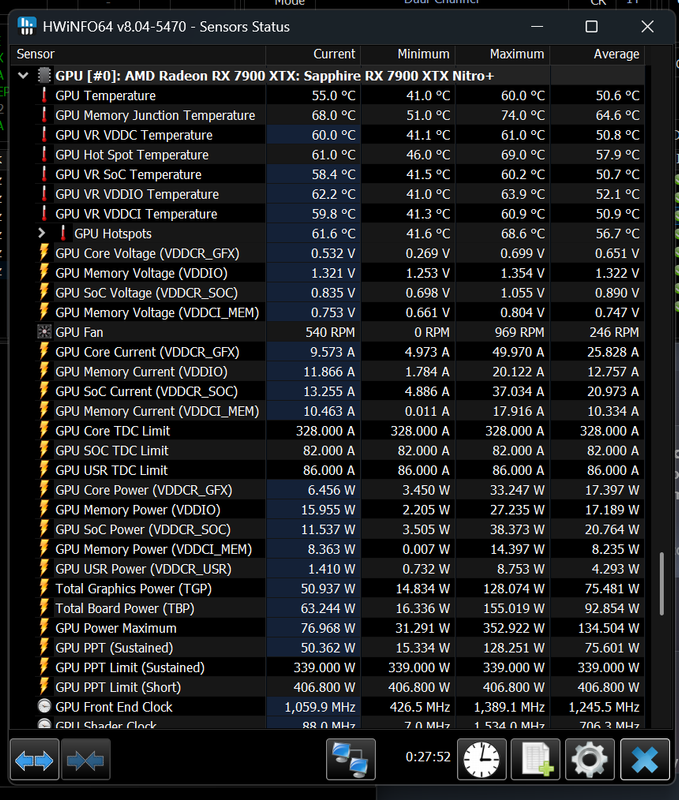
hwinfo — Postimages
this is my temps after 40 minutes on street fighter 6 in 4k
Is that not a demanding game? I ask because your GPU appears to be taking it easy.hwinfo — Postimages
postimg.cc
this is my temps after 40 minutes on street fighter 6 in 4k
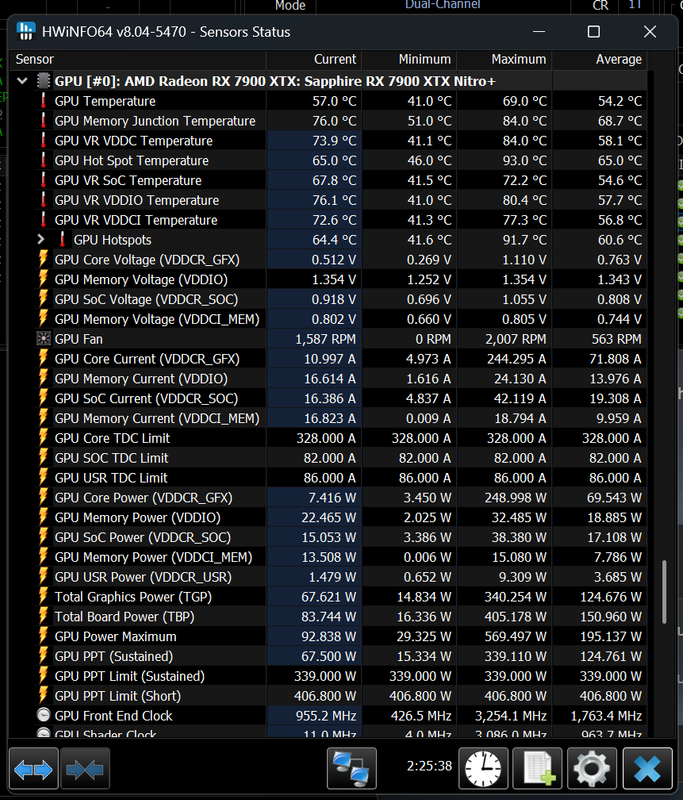
hwinfo — Postimages
ok after 40-50 minutes of black myth wukong maxed 4k
Last edited:
Yup, that's more like it!hwinfo — Postimages
ok after 40-50 minutes of black myth wukong maxed 4k


Well 90C is the throttling temp on 5950x's if I'm not mistaken, so it will never go over it.Cooling is fine for both. Always below 90c
If your CPU temps are around 88-90C in your sensor when benchmarking your CPU could well be throttling, causing the lower than average benchmark scores.
The CPU is performing fine. The GPU is underperforming. I thought it could be because I have 3 m.2 ssds and it couldn't give the GPU full 16 lanes, but I tried with 2 ssds and the performance is the same.Well 90C is the throttling temp on 5950x's if I'm not mistaken, so it will never go over it.
If your CPU temps are around 88-90C in your sensor when benchmarking your CPU could well be throttling, causing the lower than average benchmark scores.
Last edited:

Afraid the simple truth is you need more PCI lanes to avoid being kneecapped. To be fair I still run my new system PCI slots and NVMEs in GEN4 rather than GEN5 as in real world you don't notice the difference and the payback in reliability and temps is great.