• Competitor rules

    Please remember that any mention of competitors, hinting at competitors or offering to provide details of competitors will result in an account suspension. The full rules can be found under the 'Terms and Rules' link in the bottom right corner of your screen. Just don't mention competitors in any way, shape or form and you'll be OK.

The Radeon RX9070XT / RX9070 Owners Thread

Thank you kindly good sir. I got the 9070 reaper btw.
I’ve got the XT so key for me was lowering the Power limit but with the Non Xt I think they’re power limit starved from factory so I’d try the following

-40 MV - this will give you more headroom for the boost clock to auto boost even higher
Increase the power limit as high as it’ll go and that will work in tandem with the above for the GPU to clock itself higher
Set the memory to 2714mhz on the VRAM (it’ll clock at 2700 - for some reason you have to add the extra 14mhz)

I’d highly recommend watching Ancient Gameplays and watch his Undervolting video which covered the Xt and Non Xt - it’s a great channel for AMD users - enjoy the card :)
 
as i said same problem here ive been trying to find a way around for months no joy so far so got a second gpu to run the extra monitor off of althouhg driver updates sound like they have made that no longer an option so decided to upgrade to am5 with its igpu and well hopfully at least that one they will fix so i can use it LOL!
 
Just bought the Hellhound & just thought I'd ask what difference does having 2 x 8 pins, as opposed to 3 x 8 pins for power? I'm assuming there is no real world disadvantages to having a 2 x 8 pin?
 
Only way to find out is to clock them to the same core and memory then compare.

Or see what happens when you only connect two PCI-E cables on a three connector GPU like the Pure.
It's not the end of the world tbh - I can't see it being too much difference, just thought I'd ask in case I missed something important.
 
Last edited:
Sad Boi is back again, fitted the new PSU today, which was an utter arsing about match, but all is done, I unfortunately have the exact same 'hang' and die error in Bg3 and FO4.

RMA card? Or any other suggestions before i do so?
Have you removed all over clocks. ?

If you have a spare drive install a fresh copy of windows 11 and steam and other game stores. Chipset drivers aswell. Do not install anything else besides your games you want to test. Give your games a good test. If you still see crashing RMA and get another.
 
Have you removed all over clocks. ?

If you have a spare drive install a fresh copy of windows 11 and steam and other game stores. Chipset drivers aswell. Do not install anything else besides your games you want to test. Give your games a good test. If you still see crashing RMA and get another.
Aye, this is exactly what I did.
I'm on a fairly barebones install, all running smoothly, new card in place, about to test it and start playing.
We'll see how it goes.
 
180hz frame limit, and reduce power limit
I was going to say, I just checked and I'm using 350-360w with no frame limit but I have increased the PL.
Obviously, with nearly using double the power, my temps are higher and I don't normally run that high fan speeds either, it sounds like a jet engine!

 
Last edited:
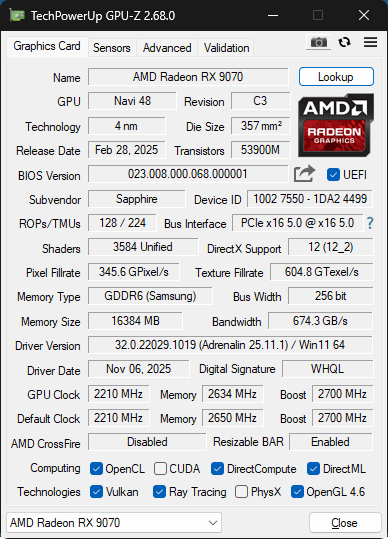
Was able to get a hold of a Sapphire 9070 Pure, I finally won the GDDR6 lottery ( at least for my build ) as I ended up with samsung GDDR6 and it has barely any coil whine so another huge win there.
I have to admit im going to have to get used to the slightly lower zero-rpm mode switch off on AMD cards and setting a fan curve was certainly needs vs the stock as it seems the AMD default fan curve isnt pretty smooth but overall I am very happy with the card. Looks like there's no turning back now :D

re4.png
 
Last edited:
I was going to say, I just checked and I'm using 350-360w with no frame limit but I have increased the PL.
Obviously, with nearly using double the power, my temps are higher and I don't normally run that high fan speeds either, it sounds like a jet engine!


That's a 31c difference between your GPU temp and the hotspot, your GPU temp is very low at 45c but the hotspot is 76c, that's not right, something seems up with that.... the hotspot should be around +15c to +20c higher at most, no more than that.

Dry spot in the thermal compound? Uneven cooler cold plate?
 
Last edited:
That's a 31c difference between your GPU temp and the hotspot, your GPU temp is very low at 45c but the hotspot is 76c, that's not right, something seems up with that.... the hotspot should be around +15c to +20c higher at most, no more than that.

Dry spot in the thermal compound? Uneven cooler cold plate?
mine is almost always between 20 and 25 degrees difference between core and hotspot
well when your running it hard at idle theres only a couple of degrees on mine
never goes above 70 something on the hotspot and rarely if ever goes above 46/47 on the core even after an hour of furmark and at this point the hotspot is as i say 20-25 higher so low to mid 70s
vram usually about 1 or 2 degrees higher than the hotspot when under heavy load for an hour or so
i thought this was relatively ok as long as it doesnt get worse? been the same since new ive not seen it go further than about a 25 ish degree diference though even after hours of furmark and Steele nomad runs etc
doesnt say what aib that is in that screenshot other than 9070xt lol
im slightly worried about mine now lol it seems to be all functioning fine other than the rgb problem and the known vram bug with different monitors but am5 and second gpu will fix that in a few weeks hopefully lol
but i am now slightly worried if my difference on the hotspot is too much :-/
 
mine is almost always between 20 and 25 degrees difference between core and hotspot
well when your running it hard at idle theres only a couple of degrees on mine
never goes above 70 something on the hotspot and rarely if ever goes above 46/47 on the core even after an hour of furmark and at this point the hotspot is as i say 20-25 higher so low to mid 70s
vram usually about 1 or 2 degrees higher than the hotspot when under heavy load for an hour or so
i thought this was relatively ok as long as it doesnt get worse? been the same since new ive not seen it go further than about a 25 ish degree diference though even after hours of furmark and Steele nomad runs etc
doesnt say what aib that is in that screenshot other than 9070xt lol
im slightly worried about mine now lol it seems to be all functioning fine other than the rgb problem and the known vram bug with different monitors but am5 and second gpu will fix that in a few weeks hopefully lol
but i am now slightly worried if my difference on the hotspot is too much :-/

Seems about right, heres my 9070 Pulse with -40 UV and max 50% fan speed after 5 hours of playing DayZ.

468L2cto_o.gif
 
Back
Top Bottom