Spec me a new mechanical keyboard

Associate
Joined
7 Jul 2025
Posts
1,094
Location
Bedfordshire, UK
My Logitech G413 is showing signs of death, so looking to replace it. I'm struggling to find options, so would appreciate some help.

  • Full size
  • Wired
  • Numpad required for work
  • Brown switches
  • Red backlight or some sort of backlight
I don't really want a keyboard where the numpad is separated from the rest of the board, as I'm aware there's options like those floating around. I would prefer a full size keyboard that has the numpad included.
 
Last edited:
My Logitech G413 is showing signs of death, so looking to replace it. I'm struggling to find options, so would appreciate some help.

  • Full size
  • Wired
  • Numpad required for work
  • Brown switches
  • Red backlight or some sort of backlight
I don't really want a keyboard where the numpad is separated from the rest of the board, as I'm aware there's options like those floating around. I would prefer a full size keyboard that has the numpad included.
Per a recent thread on here, if your budget covers it, Keychron K10 HE


Or if it really must be brown switches, K10 QMK (which also comes with/available with shine through keycaps included)
 
Not a huge fan of the overall colour/appearance of the K10 QMK. I can't explain why, but just don't like it.

I am tempted by the K10 HE, but the shine through version looks weak? Barely shining through. Is there an option to only have one solid colour? I'm not a fan of RGB.

What's the difference between the switches used on the K10 HE and brown switches? The reason I have a preference for brown is the actuation force, etc. I find other switches, such as red, too sensitive.

I can be swayed to other options if they're similar to brown I guess.
 
Not a huge fan of the overall colour/appearance of the K10 QMK. I can't explain why, but just don't like it.

I am tempted by the K10 HE, but the shine through version looks weak? Barely shining through. Is there an option to only have one solid colour? I'm not a fan of RGB.

What's the difference between the switches used on the K10 HE and brown switches? The reason I have a preference for brown is the actuation force, etc. I find other switches, such as red, too sensitive.

I can be swayed to other options if they're similar to brown I guess.

Do you mean the one with the wood edges? Personally I think it looks great, but appreciate that's a taste thing. The 'normal' shine through version is just black-on-black, with shine through keycaps (I assumed when you said you wanted backlighting that you meant shine through, rather than just having PCB lighting with solid caps!)

QMK (aka VIA) is an open software implementation that allows you to configure the board from a web browser, so no bloatware (chromium, doesn't work with firefox... I use FF generally and only use it for this function, with QMK set as home page :P ) - It allows some pretty deep macro functionality, full programibility of every key and many options for controlling the lighting - I have my board set as static purple but pulses through other colours on keypress... you can just set it to whatever static colour you want.

If you're spending £100+, I wouldn't even consider anything that wasn't QMK and an aluminium frame.

HE switches are linear, like reds/blacks (blacks are a bit heavier than reds if memory serves), whereas browns are 'tactile' (they have a little bump to them but not as noticable as blues, which are 'clicky'), with the HEs though, they're hall-effect, meaning that they report how much they're pressed, rather than on/off. This means you can configure the actuation point, from 0.1mm to fully bottomoed out (~3.8-4mm).

It kinda depends how deep down the rabbit hole you want to go, there are thousands of switches available in linear/tactile/clicky, with different actuation forces/curves.
If you just want to buy a keyboard, and not accidentally acquire a new expensive hobby, then I don't think you'll go far wrong with a Keychron (as far as I've heard, they sound and feel lovely without any modification)

... a bit wordy, but hope that helps!

 
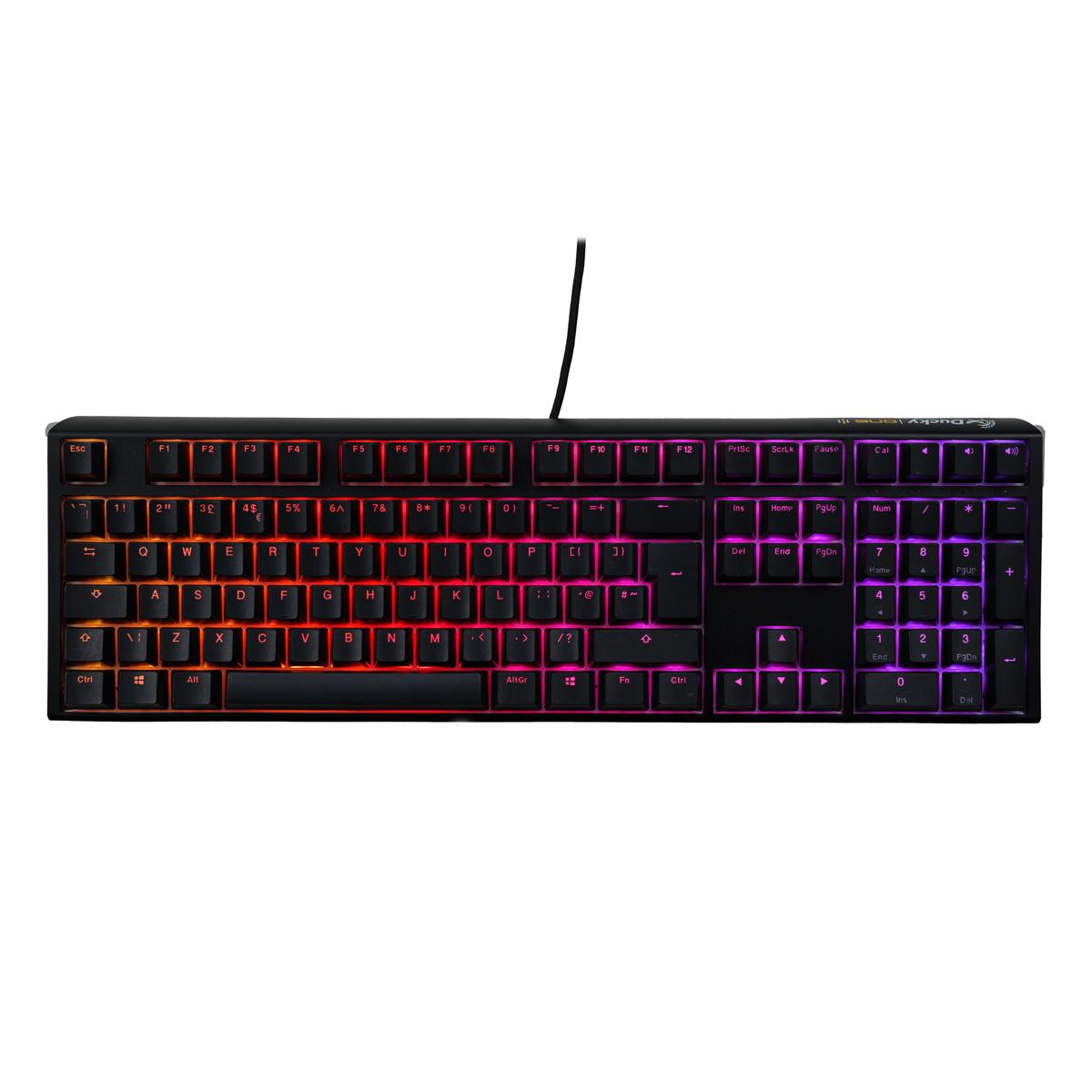
This seems to fit the bill:

Ducky One 3 Classic Fullsize USB RGB Mechanical Gaming Keyboard Cherry Brown - Black UK Layout, £128.99

I did see this, but only available to pre-order. No idea when I'd receive it.

And according to the other recent thread posted here, Ducky One's support is non-existent. Only read that comment in the thread, so I haven't looked into that much. That puts me off a bit.
 
Last edited:
Do you mean the one with the wood edges? Personally I think it looks great, but appreciate that's a taste thing.
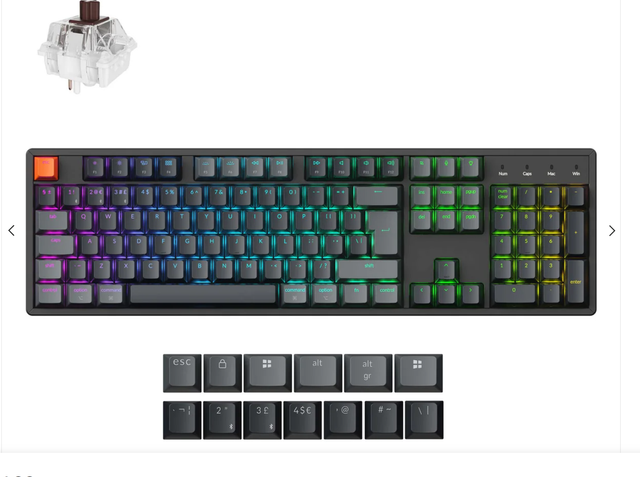
No, I mean that I don't like this one below - the K10 QMK which you recommended if I really wanted brown switches. Not a fan of these grey caps.

fZ6F6jNF_o.png


Like you, I like the look of the first keyboard you mentioned, the one with the wood edges - the K10 HE.
 
No, I mean that I don't like this one below - the K10 QMK which you recommended if I really wanted brown switches. Not a fan of these grey caps.

Like you, I like the look of the first keyboard you mentioned, the one with the wood edges - the K10 HE.
Ah ok, that's not the one I was looking at... I do personally like the caps being not all the same, but the one I was looking at was straight black.... I have just realised though, that it was a US ANSI layout, not UK ISO!
Finding good UK ISO keyboards (or even keycap sets) is a struggle!

Not sure if I'm allowed to post the link in here (as they sell them, competitor rules!) but there is a shine through, UK ISO, all black option on their site:
 
(I assumed when you said you wanted backlighting that you meant shine through, rather than just having PCB lighting with solid caps!)
To be honest, I'm not sure of the difference!

What I do know is that I want something similar to my current keyboard, which I assume is shine through:

aqFwSC7T_o.png


The only reason I mentioned that the shine through looked 'weak' on the HE is because of a product image that I saw on a competitor's site:

PECvJqBg_o.png


I could be wrong though, as the lighting might have just been dimmed or something in these photos.

HE switches are linear, like reds/blacks (blacks are a bit heavier than reds if memory serves), whereas browns are 'tactile' (they have a little bump to them but not as noticable as blues, which are 'clicky'), with the HEs though, they're hall-effect, meaning that they report how much they're pressed, rather than on/off. This means you can configure the actuation point, from 0.1mm to fully bottomoed out (~3.8-4mm).
So does this mean I could configure the actuation point to behave similarly to brown switches?

The only things I really want:

  1. Not clicky/too loud
  2. Not too sensitive when typing
With the above in mind, it's why I was considering brown, as it seems to be a happy medium. If the actuation point can be configured though, perhaps I can use that to somewhat copy the actuation point used on browns.
 
Yeah so shine through is where the backlight comes through the legend on the key - there are a lot of boards that have 'backlighting' but the caps are solid (i.e. I'm still considering some sort of top down lighting so I can read them when gaming in the dark!) - It's one of the main reasons I still use my QPAD MK85 for work, cos I sometimes work through dusk :P

This is the one on the manufacturere site...
keychron.png
 
Ah ok, that's not the one I was looking at...
Ahhh, I see now after looking at your DM. I was looking at the K10 Max QMK. You were looking at the K10 QMK (non-max). Both are different.

The non-max doesn't seem to be available on the UK site though, which is why I wasn't seeing it I think. Keyboard is UK-ISO, but it's on their US website.
 
Ah yeah... I was looking on the US site by accident/being too lazy to change it ;)

They do ship to UK though.... and also, I realised that they are also contrasting black/grey keys, but all shine through :)
Dammit.. now I may have to buy one to replace my QPAD :D
 
Last edited:
I am more tempted by the K10 HE due to those lovely wood edges. The rainforest has the shine through version available (Keychron themselves don't have the shine through version available).

I am just a little held up on the switches. Just to clarify, on the K10 HE, you were saying that I would be able to configure the actuation point on their switches to essentially 'copy' the actuation point used on brown switches?

If the keyboard can meet these reqs below:
  1. Not clicky/too loud
  2. Not too sensitive when typing
Then I'm happy :)
 
Last edited:
I LOVE the wood edge version, but from what I've seen, it doesn't have shine through caps (the HE version with the shine-throughs doesn't have the wood edges)

The HE switches you can adjust the actutation point, but they're all linear... it won't make them into a 'tactile' (i.e. where you can kinda feel the actutation point) or 'clicky' (tactile is a middle ground between linear and clicky, as far as I'm aware!).
So... You can have it activate at the top, or the bottom, but it's all linear... or you can have it activate from the top to the bottom, but deactivate as soon as you lift off at all.... or programme different actions to full or half presses...
This is all too much for me to be bothered with :P If you wanna look into it, "rapid trigger" is a good search term to start with... (wooting were, I think, the first to market... https://wooting.io/rapid-trigger)

Explanation of switch types here: https://www.kitguru.net/peripherals...itguru-guide-to-mechanical-keyboard-switches/
 
Is it actually possible to change the switches on the K10 HE if I don't like them?
Yes, but only for other Hall Effect switches (which are all 'linear'), as far as I know.

HE are a different technology (magnetic) compared to 'traditional' mech switches... I think there are some boards now that can take either... tbh, if you're not bothered about the 'rapid trigger' stuff, then you're not going to lose much - If you like the bump, stick with browns (or some other tactiles), if you like linears (I've only ever used reds or other linears), then I think the HE could be good, as you can fine tune them to activate at a point that suits you best...

Like I said, if you like browns, and just want a decent KB without the faff, I think a keychron is a good option (and I'm 99% sure it'll be better than anything you're used to)... If you wanna get in the weeds, poke your nose in the custom KB thread :P (per previous warning... it may end up costing you thousands or a significant amount of your life!)
 
Last edited:
To be honest, even after reading this stuff, a lot of it goes over my head :p

So based on what I've read above, you don't feel anything when pressing on linear switches, as there's no bump or click.

Table below has the switches that I currently use on my keyboard - Romer G Tactile (Logitech):

oH6lPHYd_o.png


Brown would obviously be the closest to my current switches, hence the consideration for them.

I am not sure where the Keychron linear switches come on this table though. But if I am able to configure the actuation point on them, then it probably isn't that much of an issue.

I just don't want a very low actuation force, like reds' 45g. Anything below 50g is basically no.

You can tell that I'm very much on the fence still. Decisions decisions...
 
I am a BIG fan of a separate numpad. It actually makes more productivity sense to have the numpad on the left because you can use your right hand on the mouse to move around whilst the left hand don't need to move as far to the left for the numpad. Just place it on the left side of the keyboard.

I can move around all the elements as and when I need them.

(It's a low profile tactile switch keyboard).

49fbb8586a65.jpg
 
I am a BIG fan of a separate numpad. It actually makes more productivity sense to have the numpad on the left because you can use your right hand on the mouse to move around whilst the left hand don't need to move as far to the left for the numpad. Just place it on the left side of the keyboard.

I can move around all the elements as and when I need them.

(It's a low profile tactile switch keyboard).

49fbb8586a65.jpg
It does look minimalist to be fair...

What options would you recommend if I were to opt for a tactile switch keyboard with a separate numpad?

I'm not sure if I'd go for one, but handy to know the options in the event I'm swayed.
 
It does look minimalist to be fair...

What options would you recommend if I were to opt for a tactile switch keyboard with a separate numpad?

I'm not sure if I'd go for one, but handy to know the options in the event I'm swayed.

My FAVOURITE tactile at the moment is the Nuphy Lemon Yellow. They do them in normal or low profile.


I want to try their Panda switches too but the lemon yellow is so nice that I don't feel the need to.

For a keyboard, you can get the AirV3 in 65, 75 or 96 config now. But only the white 75 comes in UK ISO layout i think. They also don't come with (or able to spec with Lemon Yellow, so you have to go with Brown as a default if you want tactile) then get a whole set of lemon separately.


Then the numpad, mine is call the Weikav Stars 21, I put in my own Lemon Yellow Switches and my own set of keycaps. Both Nuphy and the numpad have backlight, both are USB-C/BT/2.4Ghz dongle wifi if need be.

The keyboard I am using in the photo is the Iqunix Magi 65 Pro, they do it in UK USO too. The Pro version has that side panel with scroll wheel and 4 custom keys. I left it as default which is for volume and media playback. Buttom square hides the wifi dongle.

p.s. I have the Nuphy Air 75V3 too but I prefer the volume scroll wheel on the Magi65 to be easier to use.

2608d5b31604.jpg
 
Last edited:
Back
Top Bottom