*** Microsoft Windows 11 Thoughts & Discussion Thread ***

In the past I would use tools to create my own custom ISO / Sticks, adding drivers etc. That tended to go fine.
However, removing what appears to be integral parts of Windows, no matter how much I would have wanted to, never really ended up well for me. Even using, only as an example, the Chris Titus Powershell type scripting and recommended settings would, I'm almost sure that I'm right, lead to issues at some point with the build.
Typically with functionality, and, at times, stability.
I am more cautious when it comes to thinking about telemetry and AI, in how that is added and baked into the OS.
Perhaps some scripts are too aggressive at times, and MS with their updates can be unrelenting at trying to put things back or expect things to be in place. Coupled with my limited skills I have avoided much in the way of removing too much and using scripts etc to help with that.
Maybe it is more to do with my general understanding than the scripts.
I do use StartAllBack, even with its shell integration, as long as it gets updated for when MS pushes new builds, it remains stable so far for me. I have removed the Snipping tool and switched to ShareX.
 
Last edited:

  • Like
Reactions: TNA
I've never had any issues with the OS after running the tools but I guess it does depend on what you use the PC for.

I use it for gaming and internet only.

I do use explorer patcher as well to give me back the Windows 10 start menu and quick launch area as well.
 
  • Like
Reactions: TNA
Last edited:
Considering those scripts are GIT based, meaning they can be seen and checked etc, I tend to have a greater concern of their unintended ways of potentially messing up an otherwise running system, albeit with aspects of it not wanted nor liked, by some.
 
Last edited:
My problem isn't so much with the scripts themselves, although the two I've seen so far go way further in removing stuff than I'd personally feel comfortable with, it's that they trying to do something that's not really possible with Windows because of how MS develop it.

There's removing it using Remove-AppxPackage and setting some policies in gpedit, and then there's using unofficial workaround like making Windows think a package is EOL so it can be removed, editing manifest files to trick Windows into running programs differently, blocking shell extensions, and goodness knows what else despite those sorts of things potentially causing more trouble than they're worth because if a program makes an API call to Windows it's simply going to pass that onto the relevant .dll so unless you get rid of those, something that comes with an even greater risk of breaking Windows, you're not going to remove it.

It's the same thing that happened with IE. They integrate it into the OS so even if you deleted/removed IE it's still there, you may not be able to use it but if a program made a call to ieframe.dll because it wanted to use one of its functions.

Basically for me personally I'd just use the supported methods to remove something and set some policies, at least that way you know the worst that can happen is MS reinstalls with one of their updates. When you start using unsupported methods you never know if something's going to break 6, 12, or even 24 months from now.
 
These days, as I have previously noted, MS integrates and bakes much deeper into the OS than I would feel comfortable in trying to use scripts to remove. AI or telemetry, for me, is one example of accepting, rather than wanting or liking.
Things have had the tendancy to fall apart, over time, when running such scripts. Obscure things like our home network or remote access or printing, perhaps not the best examples, seem to not function as I would expect.
When I had previously ran the CT scripts in recommended mode, a feature type update that tried to install and did not go well. Both would it uninstall or roll back.
I didn't bother restoring a back up, I just reinstalled a fresh 25h2 build.

Apart from running SAB and removing through the apps the Snipping tool and using ShareX I largely leave things alone.
 
Last edited:
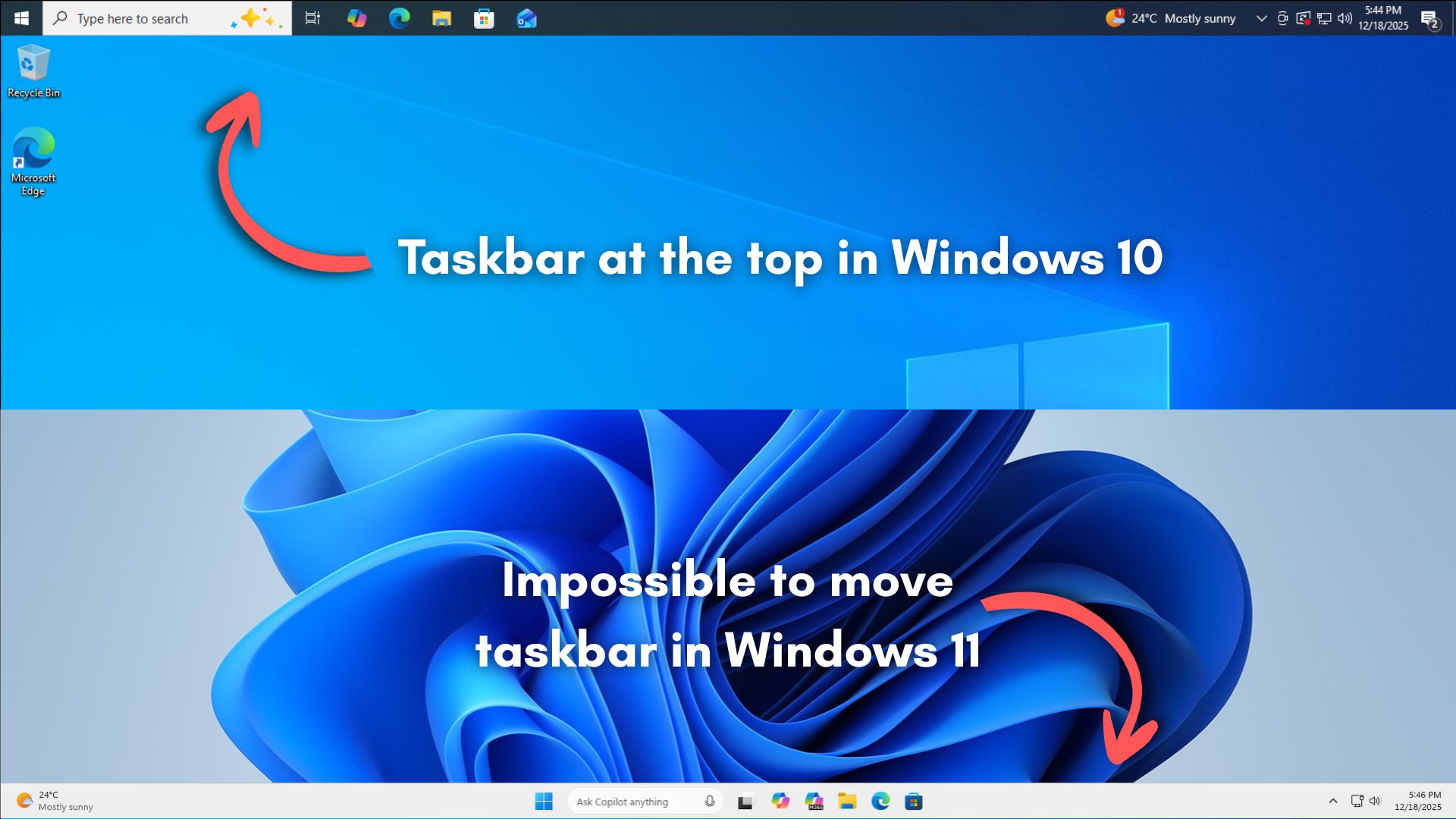
So I'm posting this not so much because it's about not being able to move the taskbar in Windows 11, but because IMO it speaks to everything wrong with current Windows development.


From the fact that a trillion dollar company can't be bothered to invest the resources, how they say it was dropped because not enough people used it, how they introduced something before it was ready, to basically saying how maths is hard.
 
Because their thought process is why get a one off payment of £99 when they can force people to pay £99 each year for a subscription to some sort of online only service.
I really think this is what they are pushing for, it's a much more profitable model in terms of regularised annual income but also will be much easier for data mining. With the cost of PC ownership increasing using your internet attached TV as a PC with no extra equipment needed and a £99 per year subscription ...........

I'm seriously looking into dual booting into Linux and slowly eliminating my need for Windows.
 
Last edited:
I'd be unsurprised to find that their data is probably heavily polluted by corporate/business users where masses of machines will be deployed with a fairly standard image of the OS... that said I know very few users who have other configurations of the taskbar but that alone in my opinion isn't a reason to omit the option.

Also for something like the taskbar good modular, extendable, engineering would be to make it configurable like that from the very start so that all methods of interacting with the taskbar develop on top of that - the shell API backend should be handling the reflow not the applications - the application should be telling the relevant API what it wants to do and then the OS shell figures out how to do it. (In some cases applications which do advanced tweaking of the OS may need deeper knowledge which is where the appropriate API features come in to expose that on demand).
 
Last edited:
I'd be unsurprised to find that their data is probably heavily polluted by corporate/business users where masses of machines will be deployed with a fairly standard image of the OS... that said I know very few users who have other configurations of the taskbar but that alone in my opinion isn't a reason to omit the option.
Not only that but if you take it to its logical conclusion you end up with an OS that can't be customised in anyway, that's setup how the majority of people use with no scope to change anything even if you want to.
Also for something like the taskbar good modular, extendable, engineering would...
Heck, i was just thinking along the lines of teaching them about percentages. :D
 
In terms of reflowing for different screen setups, etc. - that is part and parcel of developing both an OS and an application, there is a lot wrong with MS if they are moping about that - I'll give some example code from where I've dealt with it at application level - caveat that I'm not a C/C++ programmer, this was rapidly coded for a prototype which just had to work nothing more or less, there are probably better ways to approach it and I'm aware of several issues with it:

Code:
                        POINT       curpos = { sizeof(curpos) };
                        HMONITOR    curdisp;
                        MONITORINFO mi = { sizeof(mi) };
                        RECT        ri = { sizeof(ri) };
                        LONG        ox;
                        LONG        oy;
                        LONG        ww;
                        LONG        wh;

                        // This might fail on multi-monitor systems where the system tray is on a monitor
                        // other than the primary one
                        GetWindowRect(hwnd, &ri);
                        ww = ri.right - ri.left;
                        wh = ri.bottom - ri.top;
                        // If the pointer is inside the work area then the notification icon is probably
                        // somewhere else than showing on the system tray i.e. flyout

                        GetCursorPos(&curpos);
                        curdisp = MonitorFromPoint(curpos, MONITOR_DEFAULTTONEAREST);
                        // Should check we have a valid monitor
                        GetMonitorInfo(curdisp, &mi);

                        if (curpos.x > (mi.rcWork.right - ww))
                            ox = mi.rcWork.right - ww;
                        else
                            ox = curpos.x;

                        if (ox < mi.rcWork.left)
                            ox = mi.rcMonitor.left;

                        if (curpos.y > (mi.rcWork.bottom - wh))
                            oy = mi.rcWork.bottom - wh;
                        else
                            oy = curpos.y;

                        if (oy < mi.rcWork.top)
                            oy = mi.rcWork.top;

                        ui_updateSliders(hwnd);

                        SetWindowPos(hwnd, NULL, ox, oy, 0, 0, SWP_NOSIZE | SWP_SHOWWINDOW);

                        SetForegroundWindow(hwnd);

Their developers really need to STFU and put the effort into doing a better job, or find employment in something they are more suited to.
 
Last edited:
So I'm posting this not so much because it's about not being able to move the taskbar in Windows 11, but because IMO it speaks to everything wrong with current Windows development.


From the fact that a trillion dollar company can't be bothered to invest the resources, how they say it was dropped because not enough people used it, how they introduced something before it was ready, to basically saying how maths is hard.
It's arguably even funnier when you consider that Stardock Start11 (and I'm sure others) can do it and then sell it for about 20 quid or less (5 activations)....

The reasoning about software fitting the screen properly/reflowing etc is flawed anyway... we can scale the programs we use to whatever 'resolution' we like by just not running maximised or do they also assume we all just use our software maximised?
 
...or do they also assume we all just use our software maximised?
I don't think they assume anything, their telemetry tells them how people use things and slowly but surely they'll remove the least used features until you can change almost nothing.

Why support a feature that's only used by five percent of your customers, then why support ten percent, and so on and so forth. Windows will slowly turn into a combination of macOS and iOS but with none of the polish (IMO).
 
Last edited:
I could not upgrade to 25H2 form 23H2, found a post that running the upgrader as admin might fix it. Did not think it could be that lame, I was wrong!
I just popped in here to ask what could be the reasons for not being given the opportunity to update from 23H2 to 24/25H2.
It took until late 2024 to update to 23H2...

Could you share the post which helped you to update, please? Thanks.
 
Last edited:
I just popped in here to ask what could be the reasons for not bring given the opportunity to update from 23H2 to 24/25H2.
It took until late 2024 to update to 23H2...

Could you share the post which helped you to update, please? Thanks.
It was an MS support forum, did not save it. Just download the Windows11InstallationAssistant.exe and run it as admin. Think I had to do that for 23H2 as well.
 
Last edited:
It was an MS support forum, did not save it. Just download the Windows11InstallationAssistant.exe and run it as admin. Think I had to do that for 23H2 as well.
Thanks, but doesn't that install Windows 11 from scratch? I'm already on Win 11, I just need to move to at 24 or 25H2.
 
Last edited:
Well, aside from some visual adjustment to the settings, it still won't update.

Maybe it will take a long while, as it did before when moving from 22H2 to 23H2.
 
Back
Top Bottom