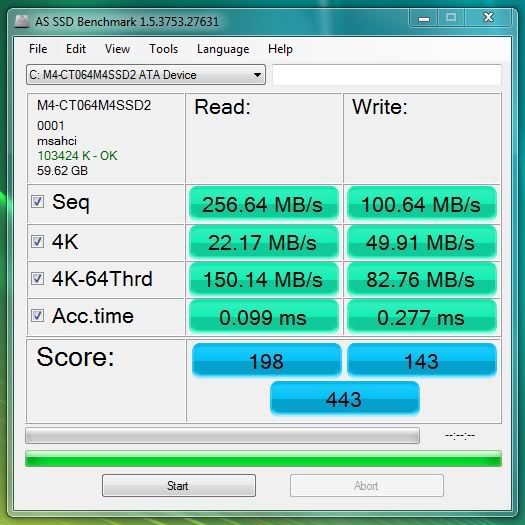
Crucial M4 Speed - Is This Right?

Associate
Joined
24 Jan 2011
Posts
2,477
Location
Mansfield
Hi guys,
I just got my Crucial M4 64GB SATA 3 6Gbps SSD drive installed but I accidentally a SATA 2 cable not SATA 3.
How are my speeds ? How much speed am I losing by using the older cable?

[/URL]
 
your speeds look good there buddy :)
the sata speeds will be identical regardless of what cable you use.

here is a quick bench of an m4 on one of my test beds using a sata 6gbps cable to compare with yours
crucial-sata3cable.jpg


heres a comparison i did with an ocz agility drive for a customer a week or so ago.

OCZ - Sata 2 cable
OCZ-sata2cable.jpg


OCZ - Sata 3 cable
OCZ-sata3cable.jpg


make sure you have AHCI enabled also as you may notice some wierd results, but from your benchmark, it looks like you have.

have fun with your new SSD :)
 
I can't comment on your speeds but all SATA cables are the same regardless.

Not strictly true. "Proper" sata 3 cables tend to be thicker to reduce potential drop in speed and sata 3 have a shorter maximum length.

In practice over 30cm the difference will not be noticable.
 
Picked up a Bargain Crucial M4 64GB the other day.

Running on a SATA 2 board until I upgrade later in the year

Nice SSD and I think good speeds for SATA 2

CrucialM4Sata2.jpg


CrucialM464GBSata2.jpg


------------------------------------
 
What is one supposed to make of those results?

I've been looking at the Agility and the M4 and can't decide which to go for... I was initially attracted to the better sequential write speeds of the Agility but then someone on here started talking about 4k random reads/writes and completely lost me.

Can anyone shed some light or is it a bit of a grey area?
 
OK kingbal general use of the computer uses more of the 4k files read and writes, you only use sequential reads and writes when reading and writing large files.

Another thing to note is that the Sandforce controllers use compression on the fly and therefore are slower when reading and writing say video files that are compressed i.e. divx files. Where as all the other SSD drives do not compress files and therefore maybe faster then the Sandforce ones.

I personally went for the Crucial C300 64gb at this time last year. It has a very faster read and slow write. I only use it as a OS drive for e windows 7 as it is small and so I do not need a drive that can writes fast only read fast. I get about 350mb/s read.

I do like the crucial drives, my first was the m225 120Gb which was very good and stilling running in my laptop.

I would go for you budget, I found the Crucail drives are the cheapest and very good.

If you can afford it then get the OCZ vertex 3, or the Intel 510.
 
Last edited:
There is no difference in cable specifications or maximum length.

There is:

http://www.serialata.org/documents/SATA-6-Gbs-The-Path-from-3gbs-to-6gbs.pdf

In the transition to SATA 6Gb/s, it will be important to use high-quality cabling. Problems may be related to the use of cables made from marginal materials that perform at the edges of SATA 3Gb/s tolerances, which could become a failure point at the faster 6Gb/s signal rates. SATA-IO therefore recommends that only high quality
cables and connectors be utilized for SATA 6Gb/s.
Cable manufacturers and all suppliers of SATA products are encouraged to
register their products on the SATA-IO Integrators list. This list is available to the public as a resource for determining reliable products that meet the SATA interface specification.

Also the maximum lenght of cable for sata 3 is 40% less than sata 2

The primary challenge designers face when moving from 3 to 6Gb/s is that
losses in signal amplitude over boards and cables increase as data rates rise. Higher
frequency signals have increased sensitivity to attenuation and jitter. When attenuation
and jitter become too pronounced, signal quality degrades and throughput drops
significantly because of an increasing number of resends. Attenuation is also affected
by cable length.

However as I said before if you have a decentish quality sata 2 cable and a short length then you won;t have any spped drop.
 
Last edited:
There is:

http://www.serialata.org/documents/SATA-6-Gbs-The-Path-from-3gbs-to-6gbs.pdf


Also the maximum lenght of cable for sata 3 is 40% less than sata 2


However as I said before if you have a decentish quality sata 2 cable and a short length then you won;t have any spped drop.

Sorry but you're wrong, neither of those quotes mention any changes, nor even mention length at all. The cables specs and lengths are exactly the same. Reiterating that high quality materials should be used for the cables isn't a change in spec, or any sort of description at all in fact....
 
Sorry but you're wrong, neither of those quotes mention any changes, nor even mention length at all. The cables specs and lengths are exactly the same. Reiterating that high quality materials should be used for the cables isn't a change in spec, or any sort of description at all in fact....

Cant finf the link atm but sata 3 max length is 5m and sata 2 is 3m
 
either way, the benchmark i ran between the same drives above on cables of identical length shows no difference.
 
Back
Top Bottom