New Crucial M4 040H Firmware Out Today (04/12/12)

Soldato
Joined
23 Nov 2002
Posts
9,878
Location
Near Bristol
Quick heads up, as always backup before you upgrade.

http://www.crucial.com/support/firmware.aspx

Release Date: 12/04/2012

Firmware for the Crucial m4 2.5” SSD is being updated from version 010G to 040H.

The m4 is updatable to this new firmware starting from any previous version in a single step.

Do NOT use any other m4 firmware update for your 2.5” SSD such as the 040H firmware for the mSATA form factor.

Version 040H includes the following changes:

  • Improved robustness in the event of an unexpected power loss. Significantly reduces the incidence of long reboot times after an unexpected power loss.
  • Corrected minor status reporting error during SMART Drive Self Test execution (does not affect SMART attribute data).
  • Streamlined firmware update command for smoother operation in Windows 8.
  • Improved wear leveling algorithms to improve data throughput when foreground wear leveling is required.

Additional details can be found in the firmware guide

 
I have, so far results are quite promising. It seems to have solved an issue I was having with my dads Windows 8 setup where it would hang for 60 seconds on a blue screen, then reboot and post fine. Not had that since the move from 000F to 040H. Boot times have improved noticeably on that system as well.

Only slight issue I've had is with Windows 8 I had to use the USB flash drive method, despite the change log stating firmware update command has been improved I couldn't use the Windows updater. It would reboot and cause a stop error. That could however be specific to my dads system though.

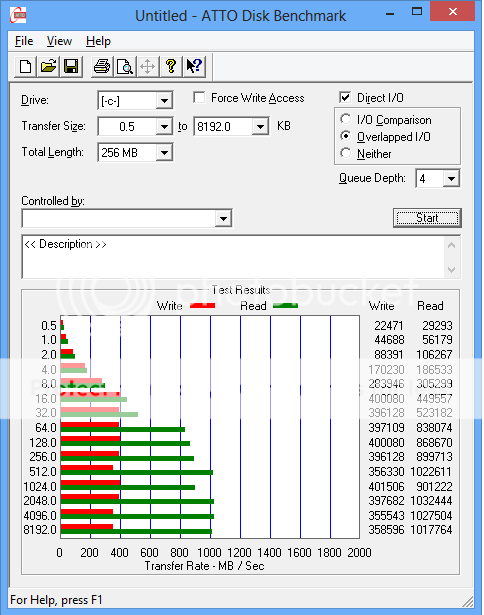
Just flashed my web system so will report back with benchmarks if all goes well.
 
Last edited:
This system also boots quicker, spends less time loading the initial loading screen and the logging on one. Knocked maybe 3-4 seconds off it. No noteworthy increases in performance with AS SSD tests, differences could easily be down normal variances in each benchmark run.

So far so good really.
 
I've never touched any of the M4's I have used in builds, apart from updating them past the firmware that was a timebomb. You know, the one that would brick them after X hours of usage. I updated past that and never had a problem. Perform flawlessly.
 
Yeah I learnt the hardway that the last update was utter rubbish, they blamed the issues on UEFI BIOS but then the one I had an issue on was on a board that didn't have a UEFI BIOS. Either way so far this one seems decent.
 
I got caught out and flashed the last one on the day of release, and then issues started :(

Having gone back to a faultless 000F I would find it difficult to risk changing that again. At the very least I would wait a week or two and then see what is written about this firmware in the Crucial forums from those who have flashed it.

I will not be an early adopter this time.
 
Upgraded an hour ago without any problems. I had no problems on the 010G firmware either.
 
Its about 20% slower than previous one.

4kbfhw.jpg
 
installed last night on my m4 RAID all went perfectly.

windows installer didn't work though said I had no drives that needed updating.

had to do it through bios.
 
Will this work okay with the UEFI motherboards does anyone know? As the previous version didn't seem to work well with them iirc?
 
Quick heads up, as always backup before you upgrade.

http://www.crucial.com/support/firmware.aspx

Release Date: 12/04/2012

Firmware for the Crucial m4 2.5” SSD is being updated from version 010G to 040H.

The m4 is updatable to this new firmware starting from any previous version in a single step.

Do NOT use any other m4 firmware update for your 2.5” SSD such as the 040H firmware for the mSATA form factor.

Version 040H includes the following changes:

  • Improved robustness in the event of an unexpected power loss. Significantly reduces the incidence of long reboot times after an unexpected power loss.
  • Corrected minor status reporting error during SMART Drive Self Test execution (does not affect SMART attribute data).
  • Streamlined firmware update command for smoother operation in Windows 8.
  • Improved wear leveling algorithms to improve data throughput when foreground wear leveling is required.

Additional details can be found in the firmware guide

i did not know ssd's had firmware updates. to update the firmware does it reformat it?
 
No it doesn't. But it's a good idea to backup, just in case!

Which SSD do you have?

Quite often the firmware updates to SSD's iron out problems and increase performance.

Just updated mine

RaptorW8CrucialM4.png


Forgot to save the before screenshot.. :s
 
Last edited:
Its about 20% slower than previous one.

4kbfhw.jpg

Are you sure it hasn't just worn out more? Unless you did the bench right before updating it and then after. Also, the more times you bench SSDs I read that they can show slower results? Surely they would not release something 20% slower? That's significant.
 
Back
Top Bottom