Samsung Magician 4.3 - Rapid Mode for 840 Pro now.

Soldato
Joined
19 Dec 2003
Posts
7,369
Location
Grimsby, UK
If you have 8.2.1 installed, click Magician Info, it should update, if you want to download it directly then:

Click Here >> http://www.samsung.com/global/business/semiconductor/samsungssd/downloads.html

Scroll down to where it says "Samsung Magician Software Download" 4.3 is listed.

Direct link >> www.samsung.com/global/business/semiconductor/samsungssd/downloads/Samsung_Magician_v43.zip

New in Version 4.3

Magician 4.3 features a number of improvements over version 4.2.1:
  • New model support : 840 EVO mSATA
  • RAPID mode is extended : 840 PRO, 840 EVO(2.5”, mSATA)
  • Windows 8.1 support
  • Providing Data security guideline
Data security informs the user about the current security feature
settings and provides a guide for using the desired features.

User can choose class 0, TCG/Opal and Encrypted drive for one’s convenience
  • Fixing crash issue between Magician and SoftPerfect RAM Disk
  • Fixing auto-wake up issue during hibernation mode without user’s command

eqy9.jpg
 
Last edited:
Is there any good reason to use the SSD Magician tool at all? Seeing this post has made me realise I never reinstalled it after reformatting and reinstalling a few weeks back.
 
Is there any good reason to use the SSD Magician tool at all? Seeing this post has made me realise I never reinstalled it after reformatting and reinstalling a few weeks back.

I never installed it once but this post definitely has me thinking.
 
Last edited:
Is there any good reason to use the SSD Magician tool at all? Seeing this post has made me realise I never reinstalled it after reformatting and reinstalling a few weeks back.

Only for the TRIM function if you don't have native OS support, RAPID mode does little for general performance outside specific uses.
 
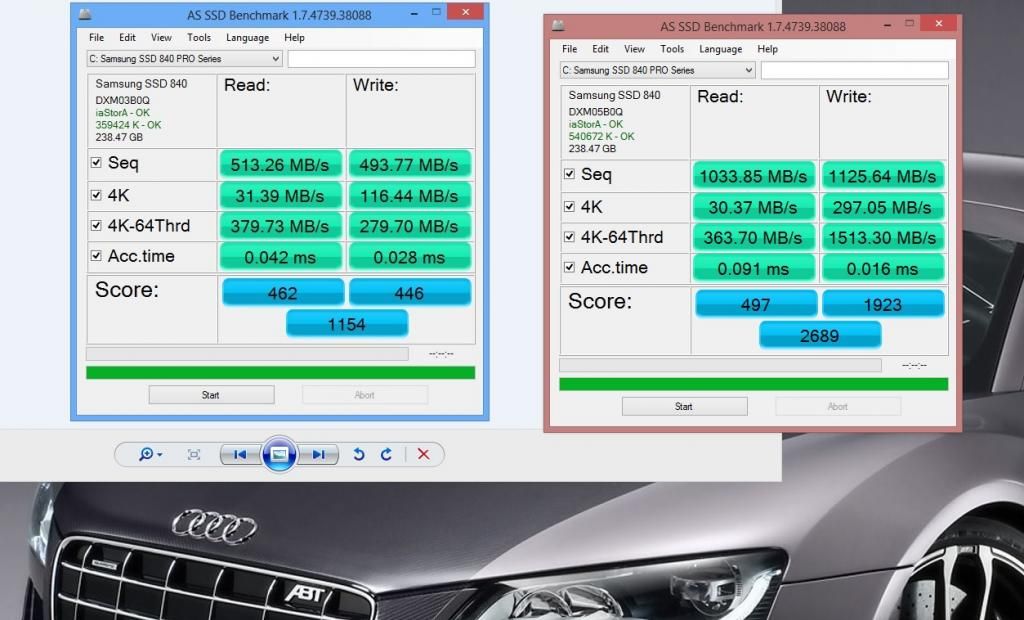
My 840 PRO with RAPID off / on. Note it isn't brand new, is running windows 8.1 (and probably a few other applications) and is nearly 70% full. Perhaps this makes it a better real world test than benching a brand new empty drive.

RAPID OFF

11289258853_04413f8ee7.jpg


RAPID ON

11289158333_d3f422763c.jpg


Sequential
Read 77.6% Increase
Write 120.7% Increase

512k
Read 79.4% Increase
Write 142% Increase

4k
Read 52.5% Increase
Write 579.3% Increase!

4k QD32
Read 22.4% Decrease
Write 20.8% Increase
 
Last edited:
looking forward to using this feature just order 250gb Samsung evo after my 128gb ocz vector failed yesterday.
 
Just updated to 4.3 on a family PC with an EVO in it and am running into some problems. Perhaps it is being caused by something else (I rarely use this PC) but I can't seem to enable RAPID mode again. It keeps trying to create a restore point but doesn't actually create one. I tried making one manually through windows but likewise, it never finishes creating it and oddly my past manual restore points have disappeared.
 
I'm pretty sure Rapid mode only really massages the benchmark figures, not seen anything to suggest a real world performance boost.

Realworld gains from it are highly specific to certain tasks outside of benchmarks and with the increased chance of data loss I wouldn't personally enable it on an OS drive.
 
Just updated to 4.3 on a family PC with an EVO in it and am running into some problems. Perhaps it is being caused by something else (I rarely use this PC) but I can't seem to enable RAPID mode again. It keeps trying to create a restore point but doesn't actually create one. I tried making one manually through windows but likewise, it never finishes creating it and oddly my past manual restore points have disappeared.

Having problems with 4.3 it wont see my 840 EVO. I've given up gone back to 4.21. Flashed new drive firmware as well in case 4.3 needed this but still no joy.
I had to disable my HWinfo to get RAPID working again on 4.21.
Check to see if you are running any hardware monitoring programs.
 
Ok while we are here does RAPID work with a 840 EVO raid setup? As my motherboard doesn't support Trim in raid 0 on Windows 7 x64. I had a OCZ SSD raid setup which didn't support Trim. I may get another 840 EVO if TRIM via Magician software works on raid.
 
Back
Top Bottom