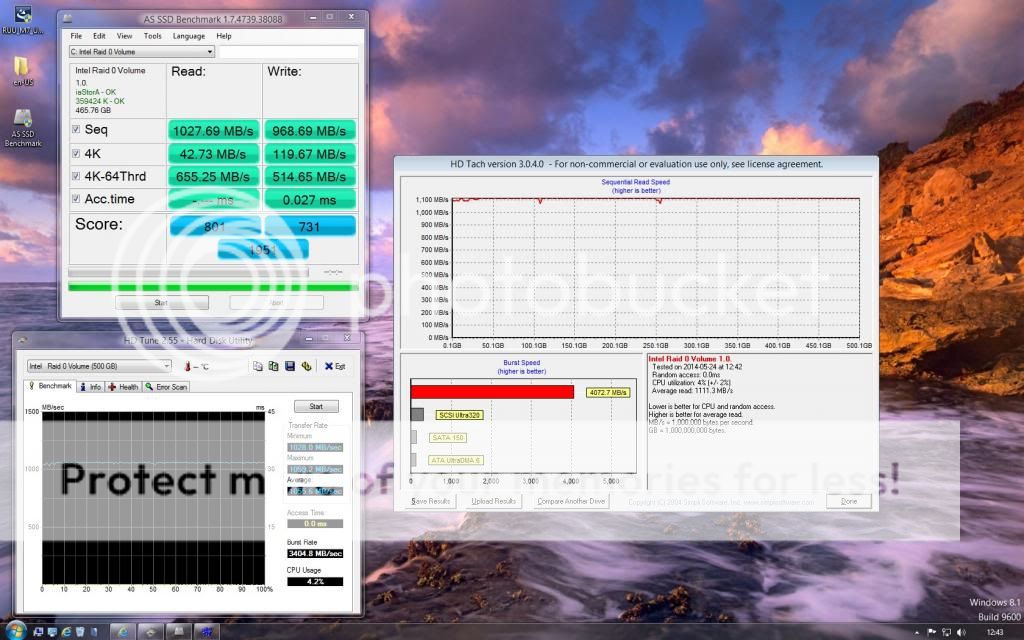
doesn't matter how big the file is, as long as its above whatever you set the block size to, for instance my block size is 64k, if I write I file the size of 128k it would be spilt between both drivers, 64k to each, you only don't notice the speed difference with small files because a file the size of 128k for instance would be pretty much instant on any drive, be it RAID, ACHI or IDE.
That's why you only really see a difference with large files and things like installing windows, trouble again with installing windows is dependant on how you are doing it, if its from a CD /DVD then chances are, your DVD drive will struggle to keep up, which is why I used a USB hard drive I built with an SSD inside it and stuck all my copies of windows to different partition on that one drive, took me just over 5 mins to put Windows 8.1 on my RAID.
Its not like the drive slows down or speeds up dependant on the file size, as you see from the benchmarks I posted, the read/write speed remained consistent right across the board.
Moving 1 big file from say my RAID setup to another drive would be no proof unless my other drive was also a RAID setup, if it was just a single drive (which mine is) it would be the bottleneck.