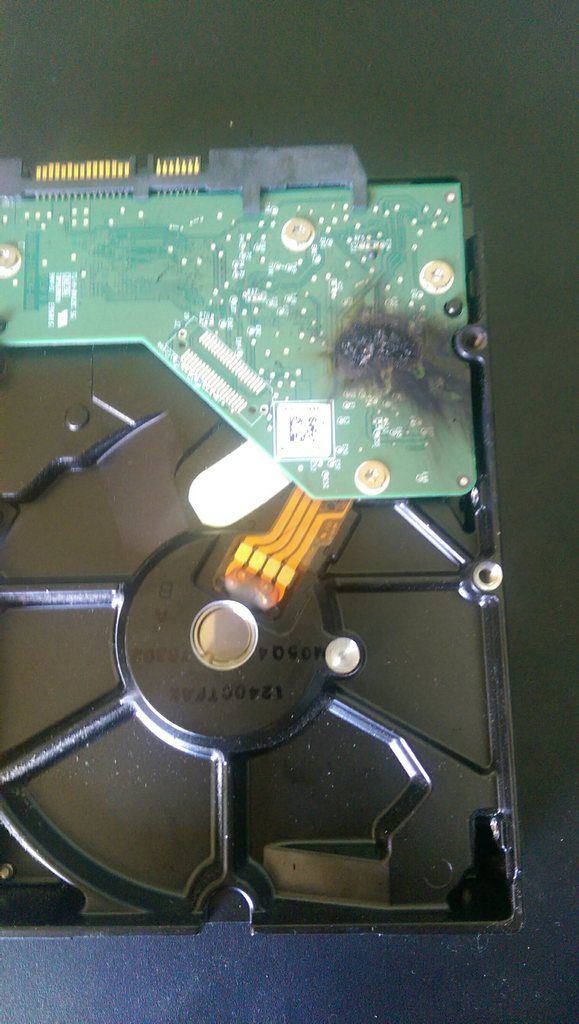
HDD Just Caught Fire!

Associate
Joined
11 Jan 2014
Posts
243
Location
Eíre
Hey Overclockers, Just plugged in my PC, flicked the switch on my PSU and powered it on. I had the case door open luckily enough and seen the HDD catch fire so I turned off the PC straight away and the fire stopped instantly, turned it back on and more fire left if for a while and rebooted it no flame but it's not being read as a bootable disk by my PC! Anyone any idea why this would happen? And to make matters worse I dropped my 3TB external yesterday and broke it! FML :mad:

 
Last edited:
Absolutely gutted mate. Two HDDs in two days. must have walked under thirty ladders. Is this my own fault or would I be entitled to a replacement off the company I bought it from/NZXT or Western Digital? All I litterally did was turn it on :/
 
SMD capacitors "can" catch fire especially tantalums (though most PC part manufacturers shy away from them these days). In which case while fiddly swapping the logic board for one of the same type from a working HDD could potentially allow you to get data off it.
 
SMD capacitors "can" catch fire especially tantalums (though most PC part manufacturers shy away from them these days). In which case while fiddly swapping the logic board for one of the same type from a working HDD could potentially allow you to get data off it.

Thanks, I'll try that if I can get my hands on another one.
 
it was a mission impossible sourced hdd (this hdd will self destruct):eek:

component failure/damp short circuit idk,you were lucky to catch it
 
sorry to hear about the HDD catching fire, never heard of this before but anything is possible with PCs lol.

hope there was not any data you needed on it.

got an excuse to get a SSD now :)

hope you get it sorted soon, if you look about their might be some easter deals on a ssd
 
Drive is probably fine, just needs a new controller board.

I'd contact the manufacturer and link them to this thread!
 
If you want the best chance of recovering your data, take pictures of both sides of your harddrive and both sides of the PCB then post here.

Otherwise, if you just want a replacement, contact WD.

I'd say you'd probably need a PCB and to transfer your existing ROM to the new PCB, which is going to involve some delicate soldering. But that's just speculation, the forum I linked you to will be more knowledgeable.
 
Back
Top Bottom