


Hi
I have 2 issues, not that serious but would like to solve them
1- The reset button suddenly stopped working, i tried to reconnect the connector , checked the bios , still its not responding.
2- my TP-Link WiFi adapter BE9300 is only connecting to 20MHz, for all 2.4, 5, and 6GHz ,you can see the picture attached, I tried to contact tp-link support but no response from them.
I tried to reinstall the driver, remove and install, latest driver is installed , still the same
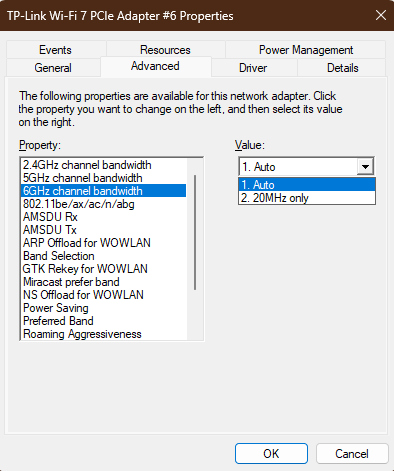
how to solve these issues?
I have 2 issues, not that serious but would like to solve them
1- The reset button suddenly stopped working, i tried to reconnect the connector , checked the bios , still its not responding.
2- my TP-Link WiFi adapter BE9300 is only connecting to 20MHz, for all 2.4, 5, and 6GHz ,you can see the picture attached, I tried to contact tp-link support but no response from them.
I tried to reinstall the driver, remove and install, latest driver is installed , still the same
how to solve these issues?
