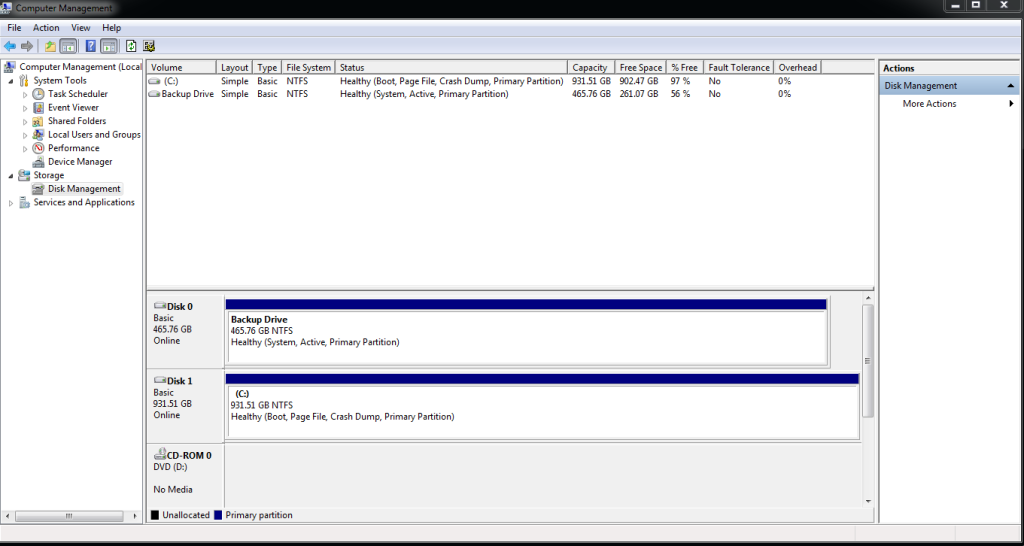
I have just put together my new ivy bridge system with an asus p8z77-v deluxe motherboard.
Trouble is, when I was installing windows I could see both of my hard drives fine in the process, but now that windows is installed when I click on the windows desktop icon "computer" it only lists one drive (the one that windows is on).
Even if I look in device manager the other drive is listed and also if I click on disk managment the disk is visable in there too, its just not listed next to my main windows drive when I click on the my computer icon on the desktop and its my backup drive and has all my files etc on it I need and I cant find a way to access it
Can someone please help me with this ? Thank you
Trouble is, when I was installing windows I could see both of my hard drives fine in the process, but now that windows is installed when I click on the windows desktop icon "computer" it only lists one drive (the one that windows is on).
Even if I look in device manager the other drive is listed and also if I click on disk managment the disk is visable in there too, its just not listed next to my main windows drive when I click on the my computer icon on the desktop and its my backup drive and has all my files etc on it I need and I cant find a way to access it
Can someone please help me with this ? Thank you