


• Competitor rules

    Please remember that any mention of competitors, hinting at competitors or offering to provide details of competitors will result in an account suspension. The full rules can be found under the 'Terms and Rules' link in the bottom right corner of your screen. Just don't mention competitors in any way, shape or form and you'll be OK.

2xHD6850

i believe i downloaded that the other day, but it wont hurt to install it twice to be safe :) thanks. am i right in thinking, because 1 has been running now since tues on my current windows install, i just plug the second one in, connect them with the CF ribbon and then tick the box in CCC?
 
i believe i downloaded that the other day, but it wont hurt to install it twice to be safe :) thanks. am i right in thinking, because 1 has been running now since tues on my current windows install, i just plug the second one in, connect them with the CF ribbon and then tick the box in CCC?
yes.

the drivers should automaticly install.
 
kool :) i had my HD5770s crossfired but sold them last summer so couldnt quite remember if it was that simple.
is there anyway to force V-Sync on CCC?
 
i have noticed in Fifa11 settings, there is a tickbox to stop microstutter on mulitple gpu systems, do these settings work, if so, why are they not implimented in more games?
 
i have noticed in Fifa11 settings, there is a tickbox to stop microstutter on mulitple gpu systems, do these settings work, if so, why are they not implimented in more games?

microstutter only happens when you go under a low fps count which just dosnt happen with a crossfire and games nowadays unless you run it with some nutty resolutions.
1920x1080 as most play, none issue.
2560x1400 or so, likely a non issue also.

eyefinity I am sure it can happen but those are not for everyday consumer and then you buy the gear to run it also.
or else it just dosnt make sense since 3 screens require hardware to run it good.
 
ok thanks :) i play @ 1920x1080 mainly because thats what my tv supports, maybe a lower res would allow me to have better settings, not sure im not clued up on this sort of thing. again my monitor only supports upto 1920x1080, so i assumed as thats their max then thats what i will set them to. i get a bit of stutter, but not sure if its the same as microstutter, in fifa11 (not really played a lot of anything else yet) but i think thats when windows or something is doing a task in the background rather than my single card. i also had to download directx to get LP2 benchmark and Kombustor to work, which completly screwed fifa11 up, so had to do a fresh windows install. not sure as the reason, but it was like screen tearing all the time, so havent braved installing DX again.


 
I have two 6950's in crossfire. I then unlocked both of them to a 6970. The cards are both 2gb Asus OC edition. The two cards are faster than the 6990 - since the 6990 runs on 2 6970 gpu's. I get smooth gameplay and no artificats. My current monitor resolution is 1920 x 1080.
 
http://www.anandtech.com/bench/Product/302?vs=305

Yeah not much in it, still I would take a single GPU over a crossfire/SL setup any day, especially if they are offering roughly the same performance.
I don't know if this applies to cards like the 6850 I mean a GTX580 is about £390 and 2 6850's are £270 leaving a difference of £120, IMO that's a lot of premium to pay for a single card considering the AMD solution is quicker to boot and yes you do get issues with multiple cards but its not like AMD don't fix things everything month, not to mention hotfixes.

Looking at the anandtech the 6860 in crossfire is hugely impressive when compared to the much more expensive 580 GTX

At 1920x1200 the 6850's are 10% faster in Crysis, 21% faster in Civilisation V, 14% faster in Battlefield: Alright Company 2, 4% in STALKER Call of Pripyat and 14% faster in Mass Effect 2. It's only really when the resolution is cranked up to 2560x1600 where the 580 GTX can use its extra VRAM to open a lead.

So do you still think paying £120 more for less performance is still worth it for the sake of having a single card?
 
Last edited:
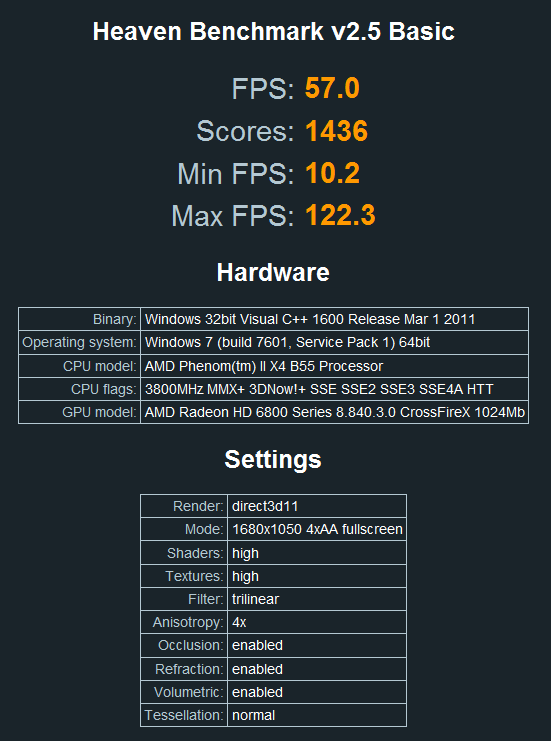
heaven25xfire.png


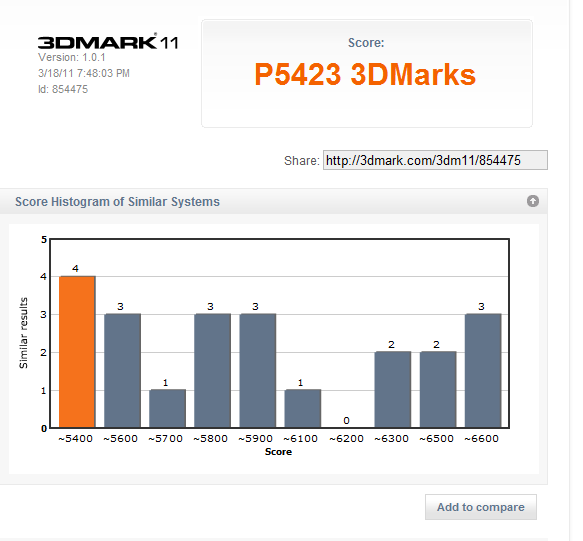
3dmarkxfire.png
 
does it matter which card and sockets i plug my screens into. at the moment i have them in the dvi port and hdmi port of the top card. im guessing as both cards do the same job, if i plugged the dvi into card 1 and the hdmi into card 2 it would make no difference to performance at all, or just wouldnt work?
 
does it matter which card and sockets i plug my screens into. at the moment i have them in the dvi port and hdmi port of the top card. im guessing as both cards do the same job, if i plugged the dvi into card 1 and the hdmi into card 2 it would make no difference to performance at all, or just wouldnt work?
no. u can only plug the monitors into the top card or bottom card not both. if u plug the monitors into the bottom card u want need to change the first graphic card option in the bios to PEG1
 
well, i repaired my friends i7 950 with a GTX480 card, and its 3dmark11 score was only 5200ish, so my 2 cards beat it, and with the new drivers im now getting 5700+ score, so im glad i went for the 2nd card :) aslong as i enable vsync in games i have found no microstutter or tearing.
 
Last edited:
not using MSI AB at the moment, want to get everything stable first, then will look @ overclocking it. i think the microstuttering and screen tearing are down to my screens, as when i turn vsync on it stops.
 
Back
Top Bottom