• Notice regarding image hosts and attachments. See here.

  • Competitor rules

    Please remember that any mention of competitors, hinting at competitors or offering to provide details of competitors will result in an account suspension. The full rules can be found under the 'Terms and Rules' link in the bottom right corner of your screen. Just don't mention competitors in any way, shape or form and you'll be OK.

5850 fan question.

Soldato
Joined
29 Feb 2004
Posts
4,216
The fan on my 5850 Pcs+ has seen better days I think and is no longer silent :(. Makes a kinda hissing noise I guess, definitely not hitting anything and is clean, so I assume the bearings are worn.

Looking at a few reviews, it seems the shroud can be separated from the heatsink

http://www.techpowerup.com/reviews/Powercolor/HD_5850_PCS_Plus/4.html

and the fan can detach from that with four screws

Looking further it seems the fan is made by powerlogic and has the model number pla09215d12m. So I'm just wondering if they can be sourced and bought separately? I've looked around and can find plenty of power logic fans, just not that one :(.

I'd much prefer to just replace the fan rather than the whole thing as all the replacement coolers all seem to be 3 slots :(.

So anyone know if you can get them? or maybe an equivalent?

Thanks.

 
With a big open-fin heatsink like that, you could probably zip-tie a good 140mm (or 120mm) fan onto it and get far superior temperatures. If you make sure the fan reaches over the VRMs you would probably get superior VRM temperatures also.
 
Hmm, don't have any 120mm or 140mm fans spare at the moment :(, will need to get one and try it I think.

So just strap it down with a few zip-ties. The stock set up has no heatsinks on the ram, I guess they don't need it or just take air from the current fan. The vrm heatsink is separate, so that can stay on. The shroud has gaps all around the edge, so doesn't really direct air over them, so they should still be fine with just a bigger a fan.

If the fan was insufficient, will the card throttle back if it gets too warm? oh and if I do it, does anyone know if there are any adapters or anything to plug the fan into the card? so the card can control speed.
 
You can buy graphics card fan header to PWM standard fan headers on the auction site.

You'd need to get a PWM fan of course otherwise it'll run at full pelt all the time.
 
:(. Seems to be a problem with that as well. Card is a mini three pin header.

If it's only three pin, then the third is just a monitor wire. As ccc shows the fan speed percentage, so I'm guessing it just adjusts the voltage to the fan in reaction to the temp?

So that being the case, if I got a standard three pin fan, got or made an adapter to change the mini one, do you think it would be able to control it? or do you think there may be hard coded stuff in it's bios temp/load=X, set fan to X% so probably will only work well with the stock one or just a certain temp, increase voltage to fan till it drops, so it'll be fine with any fan?

Damn non reference card, more trouble than it's worth, crappy fan, crappy connector :(

Thanks :)
 
Last edited:
:(. Seems to be a problem with that as well. Card is a mini three pin header.

If it's only three pin, then the third is just a monitor wire. As ccc shows the fan speed percentage, so I'm guessing it just adjusts the voltage to the fan in reaction to the temp?

So that being the case, if I got a standard three pin fan, got or made an adapter to change the mini one, do you think it would be able to control it? or do you think there may be hard coded stuff in it's bios temp/load=X, set fan to X% so probably will only work well with the stock one or just a certain temp, increase voltage to fan till it drops, so it'll be fine with any fan?

Damn non reference card, more trouble than it's worth, crappy fan, crappy connector :(

Thanks :)

Yes the card will adjust the voltage rather than sending a PWM signal I'd imagine.

Not sure where you could source a connector to do it yourself but I found loads of 2 pin and 3 pin inside an old ipod dock/alarm clock which I dismantled last summer.

I don't think the card's fan controller will be that intelligent, it'll most likely just do a voltage drop on a percentage basis.

Worth a try though I reckon.

If you can't find anything message me in trust and I could possibly pop a 3 way mini fan header in the post to you, assuming it's the same thing of course.

Here's what they look like.
minifan_connector.jpg
 
Does the noise go away if the case is laid flat? The fan on my old one was catching the inside of the hole when facing downward as installed with the case upright in the normal position.You could feel the fan moving up and down slightly on the shaft if you pushed it in. I took off the cover (lots of small screws) and cut the hole a bit bigger. I also changed the thermal paste. Worked a treat. (reading back to myself it sound almost pornographic!)
 
Yes the card will adjust the voltage rather than sending a PWM signal I'd imagine.

Not sure where you could source a connector to do it yourself but I found loads of 2 pin and 3 pin inside an old ipod dock/alarm clock which I dismantled last summer.

I don't think the card's fan controller will be that intelligent, it'll most likely just do a voltage drop on a percentage basis.

Worth a try though I reckon.

If you can't find anything message me in trust and I could possibly pop a 3 way mini fan header in the post to you, assuming it's the same thing of course.

Here's what they look like.
http://i959.photobucket.com/albums/ae72/Tealc_wii/PC Stuff/minifan_connector.jpg

Looks similar, would have to check when I try it though as the connector is under the shroud, so I can only go on other pictures and what I can see through it.

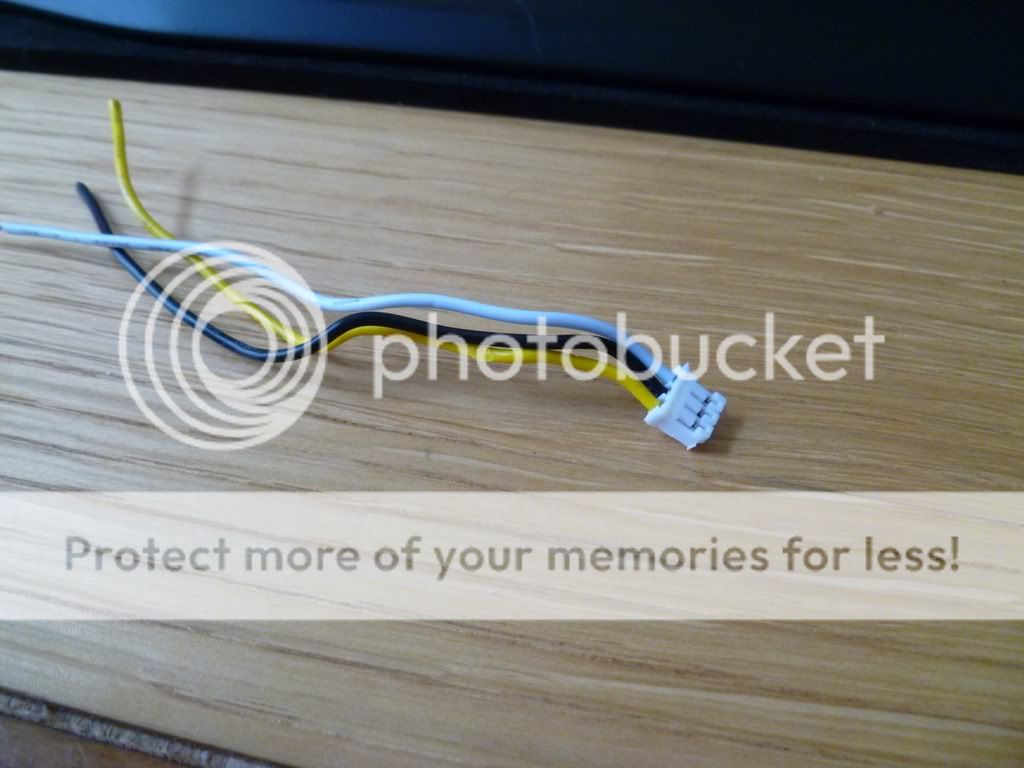
Was doing a little digging anyway, and the mini 3 pin connectors appear to be a 3-Pin JST, searching for Infrared Sensor Jumper Wire - 3-Pin JST, you can get them with lengths of wire already attached so you can solder to what you like, for around £1 each :).

Seems they are used in rc stuff quite a lot, I got a load of old stuff around here anyway, I'm gonna get digging through it, as I'm sure I've seen one somewhere.


Does the noise go away if the case is laid flat? The fan on my old one was catching the inside of the hole when facing downward as installed with the case upright in the normal position.You could feel the fan moving up and down slightly on the shaft if you pushed it in. I took off the cover (lots of small screws) and cut the hole a bit bigger. I also changed the thermal paste. Worked a treat. (reading back to myself it sound almost pornographic!)

Nope. Noise is always present, definitely not catching on anything.

Just need to get a decent 120mm or 140mm fan now, to try it. Going to go over to the overclocking and cooling forums with that, as I guess I need one that has decent pressure as well as airflow to push through the heatsink.

Thanks for the help :).
 
I agree those Infrared sensor jumper wires do appear to have the same 3 pin JST PHR-3 connector that would fit your card.
 
Back
Top Bottom