770 sli overheating

Associate
Joined
21 Jun 2012
Posts
32
Well, problem pretty much as per the title. I've just added a second GPU to my rig in sli and i'm having terrible trouble with the temps, they keep rising gradually and within 25 minutes have hit 96deg before I stopped gaming. Specs as follows

Assus P8Z77V Mobo
Intel Core i5 2500k overclocked to 4.2ghz with Arctic Freezer i30 (temps around 50-55deg under load)
NZXT Phantom 410 case
Gainward Phantom gtx 770 2gb (x2 in sli)
Corsair CX750 psu

So I have been running with one phantom 770 for about 8-10 months now and its been great but I am using nvidia surround to run 3x 20" monitors so wanted a little extra juice for Crysis 3 etc. I've got it all up and running and the cards are fine at idle but as soon as I start to game the temps go up very quickly and within a few minutes one card is over 80deg and keep rising steadily with no sign of stopping.
One card is always hotter than the other (the top one, presumably as its drawing in hot air from the lower one) but only by 10-15 deg. The warmer card is my original one which I know is a good card.
I have ordered some more fans in the hope that a side exhaust next to the cards will pull the warm air out the case and a mid intake and lower intake will bring more cool air in but in my experience adding more fans generally makes very little difference to temperatures. Has anyone got any experience with this or any suggestions? One idea I had was to use MSI Afterburner to lower the clocks/vcore on the gpu's a little to see if that would help keep them under control but I don't even know where to start with that or if it will work. Any help would be greatly appreciated.

 
Try setting a custom fan profile under msi afterburner, use a 1-1 ratio, ie. 50c at 50% fan speed, 60c-60% fan speed etc. This is found by clicking on settings, then the fan tab, then click the check box to enable user defined fan speed.
 
I have ordered some more fans in the hope that a side exhaust next to the cards will pull the warm air out the case and a mid intake and lower intake will bring more cool air in but in my experience adding more fans generally makes very little difference to temperatures. Has anyone got any experience with this or any suggestions?

I've tried that cooling set-up in a Phantom 820, and found it was the best. Only had one card though, not SLI. The most important is the mid-intake blowing between both cards, and the side exhaust fan.

It's worth a try. If that, or tinkering with Afterburner doesn't help much, then maybe invest in a GPU water cooling solution for the top card at least.
 
How did I guess the solution was going to involve copious amounts of extra expenditure :P
Water cooling would be nice but brings its own set of issues so i'd like to avoid it. I never anticipated having such major problems, the cards are sold as being suitable for SLi so having a fairly 'enthusiast' grade case I assumed it would be a simple set up and go... do you think it would be reasonable to return the second card under warranty on this basis so I can get one with reference cooler?
 
How did I guess the solution was going to involve copious amounts of extra expenditure :P
Water cooling would be nice but brings its own set of issues so i'd like to avoid it. I never anticipated having such major problems, the cards are sold as being suitable for SLi so having a fairly 'enthusiast' grade case I assumed it would be a simple set up and go... do you think it would be reasonable to return the second card under warranty on this basis so I can get one with reference cooler?

That is the problem, not going with reference cards for SLI.

Try and maximise the air flow in your case as the problem is the heat coming off your cards and staying in the case.
 
I'm lucky enough not to have this problem! My top card is watercooled so it doesn't matter what temperature my bottom card gets to. My bottom card with a custom fan profile tops out at 84C and is still fairly quiet.
 
wouldn't it be worth ditching sli and plump for a single more powerfull card?

Uhh no, I'm running a 3 screen surround setup and the performance of 2 770s in sli is leaps and bounds ahead of even a titan so I don't think a single card solution is the answer (although I was very impressed with the power of my first 770 on its own). I'll fit these fans when I get them to maximise airflow then see what happens. If it's still no good then I'll have to try and return the card to get a reference one. Do you think I'll get away with just replacing one card with reference design or will I need to do both?
 
How much space is between the cards and are you using a custom fan profile for quiet running?

I use an MSI GTX670 TwinFrozr sandwiched above another GPU (1 slot of clearance between them with a wifi card installed which restricts the cooler slightly) and my temps don't break 70c under load plus it and even runs quietly. The cooler on the phantoms should be similar so strange that they're getting so hot.

Certainly blowing some air between the cards would be a good idea - have used the same technique in the past with great success. Another thing to consider is creating a big positive pressure bias in the case. Lots of filtered intake fans for cool air with one or two exhausts. In my cases that approach helps reduce heat welling and seems to provide optimum cooling throughout - plus is stops the case sucking in dust through every nook and cranny!
 
Uhh no, I'm running a 3 screen surround setup and the performance of 2 770s in sli is leaps and bounds ahead of even a titan so I don't think a single card solution is the answer (although I was very impressed with the power of my first 770 on its own). I'll fit these fans when I get them to maximise airflow then see what happens. If it's still no good then I'll have to try and return the card to get a reference one. Do you think I'll get away with just replacing one card with reference design or will I need to do both?

fair enough,the top card always tends to be the hottest so if you could get an aftermarket cooler for it or a non ref card it should help
 
There is a slot between the cards but as the coolers are so big (more like 2.5 slot) the gap is only about 4-5mm. Can't see how I could get any more space though as my case is practically full. Hopefully I'll be able to solve this with extra fans cos I don't want to have to buy another case or go with liquid cooling
 
When did you last do a de-dust? Sounds like you don't have enough airflow between and over the cards or something is wrong with the thermal compound used unless Gainward Phantom's cooler is a bit naff.

Both my cards running atm with a really warm room
Top: 75c
bottom: 65c
both clocked @ 1202/7008

how's your case ventilation ? (I use a window in mine no side fans)
Front - 200mm intake
Top -1x 120mm + push/pull 120mm's exhaust
Rear -1x 120mm exhaust

what direction is your CPU cooler blowing, to the rear or top? I only ask as you can create a deadzone of air around the GPU's with certain configs.
 
Last edited:
Im hoping you might be right about a dead spot. My case is spotless and running just one card works nice and cool. My cpu cooler is pushing through the heatsink and there's a 120mm exhaust fan behind. There is a 140mm intake above too. At the bottom of the case there's only one intake at the front and no exhaust so hopefully I'll be able to sort this by adding an intake in the middle of the case (there's a mount that will blow across the card) and then an exhaust on the side panel where the cards are. I've got enough fans to add an extra couple of intakes to create positive pressure if needed
 
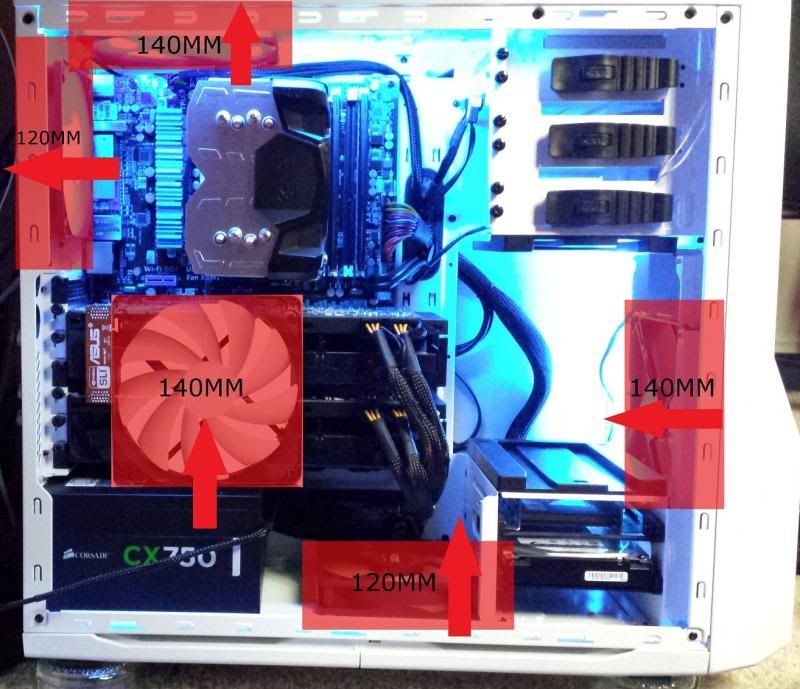
Well what do ya know! I had a chance to install my fans today and have spent a few hours trying different setups, problem solved! Looks like it was a 'dead spot' or lack of intake air causing the problem.
Once I investigated further I discovered that my rear and top fans were both setup as exhausts (rather than the top an intake as I had originally thought) so I realised this would be causing negative pressure in the case and more intakes would be needed.

I removed the hard drive cage from the front of the case to improve flow from the intake and swapped the 120MM intake fan for a 140MM (I initially tried it with two 120MM but found a single 140MM to be slightly better).
I added a 120MM intake to the case floor and added a 140MM side panel fan to exhaust the hot air coming off the cards.
With this setup the temps stayed steady at 80c under Unigine Heaven extreme bench mark and when gaming, so happy with this, but thought i'd try a couple more configs. I searched for GPU stress tests and came across Furmark, not used this before but was suprised by how much of a beast this tool is in absolutely thrashing the GPU! Even with the extra fans running a test at 1080p the hottest GPU was hitting 91c after only 3 minutes and even the bottom better ventilated fan was going over 80c (although I understand this benchmark is designed to do this to your GPU?)
The drive cage has a mount to fit a fan that will sit across the short end of the GPUs so I tried adding this back in with a 140MM fan but this only seemed to obstruct airflow and reduce cooling slightly.

I then tried flipping the side panel fan so it was an intake instead of an exhaust, this made a huge difference and now the hottest GPU sits at 75c under Unigine Heaven (before it would have hit 95 deg in a single run), success or what, well happy! I then ran a 1080p stress test on furmark and the hottest GPU was sat steady at 89c after 16 minutes (I know this is still hot but Furmark stresses the GPU far more than any real world application) so looks like im good to go!

Heres a pic of the setup
Fansetupresized_zpsaf78811c.jpg
 
Nice work - glad you've improved temps so much. Really satisfying sorting something like that! :)

Also nice to know your GPU's aren't gonna burst into flames any time soon!!! :D :D :D
 
You definelity need custom fan profile, on my 680 phantom i found defualt fan speed doesnt kick in until its to late my profile i set it so when my GPU is at 40c the fan is speed is 6 behind it so that would be 34. and 50c fan speed would be 44 and so on but as the card reaches over 80 u probably need to be more agressive with fan speed, i do i like this to keep the noise down and temps ok.
 
Back
Top Bottom