• Competitor rules

    Please remember that any mention of competitors, hinting at competitors or offering to provide details of competitors will result in an account suspension. The full rules can be found under the 'Terms and Rules' link in the bottom right corner of your screen. Just don't mention competitors in any way, shape or form and you'll be OK.

7970 hdmi audio

Soldato
Joined
18 Feb 2004
Posts
3,095
Location
Lincolnshire
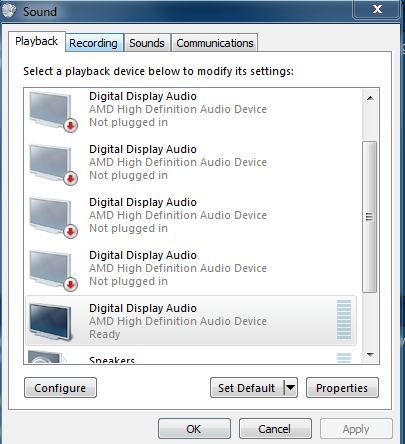
ok just tried to connect my hdmi on the card to me 42" plasma and ive installed the realtek ati 2.67 drivers and i get no sound through to the tv. Now ive tyried various hdmin leads so not that, and when i look into playback devices the ati hdmi audio says not plugged in ? any ideas what i can do to solve this?

nohdmisound7970.jpg
 
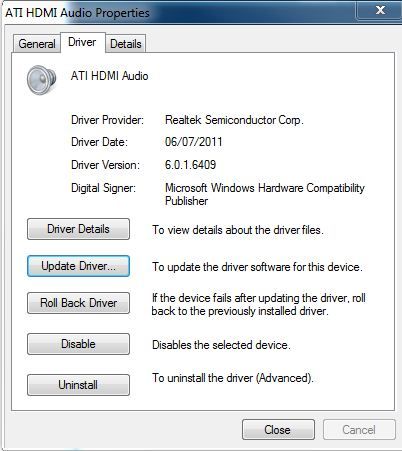
checked which driver its using and although ive installed the latest its only using this driver -
driverusedaudio.jpg


tried to update etc but says its using the latest driver when its clearly not?
 
Does your TV have more than one HDMI socket? Often only one of them is enabled for PC input. If I plug my HDMI cable into any but the 1st socket on my TV, I get no sound.

Failing that, I'd uninstall both catalyst and the relatek drivers, and just install catalyst and see if it works.
 
i had a similar problem initially with my 5870 then I think i downloaded a driver directly from realtek which solved the issue
 
Does your TV have more than one HDMI socket? Often only one of them is enabled for PC input. If I plug my HDMI cable into any but the 1st socket on my TV, I get no sound.

Failing that, I'd uninstall both catalyst and the relatek drivers, and just install catalyst and see if it works.

its in the first hdmi socket which is the one i used with my old 5850 i recently sold , which worked without issues :confused:

think i may have to try a full reinstall of the os as ive uninstalled drivers etc trying to fix this with no success :(
 
It should not say REALTEK so something in the ati installation has gone wrong. Try re-installing from the correct drivers and just select hdmi audio drivers

Or try and right click and press "show disabled devices" - does ATI come up?
 
It should not say REALTEK so something in the ati installation has gone wrong. Try re-installing from the correct drivers and just select hdmi audio drivers

it says realtek if you install the realtek drivers. it says AMD if you install the.....wait for it.....AMD drivers:p

Atomic, did you not try the amd drivers that are bundled in the catalyst drivers first?
 
I never said he needed them. The realtek drivers should work, ideally, and people use them because they are generally newer and / or fix issues with the amd drivers. However, with the 79xx series being so new, I'm just wondering if the realtek drivers support them fully. I'd have tried the bundled ones first.
 
ill try the bundled ones on the cd and see what happens, i used the newest drivers off amd site `when they were there` and no joy.
i used the ati realtek drivers on my 5850 without issue but im wondering if they support the 7970 yet.
 
ok uninstalled all ati stuff and installed off the disk and still no audio over hdmi and i had 6 playback devices labelled as digital display audio amd high definiton audio device, all not plugged in messges, so i right clicked on one and checked the driver which said microsoft compatible, so i updated driver and pointed to the amd folder on the c drive which installed a amd driver for all 6 devices but only 1 was available to use? the other 5 had the amd driver when i checked them but said they were not plugged in still? i got some audio this time but only had option for 16 bit and no surround options or anything?
So i uninstalled the device for the audio but left the driver, then tried to install them again pointing to the folder but once again none will install saying newest driver installed and all now unplugged again?

moreaudioissues.jpg
 
Last edited:
That's a definite improvement currently, you're meant to have 5 audio devices. The 7970 sports sending different audio streams to different screens (one of the 7-series new features) so you should get one audio device per possible screen the card can run.

Ok, doesn't solve your problem (sorry) but at least it explains one of the weird things encountered.
 
Back
Top Bottom