


We're in the final stages of having the loft converted during which we had some CAT 6 installed to the new rooms and to a couple of other key points around the house. The only suitable place for it to terminate was in the closet in the front hall, which happens to be where the ONT is. Space is limited and I'd like some advice with how to set it up to be neat and tidy.
I considered just terminating the ends with RJ45 plugs and plugging them straight into a switch, but I think I'd like a patch panel to both keep things organised and to help with troubleshooting if the need ever arises.
Details are:
This is the space I'm working with...
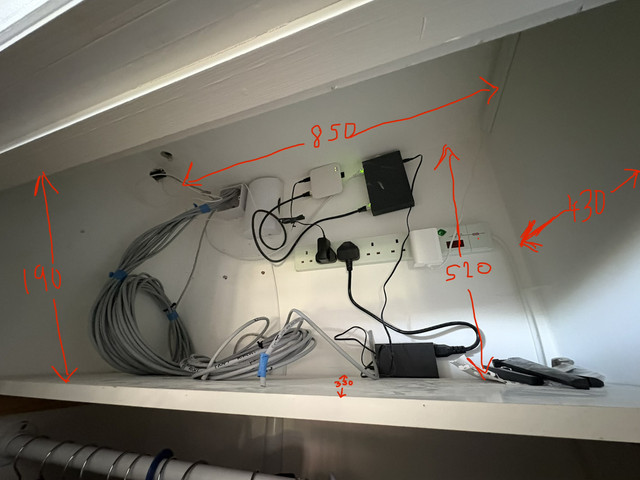
My questions are:
I considered just terminating the ends with RJ45 plugs and plugging them straight into a switch, but I think I'd like a patch panel to both keep things organised and to help with troubleshooting if the need ever arises.
Details are:
- 14x cables from wall points need to be serviced. On top of this there are a few devices which will probably live in the closet such as the NAS, NVR, and a couple of smart home device hubs. I'm thinking a 24 port patch panel and 24 port switch will do.
- 5x of the cables will serve PoE CCTV cameras. Assuming I also have a number of PoE access points, I'll probably need at least 8x PoE ports.
- Internet connection is 900/100 FTTP. I don't have a need to upgrade yet but may do in the future.
- Current router/wifi setup is a Netgear MR60 mesh setup. It is adequate but occasionally causes headaches due to buggy firmware. It also relies on a wireless backhaul. I want to replace this with something stable and reliable to ensure good coverage of the 3 floors and future proofing.
This is the space I'm working with...
My questions are:
- Given the small space, can anyone recommend a small rack that will fit in there? It will need to house the patch panel and switch. Ideally it would be able to stand on the current shelf as the consumer unit is in the same closet and I don't want to go drilling holes. If nothing wil lfit I can remove the shelf and mount something but I'd rather avoid that if possible.
- Regarding the switch, an unmanaged Netgear 24 port with PoE+ such as the GS524PP seems plenty adequate enough - is there a better solution?
- Regarding the router/wifi setup, I've heard/read a lot of good things about the Ubiquiti ecosystem although that's about as deep as my knowledge goes these days. What would an ideal router + access point setup be from their range without breaking the bank? I'm assuming 3x access points, one per floor?
- I'm considering upgrading my NAS at some point in the next couple of years - could/should this influence anything in this network spec, e.g. higher speed switch, 2.5GbE ports?
- I want to make my setup more secure than it currently is. Having IoT devices on a separate SSID might be a good starting point, but also I believe it is sensible to have the IP cameras separated somehow. I can worry about the specifics of that later, but do I need to cater for this in the new hardware setup at all?
Last edited:

