AHCI or IDE

cheers VortexA1,

Also does the swapping from IDE to AHCI trick from Vista work in Win7?
- Run Registry Editor
- Go to HKLM\System\CurrentControlSet\Services\Msahci
- Change the "Start" value to 0
- Reboot and go to BIOS immediately
- Set BIOS to AHCI

The next time you load Windows, it will auto-detect the AHCI.

and doing this will it run as if i'd set it too AHCI from fresh instal?
 
Yeah, that's the trick I did for my Windows 7.

To be honest, I haven't noticed any improvement, but then, I'm not that observant. All the stats say AHCI is better, so I'll leave it where it is.
 
Yeah, that's the trick I did for my Windows 7.

To be honest, I haven't noticed any improvement, but then, I'm not that observant. All the stats say AHCI is better, so I'll leave it where it is.

That's cool then. So you did the registry hack then. That would be a handy thing for me to do because I'm in IDE mode ATM and I want to go to AHCI with the SSD that I have.

Did you have any problems/hiccups at all doing that then?

What speed increase/MBs have you gained? :)
 
That's cool then. So you did the registry hack then. That would be a handy thing for me to do because I'm in IDE mode ATM and I want to go to AHCI with the SSD that I have.

Did you have any problems/hiccups at all doing that then?

What speed increase/MBs have you gained? :)

no hicups at all.

did the reg hack. rebooted into bios. swapped over to AHCI.
Went into windows which installed new drives. rebooted and all fine.

not tested my ssd as yet but will do now
 
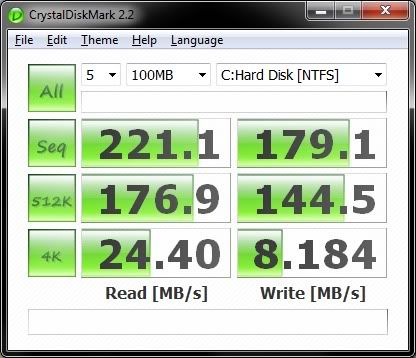
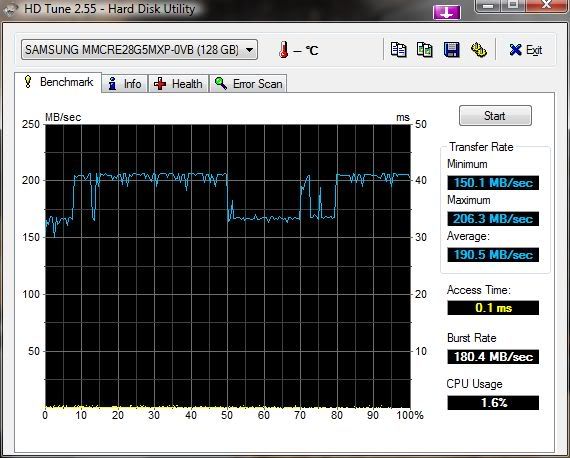
this is my current speeds. searching for an old bench i did.

SSDBench.jpg
 
Back
Top Bottom