


Ok, so I was one of those people who had their HDD all setup and later cloned it to an SSD.
Purists said "Nooo! Thou shalt reformat and reinstall". I said "Bugger that, its working fine".
Anyhow, TigerUK posted a link on here today to a blog showing how to realign partitions that er.. weren't. So I figured I'd give it a go.
The link is here.
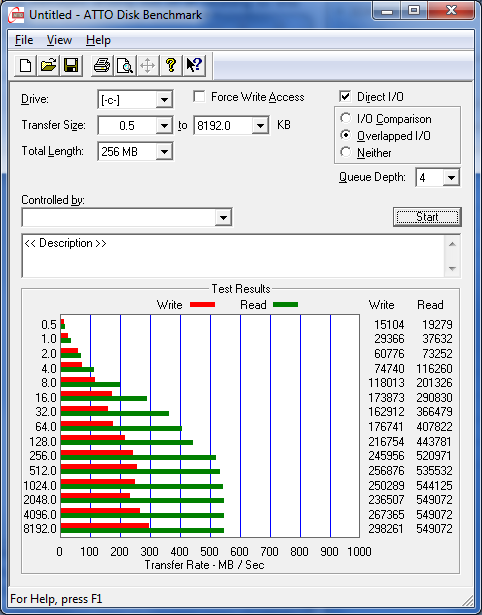
Took some initial measurements.
Looked at my alignment
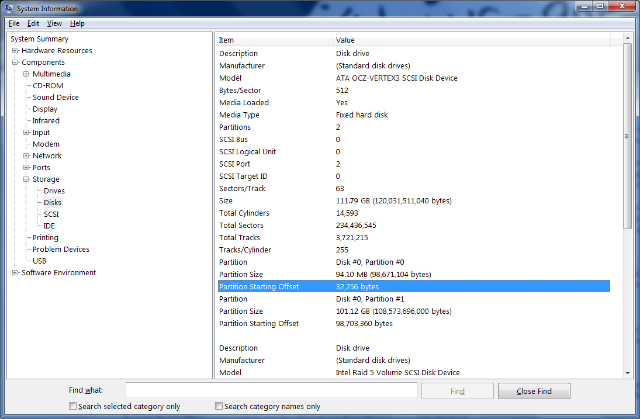
(In the picture above the blue bar is on the wrong partition. I dont really care if my recovery partition is at max performance! Should have highlighted partion #1 instead.)
To see if its aligned, need to divide the Partition Starting Offset 98703360 by 4096 =
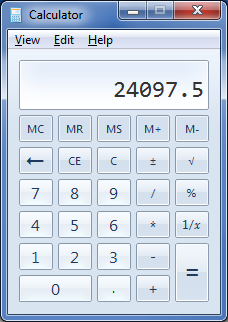
Not a whole number = not aligned.
Downloaded GPartEd.iso. Used Universal-USB-Installer-1.8.6.8 to dump the ISO onto a USB stick (I hate using CDs/DVDs for this stuff).
Booted from the USB stick and followed the instructions in the Blog above.
My version of GPartEd was later than the one in the blog, so there was no checkbox. I just selected None from the dropdown about aligning.
Apply the instructions to both partitions on the SSD.
Takes about 40 minutes.
Rebooted. Windows wouldn't boot. Blog mentions that too. Booted off a Win7 DVD (ugh.. slow!). Repair My Computer... finds the issue... offers to repair.. Repaired. Reboot.
Windows 7 starts up as normal. No noticible problems.
Check in msinfo32 for partition placement.
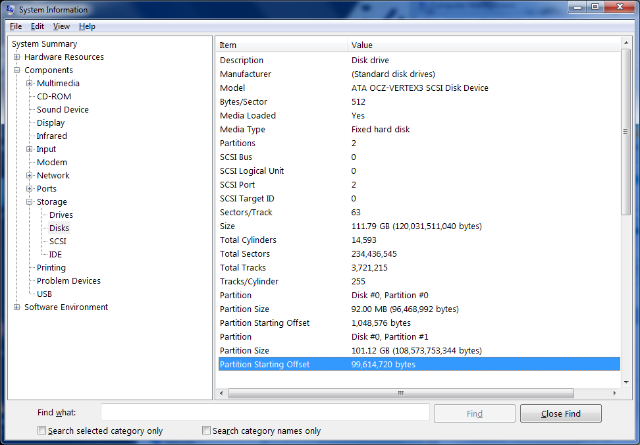
99614720 / 4096 =
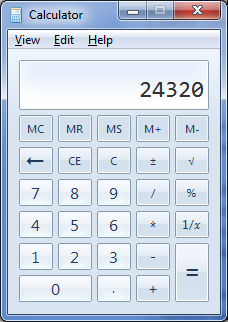
Whole number = aligned.
Did a benchmark.
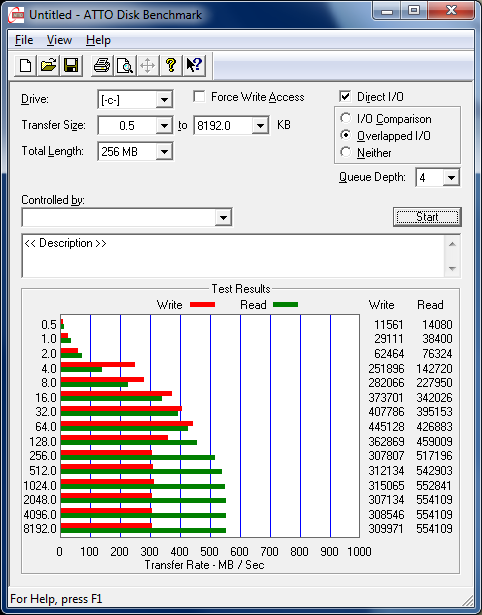
Couldnt belive the initial results, so I did them again. Twice. Both times write speeds were consistently and substantially better than the pre-alignment speeds. 16 - 128K read times are improved as well.
So there you have it. I reckon it worked.
Purists said "Nooo! Thou shalt reformat and reinstall". I said "Bugger that, its working fine".
Anyhow, TigerUK posted a link on here today to a blog showing how to realign partitions that er.. weren't. So I figured I'd give it a go.
The link is here.
Took some initial measurements.
Looked at my alignment
(In the picture above the blue bar is on the wrong partition. I dont really care if my recovery partition is at max performance! Should have highlighted partion #1 instead.)
To see if its aligned, need to divide the Partition Starting Offset 98703360 by 4096 =
Not a whole number = not aligned.
Downloaded GPartEd.iso. Used Universal-USB-Installer-1.8.6.8 to dump the ISO onto a USB stick (I hate using CDs/DVDs for this stuff).
Booted from the USB stick and followed the instructions in the Blog above.
My version of GPartEd was later than the one in the blog, so there was no checkbox. I just selected None from the dropdown about aligning.
Apply the instructions to both partitions on the SSD.
Takes about 40 minutes.
Rebooted. Windows wouldn't boot. Blog mentions that too. Booted off a Win7 DVD (ugh.. slow!). Repair My Computer... finds the issue... offers to repair.. Repaired. Reboot.
Windows 7 starts up as normal. No noticible problems.
Check in msinfo32 for partition placement.
99614720 / 4096 =
Whole number = aligned.
Did a benchmark.
Couldnt belive the initial results, so I did them again. Twice. Both times write speeds were consistently and substantially better than the pre-alignment speeds. 16 - 128K read times are improved as well.
So there you have it. I reckon it worked.



 Nice one.