


Am I asking too much? Budget amp/decoder.

Associate
Joined
3 Feb 2009
Posts
2,245
Hey

Edit: This question has evolved a little, please see later posts.

I'm trying to tidy up and improve my sound setup in my room, but I've not got the money to buy hugely expensive kit or replace things I've got for compatibility. I've got £100, maybe £150 to spend.

Basically I'm looking to combine my inputs to one output system. I've got a PC which outputs to two DVI monitors and Xbox 360 which outputs to one of those monitors via HDMI. The PCs sound is output to a set of Logitech X-540 5.1 PC speakers.

Ideally I'd like to have my PC and xbox input to the same sound system so that I can choose which I'd like to output over the speakers (although if I can only combine them, I could survive that). I'd also love a remote control as a bonus, and if I can also add my laptop and sky box's sound to the system I wouldn't complain although it would just be bonus-bonus.

I can't find anything which does these things, although admittedly I'm not even sure what I'm looking for.

Any help would be greatly appreciated. Ideally with something which does the job and fits the budget, although if I'm not spending enough, some suggestions of things which would do the job for more money would be welcome, so I can get it when I've got a bit more
cash.

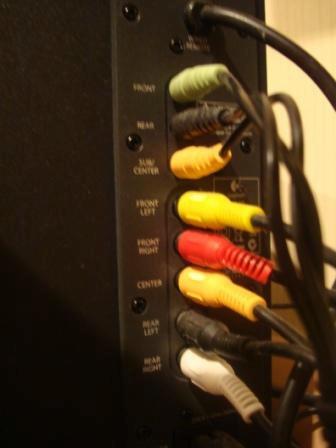
Edit: Since I don't really know much of what I'm talking about, I've found a picture of the back of the amp. The top 3 are the inputs from the PC. The bottom 5 are outputs to the speakers. Presumably I need an amp with has a HDMI passthrough (taking the sound off the HDMI and leaving the picture) and the top 3 inputs from the PC, along with the ability to output to the top 3? Do these exist? I can only find ones which output to a subwoofer and 5 speakers.
e344e10e22a08ade132ce110.L.jpg


Many thanks
 
Last edited:
My main concern is that the subwoofer doesn't seem to have it's own cable on my speakers, it sort of acts as the splitter for the signal? Would I need to get a seperate sub for the amp?
 
Is that the same for whatever I get? If so there's probably not much point. I don't have the money for a £150+ amp, then 6 speakers at £50+ each. Ah well, one for the future.

I was hoping I could get an amp that would work with my current speakers and then I could upgrade later, or that I could upgrade the satellite speakers and then the amp and sub at a later date: I rarely have £500 to spend in one go.
 
Hmmm. clutching at straws here.
Looking again at that setup it looks as though the sub unit powers itself & all the other speakers but I'm not 100% certain. Now I can't guarantee this would work, but you could cut off the plugs to each speaker & wire them direct into the proposed AV receiver. It may work, but only if I knew for certain that each speaker carries its own power or not (which I don't) Also, its a question of said AV receiver being too much for your speakers too. You could end up blowing up the AV receiver or speakers or both, especially if you turn the volume. There's also the problem of wiring the speakers correctly so they don't sound out of phase.

Explanation

http://www.richardfarrar.com/are-your-speakers-wired-correctly/

With the kind of budget you have I wouldn't risk it TBH but it would be up to you.
 
Last edited:
Or just get the basic AV Amp and connect the speakers he has to the headphone socket ;)

Might not be great, but it should do what he wants.
 
Hey

I'm trying to tidy up and improve my sound setup in my room, but I've not got the money to buy hugely expensive kit or replace things I've got for compatibility. I've got £100, maybe £150 to spend.
You might be able to get something that ticks most of your boxes.

First off though, you should probably forget about doing anything fancy with HDMI. I think you'll be very lucky to find a reasonable amp that's going to handle the audio over HDMI properly within your budget, sorry. Second thing, drop the idea of wiring your current speakers to an AV amp. They aren't designed to be used like that and could end up wrecking what ever amp you buy.

Now the bad news is out of the way lets look at what you can do... :D

You should either go for a much better PC speaker kit (a used Logitec Z5500 perhaps), or go for a used AV amp and 5.1 speaker package.

The AV amp will give you the most flexibility, and there's quite a few older but really good amps for sale now because people are upgrading for HDMI compatibility. You should be able to find something with enough digital and analogue inputs for all your sources for around £50~£70.

Here's some links to start you off LINK LINK LINK LINK LINK LINK LINK LINK LINK


Then partner it with some speakers to suit your room and the space available...

LINK LINK LINK LINK LINK
 
Right, I've cancelled the speakers - amazon just told me there'd be a 3 week delay anyway, so I'm scrapping that idea and I'm going to try to do it properly :p even if I have to put up with less speakers to start with, until I can afford to add more.

I've got myself a soundcard with S/PDIF (the ASUS Xonar mentioned above). Next up is the amp, then presumably two speakers and a subwoofer to start with? How much will I need to spend on reasonable 2 speakers and a sub? I figure the best way to go about it would be to choose them first, then subtract it from what I can spend and get the best amp I can for the money (since there seems to be a massive range of amps, I can find one to suit)... then add more speakers later?

Any suggestions on cheap-but-reasonable speakers? I don't mind the auction place, but I pretty much only use buy it now (otherwise I usually end up spending way more than I have to)

Also, do all amps work with all-for-one style remotes, or should I only look for ones with an included remote?

I'll post on MM too, see if there's anything around :)
 
Last edited:
Go have a look on the classifieds section of AV Forums. You'll need to be a member before you can buy, but there's no minimum post number before you can enter the market to have a look:

AV amps are here

Speakers are here

Most AV amps come with a remote, and the units own remote will be far easier to use than a basic all-in-one remote where half the features and buttons you'll need witll either be missing or cryptically labeled.
 
I've seen an Onkyo system at a high street shop all in for £280. That includes a HDMI equipped AV receiver and the required 5.1 speakers.....no linky as it's against the competitors rules.
 
Sorry for the random changes in direction, but I'm doing a little research.

I can't link to a certain major tree-like competitor (although OcUK don't sell AV equipment, so I might get away with a hint?), but I've found an ONKYO 576 for £180, and some KENWOOD KS-2200HT speakers for £70.

I had £150 for the amp, and £70 refunded from my speakers that never happened, so I reckon I can push the budget by £30. I know they're lower end kit, but I figure that separates are probably still better than an all-in-one kit from the likes of logitech/creative? And either way, I'm not a massive audiophile - it was the convenience of the amp that I wanted (multiple in, single out, no having to unplug everything to use the xbox or sky instead of the PC), rather than the sound quality.

I'll wait a couple of days and carry on doing some research for cheaper options yet (as well as looking on the places you guys mentioned for any second hand gems). Any suggestions of decent cheap speakers would be great, too - those ones seem a bit bulky although they're nice and cheap.
 
Quick question: will most/all amps allow me to give it an HDMI and optical input from my PC, then switch the HDMI while playing the optical?

Basically I'm looking to have 3 HDMI and 2 optical inputs. One HDMI will be a straightforward xbox - pass through the video, play the sound, job done. The other two will have PC HDMI video only inputs and corresponding optical sound inputs. Will this work with the switching? Or should I be looking for a specific one that will allow me to do that?

I can survive if it won't, but I'd prefer to be able to use a single input to my monitor and just switch with the remote.
 
Most AV Receivers will do exactly that, you just hook up the right connections to the right inputs. Optical is usually seperate so you can do it. Some receivers have the newer HDMI 1.4 spec (needed for 3d stuff) and some are "only" 1.3 depends on how much future proofing you wish to do. The budget receivers however tend to skimp on the number of connections, so might have, say, only 2 x optical and 2 x HDMI's for inputs. Switching via the remote is obviously always a feature....
 
1.3 doesn't bother me, I'm looking at a few which have 1.3 or 1.4. 3D isn't really an issue, I'm not massively keen on it anyway.

It only has 2x optical I think, but I only need two anyway. What I mean is, can I tell it that when I switch, I want it to link (for example) HDMI1 and Optical1. So HDMI1 gets switched to the output, and Optical1 gets played? Then I plug my GTX460 to HDMI1, and the output from my Xonar to Optical1. I don't want it to just pass through HDMI1 but not play Optical1.

Sorry if I'm being a bit obtuse asking basically the same question several times, but this is my first foray into A/V equipment, and I want to make sure I'm not misunderstanding your answer :)

Thanks
 
I think that's not possible. Basically, both HDMI and optical carry audio signals and I'm fairly sure that when you select one it will play the audio from that input. Could be wrong, and you'd have to ask someone else to clarify!

:-)
 
Most AV Amps will allow you to assign what plays with what. Some have more tricky menu's than others however.

As someone stated earlier in the thread, for a better system for your money, go to AVForum's classified sections and pick something up second hand. You'll get a much better system for the money, as anything you buy new with your budget will be very low spec.
 
Not a lot of use to me when it's strictly collection only from London unfortunately. Collection is pretty much out of the question unless it's in the North west. Cheers for the effort though.

I've posted on AV Forums to see what I get offered :)
 
Back
Top Bottom

