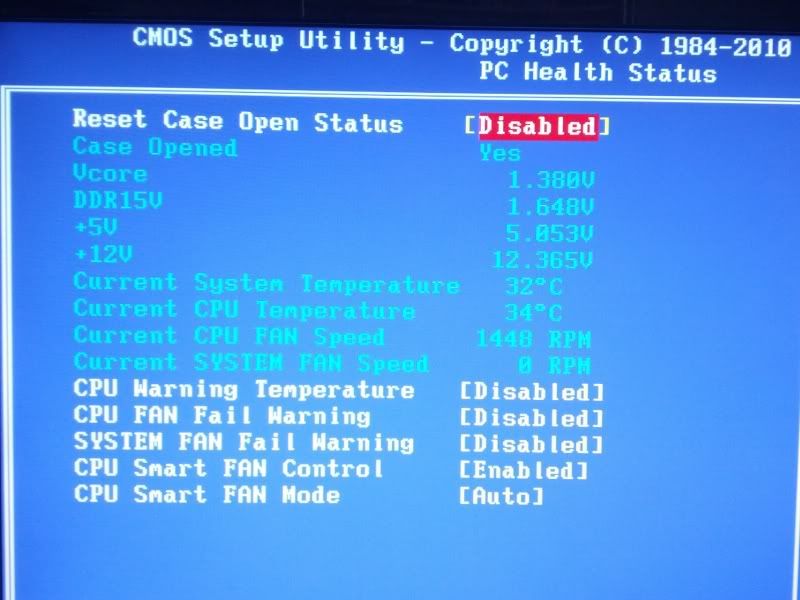
Hey,
I've been trying to get some work done but my PC isn't allowing it by blue screening.
It happens whenever I seem to put any stress on the system. I've been trying to render a video I'm making but it always blue screens. The dumps seem to be saying the same thing all the time on what is causing the crashes.
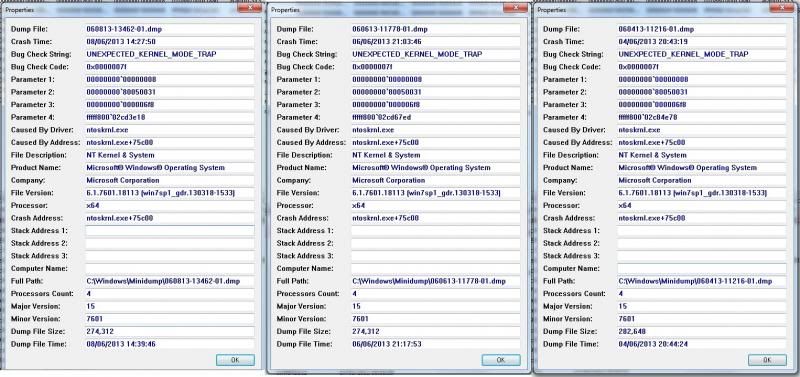
I don't suppose anyone could shed any light on this issue at all? Kinda getting desperate. I've re-installed my Graphic drivers, which 'appeared' to have fixed the issue but after a while it just blue screened again.
Thanks
Craig
i got the same problem:
==================================================
Dump File : 052013-19625-01.dmp
Crash Time : 20-May-13 05:45
Bug Check String : UNEXPECTED_KERNEL_MODE_TRAP
Bug Check Code : 0x0000007f
Parameter 1 : 0x0000000d
Parameter 2 : 0x00000000
Parameter 3 : 0x00000000
Parameter 4 : 0x00000000
Caused By Driver : ntoskrnl.exe
Caused By Address : ntoskrnl.exe+3927b
File Description : NT Kernel & System
Product Name : Microsoft® Windows® Operating System
Company : Microsoft Corporation
File Version : 6.1.7600.17273 (win7_gdr.130318-1532)
Processor : 32-bit
Crash Address : ntoskrnl.exe+3927b
Stack Address 1 : ntoskrnl.exe+1fdf17
Stack Address 2 : ntoskrnl.exe+b4e15
Stack Address 3 : ntoskrnl.exe+b4e05
Computer Name :
Full Path : C:\Windows\Minidump\052013-19625-01.dmp
Processors Count : 2
Major Version : 15
Minor Version : 7600
Dump File Size : 142,736
==================================================
==================================================
Dump File : 052213-23031-01.dmp
Crash Time : 22-May-13 04:44
Bug Check String : DRIVER_IRQL_NOT_LESS_OR_EQUAL
Bug Check Code : 0x000000d1
Parameter 1 : 0x63637051
Parameter 2 : 0x00000002
Parameter 3 : 0x00000000
Parameter 4 : 0x888a19f5
Caused By Driver : tcpip.sys
Caused By Address : tcpip.sys+8a9f5
File Description : TCP/IP Driver
Product Name : Microsoft® Windows® Operating System
Company : Microsoft Corporation
File Version : 6.1.7600.16385 (win7_rtm.090713-1255)
Processor : 32-bit
Crash Address : ntoskrnl.exe+38b3b
Stack Address 1 : tcpip.sys+8a9f5
Stack Address 2 : tcpip.sys+8a7db
Stack Address 3 : tcpip.sys+8a4b0
Computer Name :
Full Path : C:\Windows\Minidump\052213-23031-01.dmp
Processors Count : 2
Major Version : 15
Minor Version : 7600
Dump File Size : 142,736
==================================================
==================================================
Dump File : 052213-20296-01.dmp
Crash Time : 22-May-13 04:45
Bug Check String : KERNEL_MODE_EXCEPTION_NOT_HANDLED
Bug Check Code : 0x1000008e
Parameter 1 : 0xc0000005
Parameter 2 : 0x00000000
Parameter 3 : 0x8ffc7afc
Parameter 4 : 0x00000000
Caused By Driver :
Caused By Address :
File Description :
Product Name :
Company :
File Version :
Processor : 32-bit
Crash Address :
Stack Address 1 :
Stack Address 2 :
Stack Address 3 :
Computer Name :
Full Path : C:\Windows\Minidump\052213-20296-01.dmp
Processors Count : 2
Major Version : 15
Minor Version : 7600
Dump File Size : 142,736
==================================================
But for some couples of days i am not receiving anymore, ut i tried so many things that i dont remember which one was the last:
Try SFC/Sacnow, vit registry fix, ccleaner(do the regystry issue) and many other
My Specs(are very old)
Mobo- so many time that i dont remeber
Processor- Intel pentium 4
Graphic card- nvidia geforce fx 5200
and the other things i dont know
obs-I used a bluescreenview