• Competitor rules

    Please remember that any mention of competitors, hinting at competitors or offering to provide details of competitors will result in an account suspension. The full rules can be found under the 'Terms and Rules' link in the bottom right corner of your screen. Just don't mention competitors in any way, shape or form and you'll be OK.

Evga 680 Overcloking

Wouldn't recommend a closed water cooler tbh, all I see is people complaining about them being noisy and having to replace the fans. £80+ on a cooler and then another £20 on fans is stupid money.

As you say i'd only recommend anything watercooled if it's the entire system.

custom loop is always best but its wether hes willing to drop another £300 into his rig along with the time and knowledge to do it?
 
custom loop is always best but its wether hes willing to drop another £300 into his rig along with the time and knowledge to do it?
Well I meant I wouldn't get a closed loop cpu cooler, meaning a heat sink would be a better option for performance/noise and will never fail. :)

And if I was to have/want anything watercooled it'd have to be a whole system.
 
So what if they are huge? OP has a Phantom, will fit any cooler and it'll cool a chip more efficiently, quietly and for less money.

They don't even have to be that big anymore, my Megahalems isn't that big.
 
HUGE air coolers make it difficult to get in to parts around it plus you are ristricted to what ram you can use. watercooling block keeps the area clear and most likely will give better results.

that phateks one is just silly
 
IMO the H50 is a old cooler, but those CPU temps are dangerous to your entire system setup.

This was a quote from bit tech July 2009.

But, be very aware, as we saw in the results, some chassis just don't work favourably with this kind of cooler. Without positive pressure or other ways to circulate the air around inside of the case, the heat builds up and isn't removed from the case.
The Corsair is a very basic liquid cooling device: it doesn't feature an alarm to warn users if the pump fails for example.


The stock cooler wont do a great deal to your temps either, my personal view is that you should invest in an air cooler that will have a push/pull action, or a different water cooler IE H80/100
 
IMO the H50 is a old cooler, but those CPU temps are dangerous to your entire system setup.

This was a quote from bit tech July 2009.

But, be very aware, as we saw in the results, some chassis just don't work favourably with this kind of cooler. Without positive pressure or other ways to circulate the air around inside of the case, the heat builds up and isn't removed from the case.
The Corsair is a very basic liquid cooling device: it doesn't feature an alarm to warn users if the pump fails for example.


The stock cooler wont do a great deal to your temps either, my personal view is that you should invest in an air cooler that will have a push/pull action, or a different water cooler IE H80/100

good info reaper

maybe he will listen to you because he wasnt interested when i told him.
 
good info reaper

maybe he will listen to you because he wasnt interested when i told him.

I don't think it is a case of the OP not listening bud, it is a case of the OP determining if it is broken at least. Those stock temps are seriously wrong and I am sure if when the stock cooler is on, he will know if it is the cooler or the IHS playing up. It would be a shame to buy a new cooler (which can be expensive) only to find out it is still doing the same because the chip lid isn't making contact with the chip.

If it is the cooler, I am sure he will buy a decent one.
 
Okay I have just removed the radiator and gave it another good clean, was only done a month of so ago, but it did have quite a bit of dust on it, as well as the 120mm fan.
Since doing this my temperatures idle is about 45 degrees. On load with prime95 it still hits 75 degrees. This is with the 4ghz overclock back on. At some point today i will put the i7 stock cooler on and give that a whirl.

cammy5477 you was talking about replacing the 120mm fan on the corsair as its crap? What brand of fan would you replace it with please? I need one from OCUK as i will be placing an order for an SSD today, so may as well hang fire until ive checked the stock cooler and got your opinion on the 120mm fan. Also can i just confirm a new fan will be the same dimensions as the corsair fan? Only because when i bought the h50 they only provided me with very short screws that just fit.

Regards
 
Load 75 deg is fine for the old i7's.

Your idle temp is high partly due to the CPU being locked @ 4GHz. Your grab earlier showed 4GHz @ idle. That is un-necessary. Normally the CPU multiplier scales back at idle to reduce temps when not needed.

I forget which BIOS setting enables the multiplier lock. Hopefully someone else can help.:confused:

Edit :
Think its "CPU EIST Function" turn it on in BIOS and the CPU will scale back to a lower multiplier at idle. It MAY however affect the stability of your o/c/

Worth a try. ;)
 
Last edited:
cammy5477 you was talking about replacing the 120mm fan on the corsair as its crap? What brand of fan would you replace it with please? I need one from OCUK as i will be placing an order for an SSD today, so may as well hang fire until ive checked the stock cooler and got your opinion on the 120mm fan. Also can i just confirm a new fan will be the same dimensions as the corsair fan? Only because when i bought the h50 they only provided me with very short screws that just fit.

Regards

After having a quick look at whats in stock just now id get these

http://www.overclockers.co.uk/showproduct.php?prodid=FG-005-CS&groupid=701&catid=2331&subcat=4

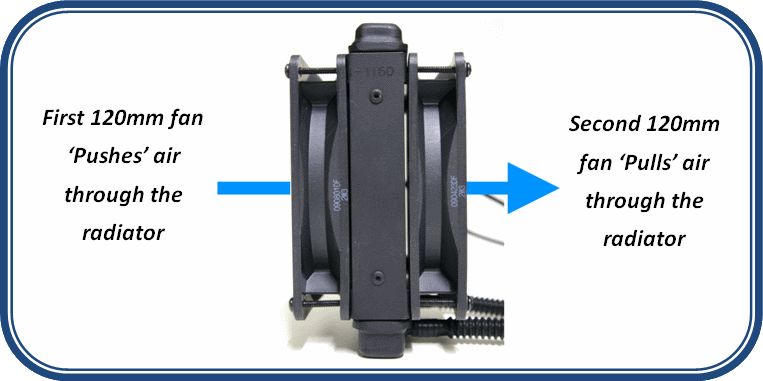
buy the dual pack so you can get a push/pull config which means you are pushing air through the rad from one side and pulling it through from the other.
you need also to be pushing cool air from outside the case through the rad and not warm internal case air like your doing just now.

go push/pull as the extra fan makes all the difference in the world on rads.

sorry for coming on a bit strong last night I had words with the other half earlier in the evening which left me alittle ****ed.... didnt mean to come across as anything bar trying to help.
 
After having a quick look at whats in stock just now id get these

http://www.overclockers.co.uk/showproduct.php?prodid=FG-005-CS&groupid=701&catid=2331&subcat=4

buy the dual pack so you can get a push/pull config which means you are pushing air through the rad from one side and pulling it through from the other.
you need also to be pushing cool air from outside the case through the rad and not warm internal case air like your doing just now.

go push/pull as the extra fan makes all the difference in the world on rads.

sorry for coming on a bit strong last night I had words with the other half earlier in the evening which left me alittle ****ed.... didnt mean to come across as anything bar trying to help.

Hi bud. No problem at all. I did take on board your advice. I just didn't really grasp the concept the push/pull method so i kind of moved on from that until i had a little look this morning on google so i full understood what you meant :)

Okay so am i right in saying once i get these two corsair fans i would fit the first fan as normal with the airflow entering the radiator from the back of the case. Then fit the second fan on the opposite side of the radiator facing into the rad. So the airflow from the case goes into the rad? If this is right will this massively improve my cpu temps in comparison to the stock 120mm single fan?
Thanks again for your time, my apologies if i sometimes come across simplistic but other than the basics i do sometimes get lost :D

Thanks Pete, I turned the setting off, i believe it was called speedstep in my bios :) That has dropped the temps slightly too :)

 
Hi bud. No problem at all. I did take on board your advice. I just didn't really grasp the concept the push/pull method so i kind of moved on from that until i had a little look this morning on google so i full understood what you meant :)

Okay so am i right in saying once i get these two corsair fans i would fit the first fan as normal with the airflow entering the radiator from the back of the case. Then fit the second fan on the opposite side of the radiator facing into the rad. So the airflow from the case goes into the rad? If this is right will this massively improve my cpu temps in comparison to the stock 120mm single fan?
Thanks again for your time, my apologies if i sometimes come across simplistic but other than the basics i do sometimes get lost :D

Thanks Pete, I turned the setting off, i believe it was called speedstep in my bios :) That has dropped the temps slightly too :)

both fans need to point the same way otherwise they will cancel each other out. put a fan either side of the rad both pointing in to the case so cool air from outside is getting sucked under pressure through the rad.

fan with arrow into case > rad > fan with arrow into case. make sure directional arrow on fans point into case.

look here at step 2 http://www.corsair.com/media/cms/manual/h50_qsg.pdf notice the airflow direction?

Push-pull-image.png


doing this will make the H-50 the bests its ever going to be. my son has that cooler and it has 2 apaches on it in push/pull and he idles at 32c with a 920 co (which are the hotest i7) at 4ghz.

if you find in a while you want to get a better cooler you will also have 2 great fans now to put on it because most great coolers are push/pull so you cant really lose.
 
Last edited:
both fans need to point the same way otherwise they will cancel each other out. put a fan either side of the rad both pointing in to the case so cool air from outside is getting sucked under pressure through the rad.

fan with arrow into case > rad > fan with arrow into case. make sure directional arrow on fans point into case.

look here at step 2 http://www.corsair.com/media/cms/manual/h50_qsg.pdf notice the airflow direction?

doing this will make the H-50 the bests its ever going to be. my son has that cooler and it has 2 apaches on it in push/pull and he idles at 32c with a 920 co (which are the hotest i7) at 4ghz.

if you find in a while you want to get a better cooler you will also have 2 great fans now to put on it because most great coolers are push/pull so you cant really lose.


Ahhh i see, so the second fan will be pulling it from the radiator into the case? Will this not dump further heat into the case? Actually that been said im guessing the 200mm fan i have at top of the case will be sucking it out from the top?
 
Have you tried running with the side of the PC case off to see if it is indeed a case cooling problem?
My i7 930 @ 4 ghz runs at 32 idle and 55 under load on BF3. I run a noctua d14 cooler though.
Try without the PC side panel on first before you go and buy stuff you might not need.
 
Ahhh i see, so the second fan will be pulling it from the radiator into the case? Will this not dump further heat into the case? Actually that been said im guessing the 200mm fan i have at top of the case will be sucking it out from the top?

Thats exactly right the top fan will take the heat away
 
Back
Top Bottom