• Competitor rules

    Please remember that any mention of competitors, hinting at competitors or offering to provide details of competitors will result in an account suspension. The full rules can be found under the 'Terms and Rules' link in the bottom right corner of your screen. Just don't mention competitors in any way, shape or form and you'll be OK.

***Geforce 7600GT Owners Thread***

Soldato
Joined
28 Oct 2005
Posts
9,190
Location
Scotland
Hey guys just got my 3D Fusion Geforce 7600GT through the door this morning and it seems pretty good! Just thought that with so many owners of the GT we should have a dedicated thread!

Obviously looking for impressive scores, overclocks, tips to get more out of the card and a good discussion!

My initial NVidia control panel overclocking attempts took the core to 610mhz and the Mem to 775(1550)mhz
so an increase on stock of 50mhz and 75(150)mhz respectively! The card itself has a fairly whiney cooler though I must admit and I am jsut about to run 3D Mark 06 to check out what it scores!

Pic of card below(sory for the terrible quality the mobile camera sucks)
1208061005iy6.jpg
 
Last edited:
I have an XFX 7600gt and its fantastic!

My speeds are 590/1600 which are stock.

How did you overclock yours in the nVidia control panel? I cant see anything of the sort in there...

Thanks in advance, Steve :)

PS - Tell me your 3Dmark score!!!
 
clocksettingsgk4.jpg

The clock settings used on the card

scoreop9.jpg

3D Mark score

To the question above I downloaded NvHardPage SE 3.4 it allows you to enable coolbits which lets you use nvidia's overclocking program!

The card was set at defualt voltage settings etc but im sure it can go higher! I tried using riva tuner but it aint very good :( doesnt do an auto overclock at all! Any other recommended programs for it?As im sure nvidia put a high safety lock on it!

 
i'll post some benchmarks when i get my AS5 and get temperatures to settle down, but currently running SLI with both cards at 635/815 and 3200+ at 2.5Ghz ;)
 
very good cards these. im clocked at 625 core and 1674mhz on the ram, although the ram does clock over 1700mhz for me but coolbits is limited to 840mhz and i hate using 3rd party apps to overclock.

my setup socres 3500 in 3dm06, not too shabby for such a cheapo card.

im also using a zalman vf900cu.
 
Cyber-Mav said:
very good cards these. im clocked at 625 core and 1674mhz on the ram, although the ram does clock over 1700mhz for me but coolbits is limited to 840mhz and i hate using 3rd party apps to overclock.

my setup socres 3500 in 3dm06, not too shabby for such a cheapo card.

im also using a zalman vf900cu.

Did the Zalman make a difference to your overclock mav?
Im gonna try overclocking my CPU but have no idea about voltage timings etc! I should be able to clock it a lot more I think!
Same with the card I believe it can go faster than this!
 
XFX XXX edition here - stock speeds 590/1600

running at 720 on the core (volt mod) and 1750 on the ram. zalman VF900-CU also installed on it.
i will run 3d mark 06 later at these speeds, in '05 i get 7572 3d marks :cool:
 
sunlitsix said:
XFX XXX edition here - stock speeds 590/1600

running at 720 on the core (volt mod) and 1750 on the ram. zalman VF900-CU also installed on it.
i will run 3d mark 06 later at these speeds, in '05 i get 7572 3d marks :cool:

Nice :D I like, I may ahve to stick a Zalman on now :P lol!

Plus what tool is everyone using? just the standard NVidia Control Panel Overclock?
 
i have mine at stock speeds, but before i overclock i want to know how will i know if its too much? where is a safe place to overclock to without worries? i ahev the asus 7600 (not the passive cooled one). at the min its 560 and 700, any safe values to go up to with stock fan and heatsink.
 
With default fan and no mem heat sinks I see my mem pretty much maxing out around 1500mhz :(
Whereas the GPU is going up to the 640's!
Looks like my memory wont be budging much on this card tbh!
 
its quicker than a 7800gt i think, these cards are probably the best results from sli'ing them, you get an 80 - 90 % increase in performance, unlike some other cards that hardly get any boost. i think it should be on par with 7900gt, not sure tho. :confused:

on another note i just clicked detect optimal frequencies or sumthin n i now got my mem at 1540 and my core at 590, thats good enough for me =)
 
Last edited:
jrodga2k5 what drivers are you using?

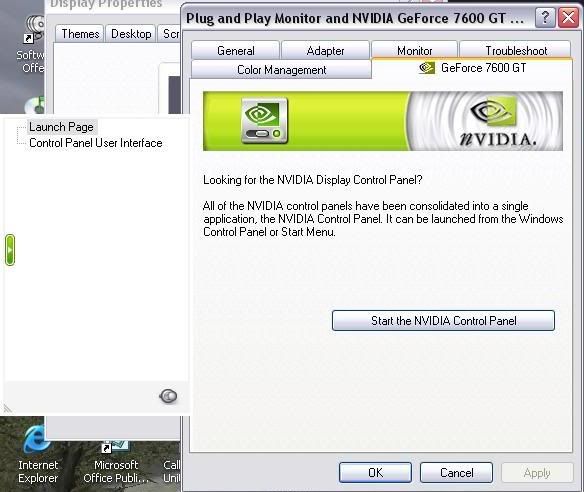
Im using 91.31 drivers and this is what my nVidia control panel looks like...

control.jpg


As you can see I dont have all the options you have!

I did have them until I updated my drivers...

Please help, thanks! Steve :)
 
stevechapman said:
jrodga2k5 what drivers are you using?

Im using 91.31 drivers and this is what my nVidia control panel looks like...

http://i13.photobucket.com/albums/a298/steve01/control.jpg[\IMG]

As you can see I dont have all the options you have!

I did have them until I updated my drivers...

Please help, thanks! Steve :)[/QUOTE]

Tried clicking on "Start the NVIDIA control panel"?
 
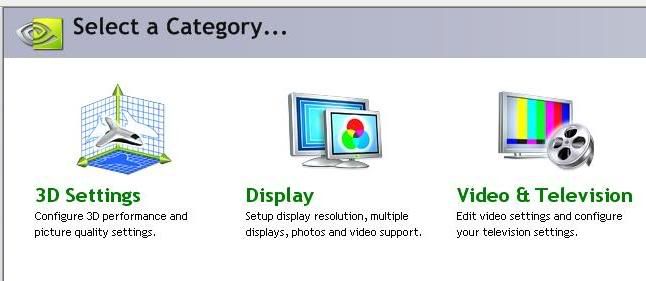
This is what I get when I click it Kizz...

whenclicked-1.jpg


Theres nothing in there about clock frequencies.

Again, what drivers you guys using so the clock frequencies are enabled. or do i need another program?

Steve :)
 
stevechapman said:
This is what I get when I click it Kizz...

whenclicked-1.jpg


Theres nothing in there about clock frequencies.

Again, what drivers you guys using so the clock frequencies are enabled. or do i need another program?

Steve :)

You need to select Advanced View at the top of 3D Settings.
 
Back
Top Bottom