Good quality radiator

Associate
Joined
2 Jul 2007
Posts
2,224
Location
Cheshire East
Need some help from you watercoling experts, Currently have an xspc 240 rad with a ek p360 rad in a lian li dynamic case and was wondering if i change to 1 x 360 quality rad would it be better and if so what rad should i buy, I ahve read that a full copper rad is a good way to go and I am wondering if i got a 54mm thick rad or maybe an even thicker one, will it be better than having 2 rads.

I am cooling a 3700x with a gtx 1080 ti

I believe the corsair rads are made by hwlabs and was looking at there Hydro X series XR7 or maybe the Raijintek's Calore C360D, any one know if these are worth a punt.

Any advice is appreciated, thanks.

 
I am using ek varder fans on the ek360 and a couple of akasa viper fans on the xspc, but i can buy some more fans if needed and could try push pull with a bigger/thicker rad.
 
Last edited:
I ran a 3900X with a RTX 2080TI overclocked, both water cooled using the EK P360 Kit. That one radiator and fans mounted at front of my case in pull config with another 4 fans on the top and rear of case as exhausts kept my water delta-t at 10 degrees C and the CPU and GPU around 50 degrees C when gaming or running Heaven benchmark. I now have 2 rads, the original PE360 from the kit and an additional EK SE360 and the only difference I see is the Delta-t between 8 and 10 degrees C. Having known this earlier I probably would not have bought the second radiator. I think your rads are adequate. I would look at case, fan location and ramping configuration.
 
I ran a 3900X with a RTX 2080TI overclocked, both water cooled using the EK P360 Kit. That one radiator and fans mounted at front of my case in pull config with another 4 fans on the top and rear of case as exhausts kept my water delta-t at 10 degrees C and the CPU and GPU around 50 degrees C when gaming or running Heaven benchmark. I now have 2 rads, the original PE360 from the kit and an additional EK SE360 and the only difference I see is the Delta-t between 8 and 10 degrees C. Having known this earlier I probably would not have bought the second radiator. I think your rads are adequate. I would look at case, fan location and ramping configuration.
Yea the problem with my case is no front mounting and no fan for exhaust at the rear of the case.... Love this case tho so I was also thinking of getting the xl case for the exhaust at the rear but still no front mounting. What I may do is perhaps keep the p360 and replace the 240 with a premium full copper rad see if that helps, my temps are not 2 bad as my gpu gets to around 50c but the cpu can get to 70c at times during gaming.... I just want to get that temp down some more
 
You say you see peaks of 70c on your CPU, I don't see anything wrong with that. I use HWINFO64 while running games and GPU benchmarks on my system and I have peak temps which are 9-10 degrees C above the average during the session. For instance I did a test running Heaven benchmark for 290 minutes and my averages were CPU= 49 degc with a peak of 58 and my GPU average was 47 degc with a peak of 51. So for all you see a peak of 70 degrees C the average may be 60. DO you use any monitoring software like HWINFO64? Its great to use while you try different configuration settings with fans and water pump ramping while soak testing. Also, have a look at this video, his explanation for internal case layout, fan setup and additional radiators is good.

 
Last edited:
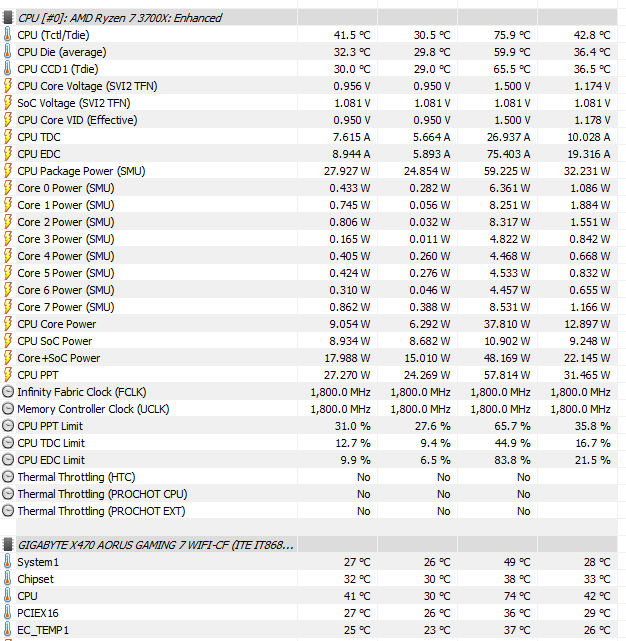
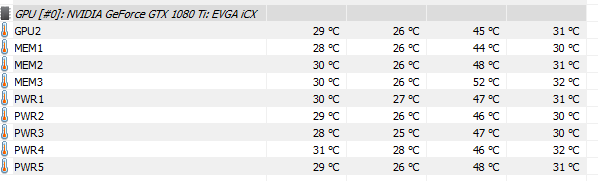
here are my temps after an hour of playing nms


temps are from hwinfo64

image uploading sites


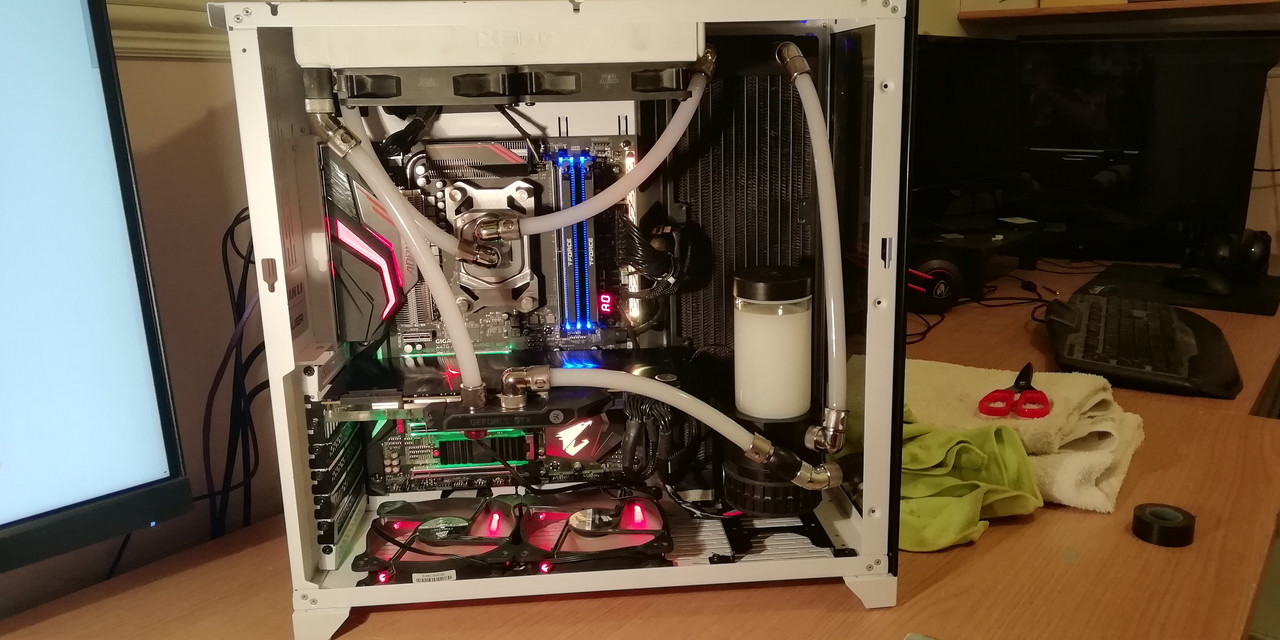
360 side rad fans are varder and are intake, bottom 2 fans are intake top rad and akasa viper fans are exhaust. Ec_temp is the water temp on the pic.

these are the temps I see in game
 
Last edited:
Those temps look OK. Your CPU average during that hour was only 42 degC. That peak of 74 degC may have only occurred for a few seconds. Granted it is quite a deviation from your average as my peak is normally no more than 10 degrees above average when I record them just prior to closing the Heaven Benchmark test. Was that HWINFO screen shot taken while your game was still up and running, immediately after it was closed down or several minutes after? Have you installed the Gigabyte System Information Viewer app so you can change the fan ramping curve without going into the BIOS? When testing your system you want consistency in your method of testing and that is why I use Heaven Benchmark just running on its loop for 30+ minutes and I record the average and peak temps just before closing Heaven down and allowing my system to cool for 20-30 minutes before tweaking a parameter such as a fan/pump speed and starting again. Its time consuming but consistent. What sensor do you have connected to EC_TEMP1, water temp?
 
the pics were taken a couple off hours after I stopped gaming.

i have had my rads in opposite position i have also had my fans in opposite directions as well....my fans are set at 1450rpm on the 360 rad and 1250rpm on the 240 rad in bios, my pump runs at a constant 3700 rpm, i manually set speed to stop the ramping up and I found the noise level at these settings to be ok for me.....these settings are what I found to be best and are set in bios. I guess what I want to know is if I bought a good quality full copper radiator would i be able to achieve similar results as I have now with just the one radiator
 
all my fan speeds are manually set, there is no ramp up or down and that includes the 2 bottom fans that are set at 1200 rpm, and yes the sensor is on the gpu
 
That EK P360 rad is 38mm thick and I used that alone to cool my 3900x CPU and RTX 2080 TI GPU and that one radiator produced temperatures that were only marginally different to my current 2 radiators. So what I am saying is that I dont think replacing your current radiator setup with a single EK Coolermaster XE 360 (60mm thick) radiator will make any significant difference to your temps. On a 60mm thick radiator, you will need to fit push and pull fans to it to get the airflow through and so keep that in mind when working out where to place it. That will be a total of 110mm thick. What you have done with your fan ramping is the same as what I have done, run them at a constant speed rather than ramping. I then continued to keep lowering that constant speed on one set of fans at a time in order to reduce the noise, while monitoring the temps to find the optimal speed that maintained good low temps at a noise level I could tolerate. If you use the Gigabyte System Information Viewer (SIV) app for your mobo you can change the fan speeds in Windows rather than going into BIOS. Also when you reboot your PC, SIV app recalls the last fan settings you used. If I were you I would gather more test data on your current configuration before spending more money. Do you have one of your thermistor cables connected up to EC_TEMP2 and placed to record ambient temps? If so then you can calculate your water to ambient delta-T which ideally you want to get to around 10 degrees C or less by adjusting your fan and pump speeds. Use Heaven benchmark to stress test CPU and GPU. Also I think your current fan and radiator locations are the best you can do with your case.
 
i only have one sensor but i think i will get another one as you suggest, my question about a better quality radiator was because I have read that ek radiators are not the best so that was why i was wondering if i would see better performance with a hwlabs or alphacool radiator the idea being maybe a thicker ,top quality rad may give me similar performance but with just having one rad in my case, I would then keep the 360 on the side and use 3 fans on top for exhaust I thought it would look a bit more tidy and keep the case cooler.
 
They're not THE best rads, no, but you'll probably need a stack of testing kit to discern much difference between them. Other variables will have more notable effects.

360 side rad fans are varder
Which Vardars?
F1, F2, F3, F4, F4-120ER or F5-FF5 Furious Vardar.....? :)

I only ask, as there are notable differences between each of the Vardar models. Noise being one of them.
 
Back
Top Bottom