Hanging/Freezing while downloading.

Associate
Joined
25 Apr 2023
Posts
34
Location
Leicester
Evening Fellas,

Hope you're having a good week! I'm having a pretty annoying issue currently which I just cannot get to the bottom of...

Basically whenever I download my disk usage sits on 100%, active time 100% and response time is sitting at anywhere between 2k - 3k ms. I noticed it at first while being on discord and downloading COD on battlenet and everything was freezing, I stopped hearing discord and it was freezing and after a while it would start working again. Anything else I was trying to do would also hang. I've just recently upgraded to fibre 900 so I thought maybe it was just draining all the download speed so I capped it at 50mb/s. Still the same issue. Other things I've tried are below.

Checked the firmware for my m.2, updating my chipset drivers, graphic drivers and used DDU to make sure there were no troublesome files.
Checked event viewer for any warnings, nothing.
Added exclusions to bit defender and also watched it on resource monitor to see if it's hanging and again nothing.
Tried downloading through steam, internet etc and it does the same thing.
Forced Gen3 on the M.2 port thinking that Gen4 might be unstable but it doesn't make any difference. My M.2 is showing healthy on the software,
Monitored hwinfo to check for temp issues and it runs at a stable temperature of around 50-70 degrees.
My bios was updated back end of 2025 so it should have ironed out issues with any 7800 processors, can try if need be.

I ran COD on extreme preset with DLSS on and using the transformer model with 70 sharpness and uncapped frames, I had absolutely no issues playing for 3 hours at a stable fps of 300-400 not a single spike playing Warzone.

I don't really know what else to do, I can try switch the M.2 which will be tomorrow now, or update my bios which I feel won't change anything. The only two things that I've done recently is upgrade my line speed and my GPU.
I would love if someone could give me a bit of info, maybe based off experiences as this only happens when I download and other than that runs perfectly fine. Even basic tasks like opening settings was lagging while it hung for a bit.

M.2 - Crucial ct2000p2ssd8 2tb - Read 2400 Write 1900
GPU - Asus Tuf 5070 ti OC
CPU - 7800x3d
MOBO - Tomahawk b650 wifi
RAM - 32gb corsair vengeance 6000mhz
 
Last edited:

It does sound like your SSD is either failing, or perhaps throttling.

Is the M2 NVME SSD, under a heatsink? Check that. Throttling may occur due to heat build-up.

Is the M2 SSD, warped due to bending of the PCB, due to a heatsink?

And yes, the best way you can check if it is the SSD is to use another drive.

Because NVME M2 SSD's have so much bandwidth, Gen 3, 4 and 5 that you should not be getting this as a bottleneck.

I have a similar speed internet connection and my Gen 4 drive appears to be fine whilst streaming or downloading.
 
maybe based off experiences as this only happens when I download
Downloading can be very system intensive now on Steam.

How full is your drive?

How much are you downloading?

It might be exhausting the SLC cache, or having to shift data around because it is nearly full.
 
Check Task Manager see if something is using a lot of CPU cycles - some anti-virus software and/or the MS Malware Protection Engine can cause issues sometimes getting into conflict with other software or stuck in a state.

You can also have problems with some motherboard or similar control centre software which sometimes comes with "AI" booster or network software which is basically trash.
 
Thanks for the responses guys. I tried swapping to the 2nd m.2 slot and once I was in windows it took about 2 mins for my start up apps like steam to start loading, tried to open discord and it froze then my PC "ran into an error and restarted" ive never had this issue before on my old line. When I downloaded it never froze. When I dropped the download speed, I dropped it to what my old line used to download at so its so confusing lol. On the software my ssd has 90% health remaining and ive only had it for about a year and a half. Yes it uses QLC nand
 
Thanks for the responses guys. I tried swapping to the 2nd m.2 slot and once I was in windows it took about 2 mins for my start up apps like steam to start loading, tried to open discord and it froze then my PC "ran into an error and restarted" ive never had this issue before on my old line. When I downloaded it never froze. When I dropped the download speed, I dropped it to what my old line used to download at so its so confusing lol. On the software my ssd has 90% health remaining and ive only had it for about a year and a half. Yes it uses QLC nand
It sounds like it is on its way out early. Should be under warranty?
 
It sounds like it is on its way out early. Should be under warranty?
I believe it has a 5 year Warranty and i just double checked I bought it in 2022. Had a good run I guess, in 20 odd years I've never sent anything back lol.

Did a couple more tests, so I played Finals last night on max pretty much for 6 hours or so, not even a single twinge while playing.. the download situation hasn't improved. I then tried the number 2 m.2 slot which is at the bottom of my board away from everything that could cause thermal issues, surprisingly this actually made it worse to the point my pc started up and froze while trying to load start up apps. I then thought before I just give up I'll try reset the pc because maybe there's some software issue or conflict causing the problem but it froze on 34% for about an hour so I force shut down and switched my slot back to slot 1. I'm going to try reset the pc then install things/download and if the issue is still there I'll have to try go down the warranty route.

Thanks for the help guys, was hoping it would be a quick fix but doesn't look promising


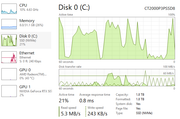
So after resetting my pc I've only installed Chrome then downloaded my nvidia app, this is what the disk was doing while installing the drivers hitting near 100% usage and was only hitting about 15-20mb read and a couple mb write so no idea lol
 
Last edited:
Easy one to try is disable Windows write caching. Device Manger - Properties - Policies. Uncheck the box.

I've had the odd drive that couldn't sustain a Steam download and kept stalling with the write caching enabled.
 
Easy one to try is disable Windows write caching. Device Manger - Properties - Policies. Uncheck the box.

I've had the odd drive that couldn't sustain a Steam download and kept stalling with the write caching enabled.
Thanks, tried this didnt work. Ive just decided to fill a warranty claim in hopefully they just replace it and i don't need to spend on another but if I do, can someone recommend a good ssd? My budget is only around 250 right now was thinking the crucial p310 2tb or something equivalent


So after resetting my pc I've only installed Chrome then downloaded my nvidia app, this is what the disk was doing while installing the drivers hitting near 100% usage and was only hitting about 15-20mb read and a couple mb write so no idea lol
Thanks, tried this didnt work. Ive just decided to fill a warranty claim in hopefully they just replace it and i don't need to spend on another but if I do, can someone recommend a good ssd? My budget is only around 250 right now was thinking the crucial p310 2tb or something equivalent
It isn't clear to me that your drive is faulty, or if you're just experiencing the limitations of early (especially DRAMless) QLC drives. Though, not all P2 drives use QLC.

All TLC/QLC drives have a limited fast write cache, so that's nothing weird, but the difference with QLC is that once exhausted performance drops off a cliff (can be less than 100 MB).

While the drive recovers the cache (if possible, depends on how much free space there is) the performance slows and controller busy time increases. With the earlier QLC drives, the fuller they got, the more performance diminished.

I wonder if your drive needs an extended period of idle time to get itself cleaned up, especially if you're often doing large multi-GB downloads.

I'd get this downloaded too, to check your drives general health/status:
Have you check it with CrystalDiskInfo?
Here's mine for reference. It has about 287GB free storage left.

If you are going to replace it I'd agree with freddie, don't buy the P310. Later QLC drives are a lot more consistent/performant, but in the circumstances, I'd get a "proper" TLC/DRAM drive to be sure you're not just exposing their limitations.
 
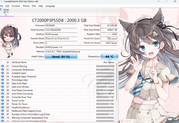
Will have to look at my options, just tried valorant and every time i start queueing my machine freezes completely and i have to force shut down. Even after resetting my pc with a clean ssd it's still not enough just can't actually fix the issue so will have to wait and see what comes from the warranty claim. this is what crystaldiskinfo says and it looks like there are no issues lol so strange...
 
Basically whenever I download my disk usage sits on 100%, active time 100% and response time is sitting at anywhere between 2k - 3k ms. I noticed it at first while being on discord and downloading COD on battlenet and everything was freezing, I stopped hearing discord and it was freezing and after a while it would start working again. Anything else I was trying to do would also hang. I've just recently upgraded to fibre 900 so I thought maybe it was just draining all the download speed so I capped it at 50mb/s. Still the same issue. Other things I've tried are below.
Will have to look at my options, just tried valorant and every time i start queueing my machine freezes completely and i have to force shut down. Even after resetting my pc with a clean ssd it's still not enough just can't actually fix the issue so will have to wait and see what comes from the warranty claim. this is what crystaldiskinfo says and it looks like there are no issues lol so strange...
Yeah, there's nothing that obviously concerns me from CrystalDisk.

About the freezing, hmm. Left-field suggestion, but exactly how do you connect to the Internet? Do you use WIFI or LAN?

The reason I ask is that while the high disk usage doesn't look right, it is also common for LAN/WIFI drivers to cause freezing/stuttering and since you just upgraded to fibre, a new router might be forcing a different channel/bandwidth.
 
Evening Fellas,

Hope you're having a good week! I'm having a pretty annoying issue currently which I just cannot get to the bottom of...

Basically whenever I download my disk usage sits on 100%, active time 100% and response time is sitting at anywhere between 2k - 3k ms. I noticed it at first while being on discord and downloading COD on battlenet and everything was freezing, I stopped hearing discord and it was freezing and after a while it would start working again. Anything else I was trying to do would also hang. I've just recently upgraded to fibre 900 so I thought maybe it was just draining all the download speed so I capped it at 50mb/s. Still the same issue. Other things I've tried are below.

Checked the firmware for my m.2, updating my chipset drivers, graphic drivers and used DDU to make sure there were no troublesome files.
Checked event viewer for any warnings, nothing.
Added exclusions to bit defender and also watched it on resource monitor to see if it's hanging and again nothing.
Tried downloading through steam, internet etc and it does the same thing.
Forced Gen3 on the M.2 port thinking that Gen4 might be unstable but it doesn't make any difference. My M.2 is showing healthy on the software,
Monitored hwinfo to check for temp issues and it runs at a stable temperature of around 50-70 degrees.
My bios was updated back end of 2025 so it should have ironed out issues with any 7800 processors, can try if need be.

I ran COD on extreme preset with DLSS on and using the transformer model with 70 sharpness and uncapped frames, I had absolutely no issues playing for 3 hours at a stable fps of 300-400 not a single spike playing Warzone.

I don't really know what else to do, I can try switch the M.2 which will be tomorrow now, or update my bios which I feel won't change anything. The only two things that I've done recently is upgrade my line speed and my GPU.
I would love if someone could give me a bit of info, maybe based off experiences as this only happens when I download and other than that runs perfectly fine. Even basic tasks like opening settings was lagging while it hung for a bit.

M.2 - Crucial ct2000p2ssd8 2tb - Read 2400 Write 1900
GPU - Asus Tuf 5070 ti OC
CPU - 7800x3d
MOBO - Tomahawk b650 wifi
RAM - 32gb corsair vengeance 6000mhz
Evening! That’s a proper headache you've got there, but that 2k-3k ms response time is the smoking gun.

The issue is almost certainly your Crucial P2. It’s a DRAM-less drive, and they are notorious for choking under heavy write loads. When you’re pinning a 900Mbps fibre connection, the controller on that drive simply can't keep up with the incoming data and the file mapping at the same time. Since your OS is likely on the same drive, the whole system hangs while it waits for the SSD to breathe.

A couple of things to try before binning it:

  1. Go into Device Manager -> Disk Drives -> Properties -> Policies and toggle 'Enable write caching' (or untick 'buffer flushing' to see if it stabilizes).
  2. Check how full the drive is; DRAM-less drives fall off a cliff performance-wise once they hit 80% capacity.
Honestly, with a beastly rig like yours (7800X3D and a 5070 Ti), that P2 is holding you back. I’d look into getting a drive with dedicated DRAM like a WD Black SN850X or a Samsung 990 Pro. You’ll never see those hangs again.

Keep us posted if the swap fixes it!
 
Back
Top Bottom