• Competitor rules

    Please remember that any mention of competitors, hinting at competitors or offering to provide details of competitors will result in an account suspension. The full rules can be found under the 'Terms and Rules' link in the bottom right corner of your screen. Just don't mention competitors in any way, shape or form and you'll be OK.

HD2900 Woes!

Soldato
Joined
28 Nov 2005
Posts
2,955
Well about to hours ago i went up to ocuk and purchased a hd2900 and a akasa eclipse. Soon as i get home i transfer everything into the new case etc.

Then the problems start after realising i need an 8pin and a 6pin for the gfx card, so i put the 2x4pin together to make the 8pin and a serperate pcie 6pin. but then i was a 4pin 12v rain short for the mobo :confused:

So i used a 6 pin for that and still it wont boot!

So i just went to maplen a bort a 8pin adaptor and it still wont boot up at all.

the lights on the mobo come on but nothing else.

Any ideas? i have a enermax 620w Psu.

thanks in advance.

 
ummn....

you probably buggered something if you used the 2 x 4 pins in the 2900XT, I don't think that works...

I'll have a gander at the pin layouts.

If you didn't use it and/or pin layouts are ok.

Remove the HD, mem and gfx card from the mobo. It should beep, if it does replace bit by bit until you find a problem...

If it doesn't beep then either the mobo is buggered or its shorted out or something...
 
i used the 2 4pins cause the guy in ocuk said to do that :confused:

cuz i asked if i need a 8pin adaptor he asked what the psu had so i told him then he aid jsut put the 2 4pins together to make an 8pin.

when i put the 7950 back in it comes on ok...
 
MofoKilla said:
i used the 2 4pins cause the guy in ocuk said to do that :confused:

cuz i asked if i need a 8pin adaptor he asked what the psu had so i told him then he aid jsut put the 2 4pins together to make an 8pin.

when i put the 7950 back in it comes on ok...

Well, looking at my two 4 pin connectors on my PSU, its totally wrong.

The 8 pin on the 2900XT is three 12Vs and 5 returns.

On the two 4 pins there is a 3.3V a 5V and 3 12Vs.

So you have probably buggered the card if your turned it on with it connected... shocking it fit tbh :eek:
 
MofoKilla said:
i used the 2 4pins cause the guy in ocuk said to do that :confused:

cuz i asked if i need a 8pin adaptor he asked what the psu had so i told him then he aid jsut put the 2 4pins together to make an 8pin.

when i put the 7950 back in it comes on ok...
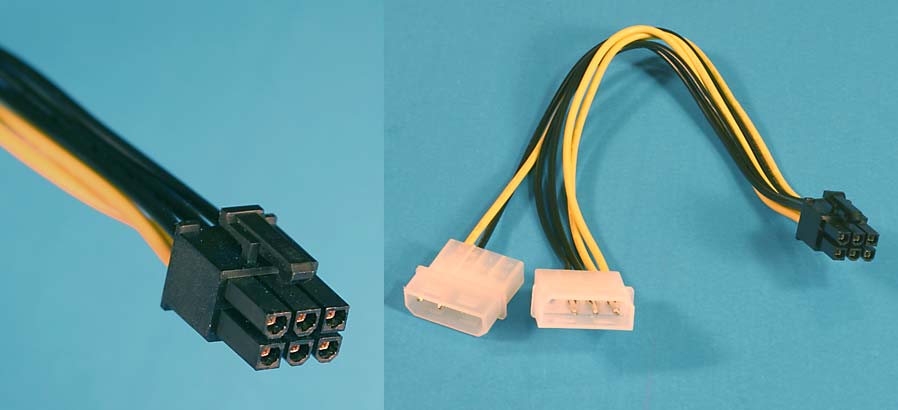
By 4 pins, God I hope you mean a molex.

2x 6pins makes an 8 pin.

2x 4pins (molex, flat) makes a 6 pin.

image1el7.jpg
 
Last edited:
No he means a 4pin 12v ATX plug, which come in twos on some power supplies to make the new 8pin ATX power supplies all Intel boards have.

I really can't see how you could have done that, the pin layout is different.

You can't go randomly plugging different cables into which ever port has the same amount of pins.

The bloke at OcUK probably said, it's ok to put in two PCI-E 6pin plugs and leave the 2 pins free on the 8pin socket. You will just lose overdrive in the CCC by doing that.
 
HD2900_ENG_01.jpg


When connecting a 2×3-pin PCIe™ power connector to the 2×4-pin connection, the connector should cover the 6 pins of the 2×4-pin connection that are farthest away from the 2×3-pin connection on the graphics card.
 
MofoKilla said:
yes thats what i did do. like the guy in the shop said . :confused:

Its a bit daft how the card doesnt come with all the proper leads.

You guys probably got confused as to what you were both on about. So which cable have you plugged into the card? The 8pin motherboard power?

EDIT: Ignore this, read next post:
 
MofoKilla said:
yes thats what i did do. like the guy in the shop said . :confused:

Its a bit daft how the card doesnt come with all the proper leads.

Let's start again.

Do you have two of these or even two on your PSU?

pciexpress.jpg
 
With your PSU, you should have two cables that plug into the RED sockets on your PSU.

Here on the right:


The cables you need to use are RED as shown below, bottom right. Are these the ones you are using?

 
Last edited:
Have you tried the 2x 6x Pins as you don't need the 8x Pin, you only need that for overdrive to show up for overclocking, but you can overclock anyway with ATi Tool.
 
MofoKilla said:
yeah i tried one of those 6pin pcie leads and a 8 pin from maplen and stil nothing.

Is that in reply to my post? Why have you only tried one 6pin from your PSU? You need both. Forget the 8pin for now, you don't need that. Just use BOTH of the red cables that plug into the red sockets on your power supply. As indicated by Toms picture.
 
MofoKilla said:
ok brb gonna give that a shot.. wish me luck

Fingers crossed, I doubt you have killed it, don't worry. Just plug one 6 pin into the 6 pin port and plug another 6 pin into the 8 pin port on the card
 
Back
Top Bottom