Right just received the last parcel to finish the build today and got cracking fitting it all, but this being my first time. I'm a little anxious about turning everything on for the first time and wanted some reasurrance that everything is plugged in as it should.
I know some of the pictures will not show everything 100% but tried to get the best angle as I coudl
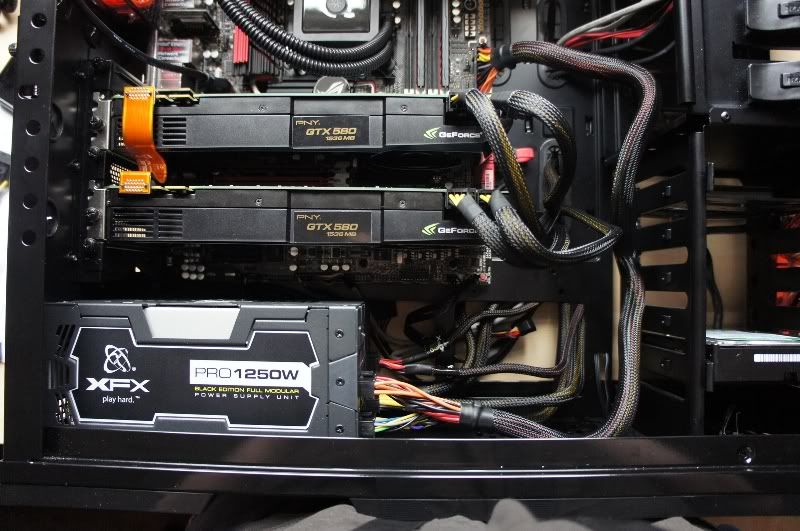
Firstly the GFX Cards and motherboard. All look ok?

SATA Cables: I have red and grey ports on my MB, are all SATA Cables either red or black? Indicating which port they have to plug into? >No Picture<
Now Molex's - Got various components that use these
Corsair H100
IcyBox Card Reader
Stock Fan Controller NZXT Phantom
All three molex's can be seen below, the white plugs belong to the icy box and others to the H100 and fan controller

What do these connect up too? I have a "EZ Plug 1" on the MB beside processor, can plug the H100 into that?

If so what cable do I use to power the others?
So far I've used all these on the Power Supply

The top right connector is labelled PCI-E/CPU - Do I need that?
Thanks in advance

I know some of the pictures will not show everything 100% but tried to get the best angle as I coudl
Firstly the GFX Cards and motherboard. All look ok?
SATA Cables: I have red and grey ports on my MB, are all SATA Cables either red or black? Indicating which port they have to plug into? >No Picture<
Now Molex's - Got various components that use these
Corsair H100
IcyBox Card Reader
Stock Fan Controller NZXT Phantom
All three molex's can be seen below, the white plugs belong to the icy box and others to the H100 and fan controller
What do these connect up too? I have a "EZ Plug 1" on the MB beside processor, can plug the H100 into that?
If so what cable do I use to power the others?
So far I've used all these on the Power Supply
The top right connector is labelled PCI-E/CPU - Do I need that?
Thanks in advance